
Core BI & Analytics Concepts
Business Intelligence (BI)
Definition: Business Intelligence (BI) is the set of technologies, processes, and practices that organizations use to collect, integrate, analyze, and present business data in order to support better, faster decision-making. BI transforms raw operational data into meaningful dashboards, reports, and visualizations that enable executives and managers to understand what has happened in the business and why.
BI is the difference between a company that reacts to problems after they appear and one that proactively identifies trends, monitors performance, and makes data-informed strategic decisions every day.
Technical Insight: Modern BI platforms (Tableau, Power BI, Looker, Qlik) connect to data warehouses (Snowflake, BigQuery, Redshift) via semantic layers — metadata models that define business metrics, hierarchies, and relationships once, so every dashboard consistently uses the same definitions. BI architectures follow the ETL-to-warehouse-to-BI pattern. Key capabilities include OLAP (Online Analytical Processing) for multidimensional analysis, row-level security for data access control, and embedded analytics for integrating BI into business applications.
Data Analytics
Definition: Data Analytics is the broad practice of examining datasets to draw conclusions, identify patterns, and support decision-making. It encompasses four progressively advanced types: Descriptive (what happened?), Diagnostic (why did it happen?), Predictive (what is likely to happen?), and Prescriptive (what should we do about it?).
For businesses, data analytics is the engine of competitive advantage — it converts the data generated by every customer interaction, transaction, and operational process into actionable intelligence that improves products, reduces costs, increases revenue, and reduces risk.
Technical Insight: Data analytics workflows span the full data stack: ingestion and storage (data warehouses and lakes), transformation (dbt, Spark), statistical analysis (Python with Pandas, NumPy, SciPy; R), machine learning (Scikit-learn, TensorFlow), and visualization (Tableau, Power BI, Matplotlib). The analytics engineering role bridges data engineering and analysis, owning the transformation layer. Key statistical methods include regression analysis, hypothesis testing (A/B tests), clustering, and time-series forecasting.
Predictive Analytics
Definition: Predictive Analytics is the use of historical data, statistical algorithms, and machine learning techniques to forecast future outcomes. It answers the question: 'Based on what has happened before, what is most likely to happen next?' — enabling organizations to act before events occur rather than reacting after them.
Business applications include predicting which customers are likely to churn (so retention teams can intervene), forecasting product demand to optimize inventory, scoring credit risk for loan applications, and identifying which sales leads are most likely to convert.
Technical Insight: Predictive models are built using supervised machine learning: regression (predicting continuous values like revenue), classification (predicting categories like churn: yes/no), and ensemble methods (Random Forest, Gradient Boosting / XGBoost — the workhorses of tabular data prediction). Model development follows the pipeline: feature engineering, train/test split, cross-validation, hyperparameter tuning, and evaluation via metrics like RMSE (regression), AUC-ROC (classification), and precision/recall. Models are deployed via REST APIs or embedded in data pipelines for batch scoring.
Real-time Analytics
Definition: Real-time Analytics is the ability to process, analyze, and visualize data as it is generated — within milliseconds to seconds of an event occurring — enabling immediate business responses rather than waiting for overnight batch reports. It is what makes live dashboards, instant fraud alerts, dynamic pricing, and real-time personalization possible.
The business value is speed of decision: a retailer that detects a sudden spike in demand for a product in real time can immediately adjust pricing or trigger restocking, while a competitor relying on daily reports discovers the trend 24 hours too late.
Technical Insight: Real-time analytics architectures combine a streaming ingestion layer (Apache Kafka, AWS Kinesis), a stream processing engine (Apache Flink, Spark Streaming) for aggregations and transformations, and a low-latency serving database (Apache Druid, ClickHouse, Redis) that can answer analytical queries in milliseconds. The Lambda Architecture separates batch and speed layers; the Kappa Architecture simplifies this to a single stream processing path. Latency targets are typically under 1 second from event to dashboard refresh.
Cloud Analytics
Definition: Cloud Analytics refers to the delivery of data analytics capabilities — storage, processing, visualization, and machine learning — through cloud-based services rather than on-premises infrastructure. It enables organizations to scale their analytics capacity up or down on demand, access cutting-edge tooling without managing servers, and collaborate on data across geographically distributed teams.
For most modern organizations, cloud analytics is simply 'analytics' — the shift from on-premises data warehouses to platforms like Snowflake, BigQuery, and Azure Synapse has made cloud the default deployment model for enterprise analytics.
Technical Insight: Cloud analytics stacks are typically composed of: a cloud object store (S3/GCS/ADLS) as the data lake foundation, a cloud data warehouse (Snowflake, BigQuery, Redshift) for SQL analytics, a transformation layer (dbt), a BI tool (Looker, Tableau, Power BI) for visualization, and an ML platform (SageMaker, Vertex AI) for advanced analytics. Elastic compute means analytical workloads can scale from 1 to 1,000 nodes in minutes. Pay-per-use pricing makes previously cost-prohibitive analyses accessible to mid-market companies.
Augmented Analytics
Definition: Augmented Analytics is the use of artificial intelligence and machine learning to automate and enhance data preparation, insight discovery, and natural language interactions with data — effectively making advanced analytics accessible to business users without requiring data science expertise. Instead of a user manually building queries and charts, the system proactively surfaces relevant insights and anomalies.
This represents a fundamental shift in who can do analytics: from a specialist function to an organization-wide capability, where a sales manager can ask 'Why did revenue drop in the Northeast last month?' in plain English and receive an instant, AI-generated explanation.
Technical Insight: Augmented analytics is implemented through: Natural Language Query (NLQ) interfaces that translate plain-language questions into SQL (e.g., ThoughtSpot, Power BI Q&A), Automated Insight Generation using algorithms that scan data for statistically significant patterns and anomalies (e.g., Tableau Explain Data), AutoML integration for automated model building, and Smart Data Preparation using ML to suggest data cleaning steps and transformations. Large Language Models (GPT-4, Gemini) are increasingly used as the NLQ layer, dramatically improving query understanding.
Self-Service Analytics
Definition: Self-Service Analytics is an approach to business intelligence that enables non-technical business users — marketers, sales managers, finance analysts — to access, explore, and analyze data independently, without submitting requests to a centralized data team for every report or dashboard. The goal is to democratize data access: to put analytical power directly in the hands of the people who make business decisions.
Organizations that successfully implement self-service analytics see faster decision-making, reduced burden on data teams, and a more data-driven culture — because insights are generated by the people who understand the business context.
Technical Insight: Self-service analytics requires three layers: a trusted data foundation (a well-governed data warehouse or semantic layer with certified, business-friendly metric definitions), accessible tooling (drag-and-drop BI tools like Tableau, Power BI, or Metabase that don't require SQL), and governance guardrails (row-level security, certified datasets, data lineage). The key tension is enabling freedom while maintaining data quality — solved through the 'analytics engineering' practice: data teams build governed, reusable models; business users build their own explorations on top of them.

Web Analytics
Definition: Web Analytics is the collection, measurement, analysis, and reporting of website data to understand and optimize website usage and digital marketing performance. It answers critical business questions: How many people visited our site? Where did they come from? Which pages did they view? Where did they drop off? What actions did they take?
For e-commerce and digital businesses, web analytics is the foundation of growth — it directly informs decisions about content, UX design, marketing spend allocation, conversion rate optimization, and product development by revealing how users actually behave on the site.
Technical Insight: Web analytics is implemented via JavaScript tracking snippets (Google Analytics 4, Adobe Analytics, Segment) that capture events (page views, clicks, form submissions, purchases) and send them to an analytics platform or a customer data platform (CDP). GA4 uses an event-based model (replacing the session-based UA model), capturing every user interaction as a named event with custom parameters. Server-side tracking is increasingly used to bypass ad blockers and iOS privacy restrictions. Key metrics: Sessions, Users, Bounce Rate, Conversion Rate, Average Session Duration, and Goal Completions.
Mobile Analytics
Definition: Mobile Analytics is the measurement and analysis of user behavior within mobile applications — tracking how users interact with an app, where they encounter friction, which features drive engagement, and what paths lead to conversion or churn. It is the mobile equivalent of web analytics, but with unique challenges and metrics driven by the app store distribution model and mobile user behavior patterns.
For mobile-first businesses, analytics is existential: understanding why users uninstall after their first session, which onboarding flow drives the highest Day-7 retention, or which in-app purchase point converts best is the difference between a thriving app and one that fails silently.
Technical Insight: Mobile analytics SDKs (Firebase Analytics, Mixpanel, Amplitude, Adjust) are embedded in iOS and Android apps to capture event streams. Key mobile-specific metrics include DAU/MAU ratio (Daily/Monthly Active Users — a measure of engagement stickiness), Retention Curves (Day-1, Day-7, Day-30 retention), Session Length, Screens per Session, Crash Rate, and ARPU (Average Revenue Per User). Attribution analytics (Appsflyer, Adjust) links installs to the specific ad campaign or marketing channel that drove them, enabling ROI calculation on user acquisition spend.
Dashboard
Definition: A Dashboard is a visual display of the most important information needed to achieve one or more business objectives, consolidated and arranged on a single screen so the information can be monitored at a glance. Dashboards translate complex data into easily digestible charts, graphs, KPI scorecards, and tables that allow decision-makers to quickly assess business performance and identify issues requiring attention.
Effective dashboards are not just visual — they are decision-support tools. A well-designed dashboard tells a clear story about business performance and directs the viewer's attention to what matters most, reducing the time from data to action.
Technical Insight: Dashboard design follows a three-tier hierarchy: Strategic (C-level, high-level KPIs, monthly trends), Tactical (department-level, weekly operational metrics), and Operational (daily/real-time monitoring, ground-level metrics). Technical best practices include using a semantic layer (Looker LookML, dbt metrics) to ensure consistent metric definitions across all dashboards, implementing row-level security for data privacy, optimizing queries with pre-aggregated tables or materialized views for sub-second load times, and designing for mobile responsiveness. Leading tools: Tableau, Power BI, Looker, Metabase, Grafana (for operational/infrastructure metrics).
KPI (Key Performance Indicator)
Definition: A Key Performance Indicator (KPI) is a measurable value that demonstrates how effectively an organization or individual is achieving a key business objective. KPIs serve as the navigational instruments of a business: they quantify progress toward strategic goals and provide an objective basis for evaluating performance, making decisions, and allocating resources.
Effective KPIs are specific, measurable, actionable, relevant, and time-bound (SMART). The critical discipline is selecting the right KPIs — ones that directly reflect business outcomes rather than vanity metrics that look impressive but don't drive decisions.
Technical Insight: KPIs are technically defined as calculated metrics in a semantic or metrics layer (dbt Metrics, Looker LookML, AtScale). A well-defined KPI specification includes: the formula (e.g., Conversion Rate = Conversions / Sessions x 100), the data source and grain, the time dimension (rolling 30-day, month-to-date, year-over-year), dimension filters (by region, product, channel), and target thresholds (green/yellow/red) for alerting. Metric stores (MetricFlow, Transform) centralize KPI definitions so every dashboard and analyst works from the same authoritative calculation.
Customer Lifetime Value (CLV)
Definition: Customer Lifetime Value (CLV or LTV) is a prediction of the total net revenue a business can expect from a single customer account throughout their entire relationship with the company. It answers the fundamental marketing question: 'How much is this customer worth to us over their entire lifetime?' — and is the foundation of rational decisions about how much to spend acquiring and retaining customers.
A company that knows its CLV can calculate the maximum sustainable customer acquisition cost (CAC), identify its most valuable customer segments for targeted retention, and prioritize product investments that increase engagement and purchase frequency.
Technical Insight: CLV is calculated using several approaches of increasing sophistication: Simple CLV (Average Order Value x Purchase Frequency x Average Customer Lifespan), Discounted CLV (applies a discount rate to future cash flows to reflect time value of money), and Predictive CLV using probabilistic models (BG/NBD model for non-contractual businesses, Pareto/NBD) or ML regression models trained on customer behavior features (recency, frequency, monetary value — RFM analysis). Tools: Python's Lifetimes library, Snowflake ML, or dedicated CDP platforms like Segment and Amplitude.
Churn Analysis
Definition: Churn Analysis is the process of studying customer attrition — identifying who is leaving, when they leave, why they leave, and what patterns predict future departure — in order to develop strategies to improve customer retention. Churn (the rate at which customers stop doing business with a company) is a critical metric because acquiring a new customer typically costs 5-7x more than retaining an existing one.
For subscription businesses (SaaS, streaming, telecom), even a 1% reduction in monthly churn can compound into a massive revenue impact over 12-24 months, making churn analysis one of the highest-ROI analytical investments a company can make.
Technical Insight: Churn analysis combines descriptive analytics (cohort analysis of churn rates over time, segmentation by customer attributes) with predictive modeling (binary classification: will this customer churn in the next 30 days? — using Logistic Regression, Random Forest, Gradient Boosting, or LSTM for sequential behavior data). Key features include: usage frequency, support ticket volume, last login recency, contract type, billing issues, and Net Promoter Score. Models output churn probability scores used to trigger proactive interventions (discounts, customer success outreach) sorted by revenue-at-risk.
Funnel Analysis
Definition: Funnel Analysis is an analytical method that tracks and measures how users progress through a predefined sequence of steps toward a desired outcome — such as signing up for a service, completing a purchase, or activating a feature — and identifies at which stages the most users drop off. The name comes from the visualization: a wide top (many users start) narrowing to a small bottom (fewer complete).
For product and growth teams, funnel analysis is the primary tool for conversion rate optimization: it pinpoints exactly where friction exists in user journeys, prioritizing which bottlenecks to fix first for the maximum impact on conversion and revenue.
Technical Insight: Funnel analysis is implemented in product analytics platforms (Mixpanel, Amplitude, Heap) or in SQL on event-level data stored in a data warehouse. Technically, it requires sessionized event data with timestamps, then applies window functions (SQL LAG/LEAD or session-partitioned aggregations) to calculate step-to-step conversion rates and time-to-convert distributions. Advanced funnel analysis includes: unordered funnels (steps can occur in any order), multi-path funnels (branching journeys), and attribution of funnel performance to acquisition channel, A/B test variant, or user segment.
Cohort Analysis
Definition: Cohort Analysis is an analytical technique that groups users into 'cohorts' — typically defined by a shared characteristic or the time period when they first performed a key action (like signing up or making a first purchase) — and tracks their behavior over time to understand how different groups of users engage with a product or service across their lifecycle.
Unlike aggregate metrics that mask trends, cohort analysis reveals the truth about a product's health: if retention is improving across successive cohorts, the product is getting better; if it is declining, there is a systematic problem that aggregate growth numbers may temporarily hide.
Technical Insight: The most common cohort analysis is a retention matrix: a grid where each row is an acquisition cohort (e.g., users who signed up in January), each column is a time period after acquisition (Day 0, Day 1, Day 7, Day 30), and each cell shows the percentage of users from that cohort who were active in that period. Built in SQL using DATE_TRUNC for cohort assignment, JOIN with event tables, and window functions. Visualization uses heatmap coloring to instantly surface retention patterns. Advanced variants include behavioral cohorts (grouped by action taken, not signup date) and revenue cohort analysis (tracking CLV by cohort).


Business Intelligence & Analytics: The Complete Decision-Making Glossary

Share
Table of contents:


Enra Group is the UK's leading provider and distributor of specialist property finance.
Streamlined Data Analytics

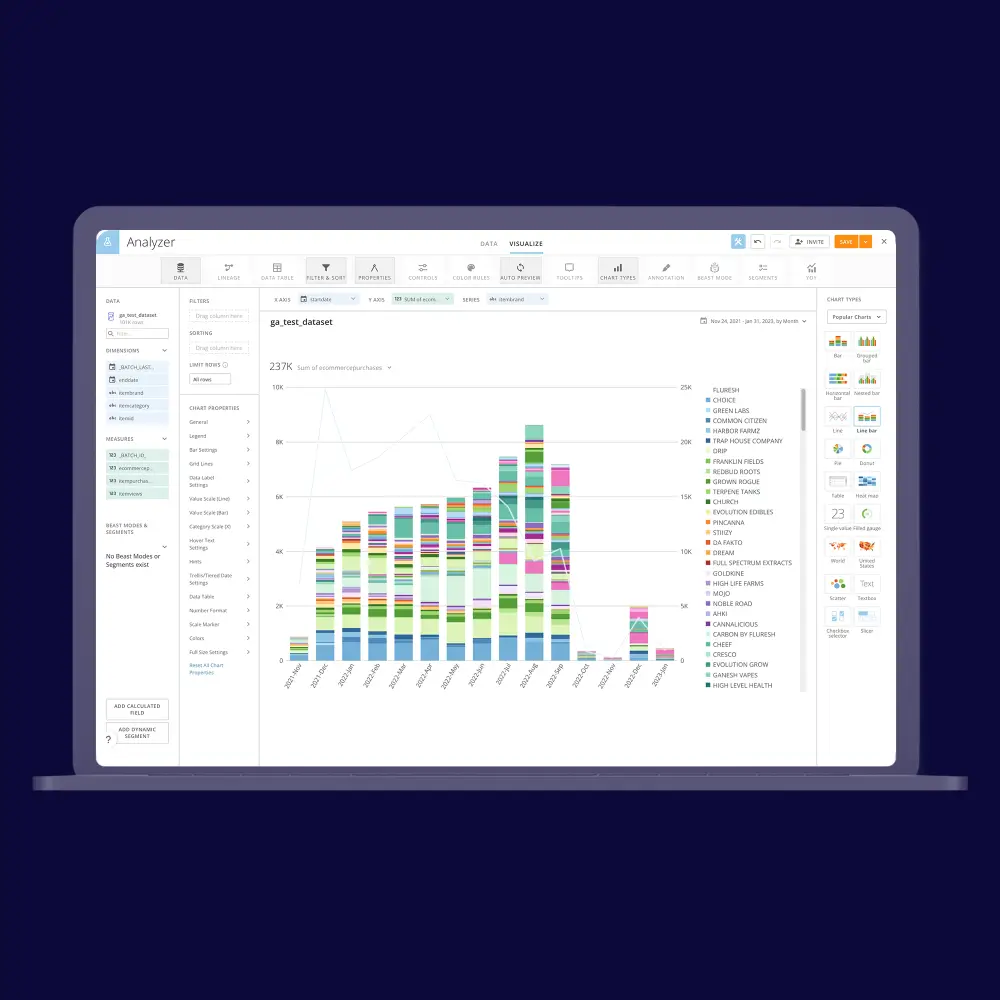
Their communication was great, and their ability to work within our time zone was very much appreciated.
Medical Lab Achieves 50% Compute Savings via Databricks Migration
.webp)
Medical Lab Achieves 50% Compute Savings via Databricks Migration
Latest publications
All publications.webp)
Business Intelligence: Turning Raw Data Into Improved Performance
Web App Analytics Is Continuous Tracking
Churn Prediction—It’s Easier to Retain Than to Fin
