

A retailer uses a structured data integration system to aggregate store sales data, and a centralized system to provide real-time information to the CEO about inventory levels around the world. This knowledge has helped reduce inventory waste by 100% in the first quarter of this year. Engineers used these steps to speed up the pipeline and reduce workflows by 100%. For the same purpose, you can book a call with us.
Why Master the Data Integration Process?
Understanding enterprise integration workflows can help managers reduce unnecessary software costs. Architects use this knowledge to build systems that sync figures between departments without errors. This transparency can accelerate the release of products and reduce storage costs by 25%.
Data integration processes
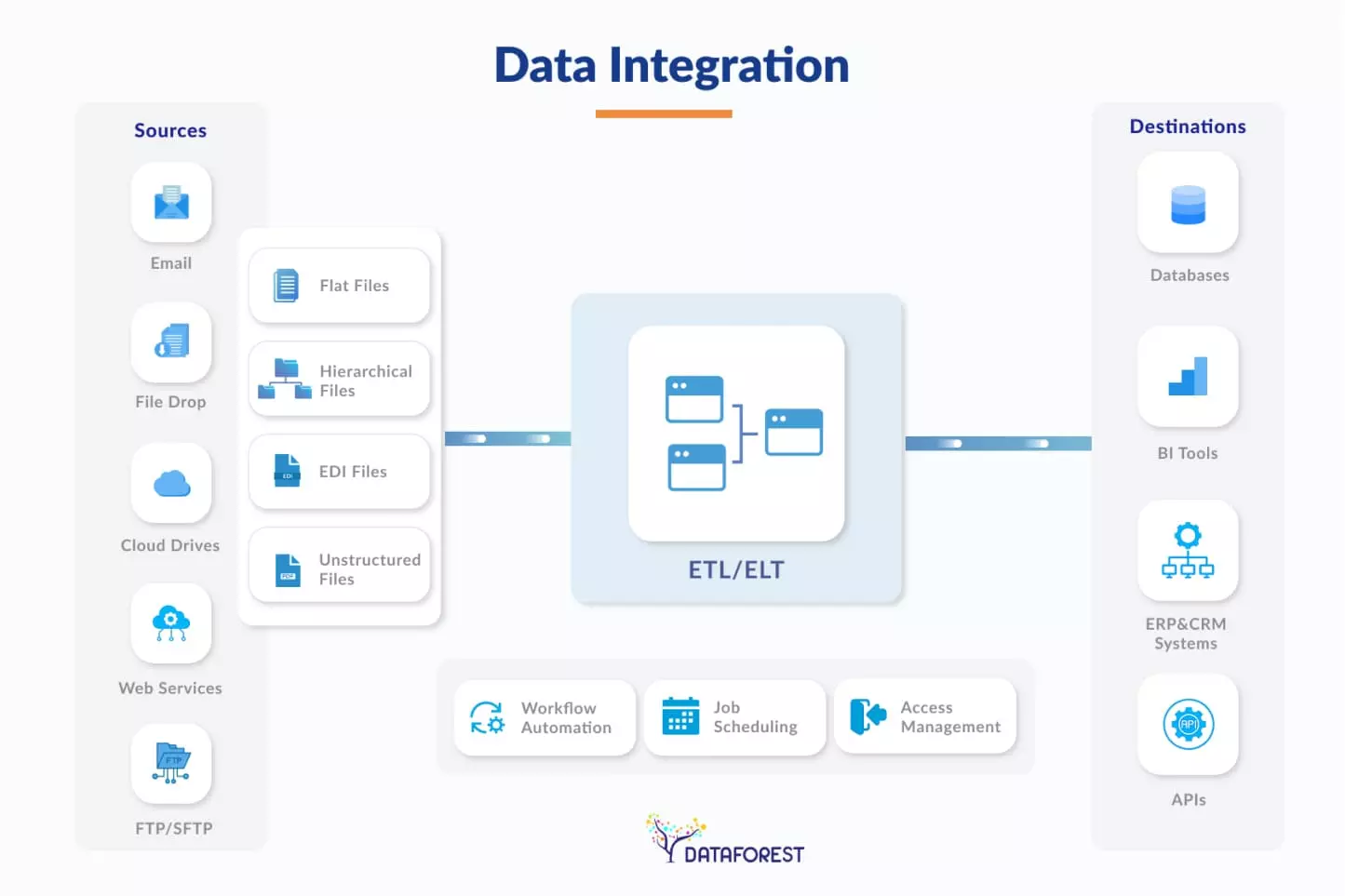
A data integration strategy integrates information from different sources into one model. Engineers move it from databases and cloud applications into a single warehouse. This system cleans and edits the records to ensure that all numbers are correct. The final provides a reliable basis for business intelligence and reporting. Organizations use these results to make decisions based on one piece of data.
Business Consequences of Data Integration Methods
- An effective data integration pipeline connects disparate systems to create a single view of a company's operations.
- This collaboration eliminates silos and reduces manual errors by 30%.
- It provides managers with real-time information that can be used to quickly allocate resources.
- Common info helps architects adhere to security protocols across cloud and on-premise platforms.
- These improvements increase the company's productivity by 20%.
Streamlined Data Analytics

Their communication was great, and their ability to work within our time zone was very much appreciated.
Their communication was great, and their ability to work within our time zone was very much appreciated.
How Does the Data Integration Process Work?
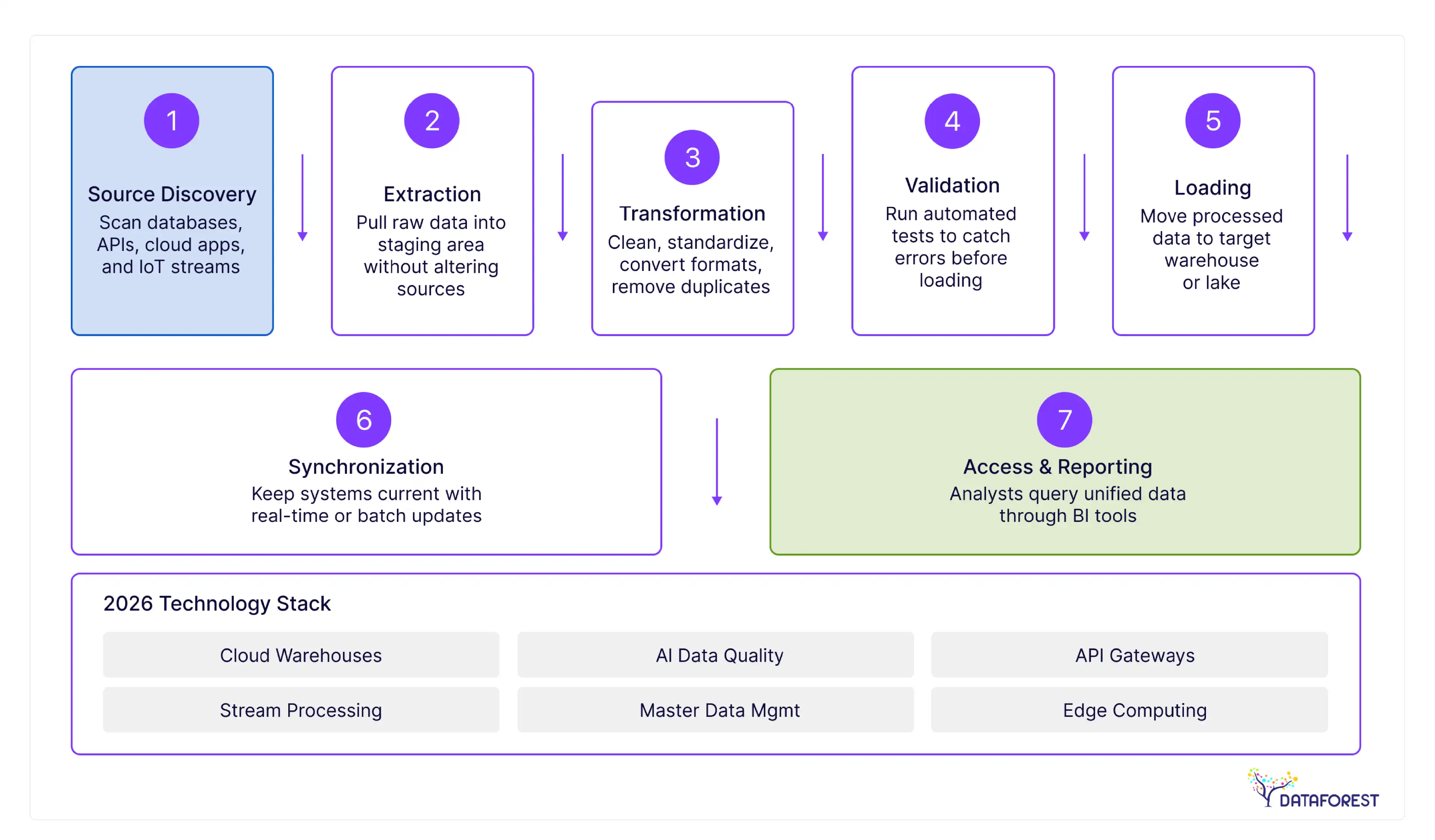
The key steps in the data integration approach turn fragmented records into a clean dataset for precise financial reporting.
Initial data analysis
Discovery and profiling are the first stage of a successful data integration plan. Engineers examine source databases to find latent patterns and identify missing values in the records. The step creates a map of the information to prevent errors during the later stages of the migration.
Example: A global bank scanned 200 legacy databases to identify inconsistent customer ID formats before a merger.
Extracting source information
The extraction is the second stage of the data integration pipeline. Engineers pull raw information from databases, API connections, and cloud storage systems. This step creates a copy of the records without changing the existing source files. Technical teams then move these files to a staging area for further processing.
Example: A retail chain pulled daily transaction records from 1,000 point-of-sale terminals into a central staging area.
Formatting the data
Transformation changes raw info into a standard format during this integration workflow. Engineers apply rules to filter records, convert currencies, and remove duplicate entries. This step makes the records ready for the destination warehouse so teams can run reports.
Example: An e-commerce firm converted diverse international currencies and time zones into a single corporate standard for reporting.
Loading figures to the destination
The loading moves the transformed records into the final target system, like a cloud warehouse. This stage of the integration workflow makes the information available for business users. Teams choose between batch loading at scheduled times or real-time loading for instant updates. Proper loading confirms that 100% of the processed records are ready for query tools.
Example: A healthcare provider moved 50 terabytes of patient history into a cloud warehouse to support real-time clinical alerts.
Validating information consistency
The validation and quality assurance are checks within the data integration approach. Engineers run automated tests to find errors or missing values before the records reach business users. The step prevents bad details from skewing financial reports or operational metrics by 15%.
Example: A logistics company ran automated scripts to catch and remove 5,000 duplicate shipping entries during its weekly audit.
Synchronizing system records
Data synchronization and updates keep all connected systems current throughout the integration lifecycle. Engineers set up triggers to push changes from the source to the target warehouse instantly. This move prevents lag and keeps inventory or financial records consistent across the company. Regular updates maintain the accuracy of the entire pipeline for every department.
Example: A streaming service used change data capture to update user subscription status across all platforms within seconds.
Accessing integrated data
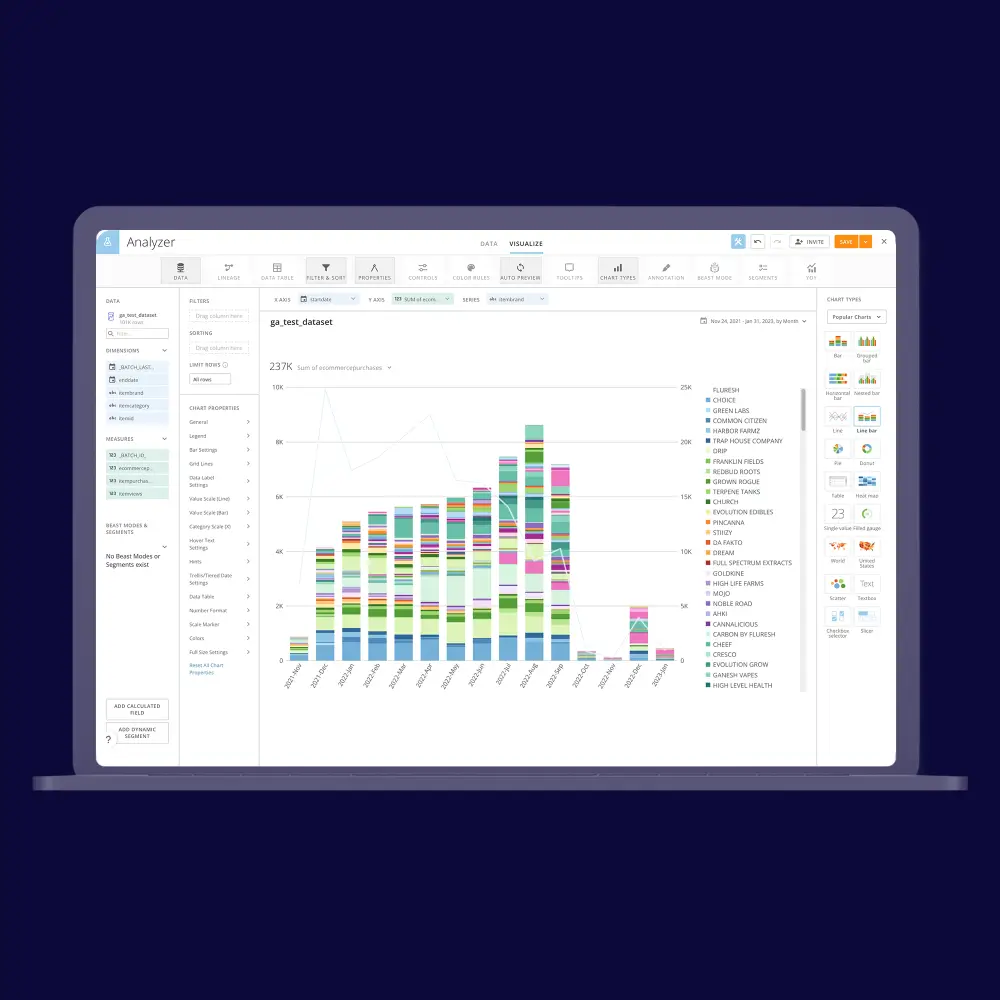
Data access and consumption is the stage where users finally interact with the results of the data integration steps. Analysts and executives use business intelligence tools to pull records for reports and dashboards. It turns raw technical pipelines into a direct source of truth for making company decisions.
Example: A manufacturing CTO used a unified dashboard to monitor factory output and reduce downtime by 12%.
Why Plan Your Data Integration Project?
A detailed project plan helps the team meet deadlines and keeps the integration initiative under budget.
Defining goals and boundaries: Project objectives and scope define the specific business goals and technical limits for the data integration pipeline. These components prevent scope creep and keep the engineering team focused on delivering high-value data for the organization.
Assigning personnel and roles: Personnel assignment defines which architects and engineers will manage each phase of the integration lifecycle. Many organizations choose to hire data engineers to design integration pipelines, manage data quality, and support large-scale migration projects. It identifies specific owners for tasks to stop delays and reduce project costs by 15%.
Setting the project schedule: Timeline and milestones establish the specific dates for completing each stage of the data integration approach. These markers help the CTO follow progress and ensure the engineering team meets its quarterly delivery goals.
Estimating project costs: Budget and cost estimation calculate the total spend for software licenses and engineering hours during the data integration steps. This component helps the CIO predict the return on investment and manage the financial resources for the entire project.
Managing project risks: Risk assessment identifies technical impediments that could slow down the integration plan. Mitigation plans outline steps to resolve these issues and prevent costly system downtime for the company delivering the integration program.

Why Do Businesses Need Multiple Data Integration Methods?
Companies use different integration techniques to meet specific speed, cost, and volume requirements across their departments.
If you think this is your case, then arrange a call.
Data integration cases
Group connection
- Financial institutions operate month-end payment systems.
- Data analysts manage nightly sales reports to track daily sales.
- Marketing agencies update email subscriber lists once a week.
Real-time integration
- Fraud detection systems flag suspicious banking transactions as they occur through real-time integration.
-
- E-commerce sites update inventory levels for customers after each purchase.
- Stock trading software displays current prices to users without delay.
Hybrid Integration
- Banks link local mainframe accounts to new mobile banking software.
- Manufacturers connect factory floor sensors to cloud-based supply chain software.
- Consumers combine physical store purchases with online inventory sites.
Add about the cloud
- SaaS startups integrate their CRM tools with cloud computing software.
- Remote teams share project information through online collaboration platforms.
- International companies expand their warehouses in different countries with an integration framework.
Middleware and ETL
- Hospital systems integrate patient records from various legacy software databases.
- The engineers clean records before moving them to a warehouse.
- Companies model different types of data for a single business intelligence tool.
Deloitte’s strategic collaborations (e.g., with Palantir) focus on breaking down data silos with integrated enterprise systems. In these collaborations, data ingestion, transformation, governance, and analytics are unified into a single platform to make data actionable across functions.
Where Do Most Data Integration Problems Start?
Data integration challenges occur when incompatible system architectures, poor quality, and a lack of centralized governance collide during the merging of disparate sources.
The silo challenges
Data silos occur when separate departments store information in isolated systems. These pockets of data prevent a single view of business performance across the company. Teams often struggle with inconsistent facts because they work with different versions of the truth. Manual info entry to bridge these gaps leads to errors and wastes employee time. Leaders must implement a unified governance policy to break down these barriers across the integration program.
Managing integration complexity
Modern IT environments contain hundreds of distinct applications and formats. Engineers must write custom code to connect these varied systems and platforms. This web of connections grows harder to maintain as the company expands. Small changes in one app often break the flow of data elsewhere. You should adopt an API-led connectivity model to standardize how these systems talk.
Solving inconsistency in data integration
Data inconsistency occurs when different systems show conflicting facts for the same record. The errors happen because databases use unique formats or update at different speeds. Inaccurate figures lead to poor business decisions and erode trust in your reports. Teams spend too much time fixing these records manually instead of doing core work. You must deploy master management tools to create a single source of truth through a governed integration layer.

How Does DATAFOREST Connect Your Data Sources?
DATAFOREST builds automated pipelines to move your data from various sources. The team connects your separate ERP, CRM, and cloud systems into one central hub. Engineers use custom code and APIs to stop manual entry errors. We lower your cloud bills and make your reporting tools run faster. Please complete the form to discuss the right integration approach for your systems.
Questions on Data Integration Project Plan
How can I ensure data quality during the data integration process?
Define strict data standards for enterprise data before you start moving any information. Deploy automated validation scripts and analytics checks to find errors and duplicates during the transfer and data propagation process. Schedule weekly audits to verify the facts in your central data warehouse repository, supported by strong metadata management and proper preparation of incoming datasets.
What is the relationship between data pipelines and data integration?
Data integration is the goal of unifying disparate data, while data pipelines are the mechanical systems that move the information. The pipeline serves as the transport layer for data streams that execute the extract, transform, and load steps of the integration process. You use pipelines in the data integration process as the primary tool to enable scalable propagation and achieve a fully integrated architecture, including inputs from modern sources like IoT devices.
What are the key considerations when choosing a data integration approach for my organization?
Assess your current data volume and the speed your business requires for updates. Compare the long-term costs of cloud tools such as data virtualization platforms against the maintenance needs of on-site systems. Check if your team has the technical skills to manage complex custom code or API connections for the integration initiative.
What role does data mapping play in the data integration process?
The mapping defines the relationship between the fields in your source systems and your target database. This process tells the integration tool exactly how to translate and format information so it remains usable. You must get this step right to prevent loss or field mismatches during the data migration.


.webp)
.webp)
.webp)


