

A logistics firm used SQL script automation to track two million cargo shipments every night. The technical team set up Databricks jobs to run these scripts as soon as the data arrived. The team wanted to automate SQL scripts to remove errors from the billing records. This move saved the company 50,000 dollars in staffing costs during the first quarter of 2025. For the same purpose, you can book a call with us.
Why Are Static SQL Scripts Slowing Down Your Business?
Data teams struggle with manual updates and slow reports every day. You can use Databricks automation to automate reporting with SQL and remove these technical bottlenecks. The shift to SQL script modernization saves time and keeps your data accurate as the company grows.
Manual maintenance causes data errors
Static SQL scripts require a person to update the code every time a database table changes. This manual work often leads to typos and broken links in the data pipeline. A single missed comma can stop a report from running for three days. Most teams lose twenty hours a month just finding and fixing these small mistakes. Automated data orchestration removes the risk of a person forgetting a step during a nightly update. You can use Databricks jobs to accelerate data workflows and check for errors immediately. SQL script automation keeps the data accurate without a developer touching the code every morning.
Scheduling and orchestration gaps
Static SQL scripts often sit in folders and wait for a person to run them. This manual process fails when a developer gets sick or misses a deadline. Modern teams now use Databricks workflow management to trigger these tasks based on time or data events. Without cloud data automation, you cannot link different scripts together in a specific order. One broken script ruins the data pipeline, and no system manages the flow. Many companies automate data pipelines to handle complex dependencies between different business reports. Proper orchestration delivers the right data to the CEO at 8:00 AM every single day.
Scalability challenges with static SQL
Static SQL scripts fail when data volume grows from gigabytes to terabytes. These scripts run on a single server and lack the power to process millions of rows quickly. You cannot easily split the work across multiple machines without rewriting the entire code. Most teams turn to Databricks automation benefits to handle these massive datasets in parallel. This shift allows automated data pipelines to manage thousands of tasks at once without a drop in speed. Companies replace manual SQL scripts with Databricks automation to ensure the system expands as the business acquires more customers. High performance remains steady even during peak hours of data processing.
Why Should You Use Databricks Jobs to Automate SQL Scripts?
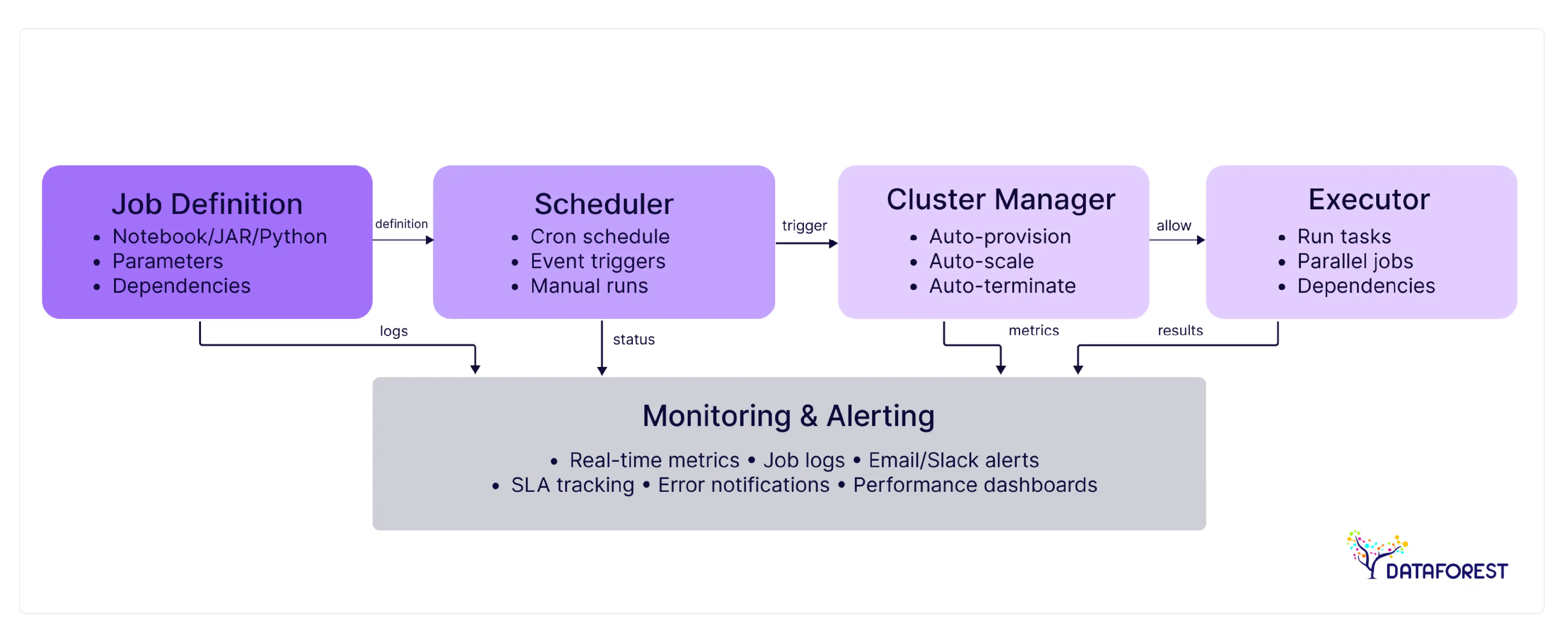
Manual data tasks slow down your company and cause costly mistakes. Databricks job orchestration helps you automate repetitive SQL tasks to create faster and more reliable data flows. You can see how SQL script automation keeps your pipelines running without human intervention.
Essential functions of Databricks automation
- Databricks jobs provide a reliable way to manage complex data workflows without manual input.
- The scheduler runs tasks at exact times or when new files appear in storage.
- Built-in monitoring tools send instant alerts if a process stops unexpectedly.
- You can use SQL script automation to link multiple tasks in a logical sequence.
- The platform tracks every version of the code to prevent accidental data loss.
- These tools allow you to automate SQL scripts across different cloud environments with ease.
Connecting jobs to data pipelines
Databricks jobs connect different data sources into one smooth flow for the whole company. The system pulls raw data from cloud storage and moves it through cleaning steps without a person involved, helping streamline ETL processes. You can use SQL script automation to trigger these moves as soon as new sales records arrive. This connection keeps the data fresh for dashboards and executive reports every hour. Developers automate SQL scripts to join tables from different departments into a single source of truth. The pipeline stays active and scales up when the volume of incoming data increases.
Steady performance with Databricks jobs
Databricks jobs run the same way every time they start. The system uses the exact same code and settings for every batch of data. You can automate SQL scripts to remove the chance of human error during a run. A failed task restarts automatically to keep the project on track, which helps improve ETL reliability. Continuous data pipeline automation provides logs that show exactly what happened during the process. This consistency builds trust in the numbers for all business leaders.
Forbes — Enterprise AI & Data Automation Trends (2025):
In 2025, enterprise data platforms like Databricks are redefining automation by leveraging AI + open data architectures to power large-scale analytics and ML. Databricks and related AI companies remain prominent on the Forbes AI 50 list, reflecting their industry impact in AI-driven automation and analytics.
How Can You Switch from Static SQL to Automated Databricks Jobs?
Moving your manual data tasks to the cloud requires a clear plan. You can use Databricks jobs to automate SQL scripts in four simple stages. This guide shows you how to use SQL script automation to modernize your company data.
Review your current SQL inventory. You must list all the scripts that currently run on your local servers or personal computers. Identify which files the team uses for daily reports and which ones the team no longer needs. Check each script for hard-coded dates and file paths that might stop SQL script automation. Map out how these tasks connect to one another before you automate SQL scripts. This review prepares your code for a shift to Databricks jobs.
Group scripts into workflows. You need to decide which scripts should run together as a single unit. Group related tasks so that Databricks jobs can execute them in a logical order. You can set dependencies to ensure that a cleaning script finishes before the reporting script starts. This step turns a pile of separate files into an organized system for SQL script automation. Once you map the flow, you are ready to automate SQL scripts within the cloud workspace.
Finalize the transition. Run your scripts in the new environment to confirm the data matches your old records. Check that SQL script automation handles null values and errors without crashing. Once the output is correct, use Databricks jobs to set a recurring daily or hourly schedule. You should monitor the first few runs to ensure the timing and resource usage stay within budget. Success in this final phase allows you to schedule SQL jobs and turn off the legacy manual servers.
Track and refine performance. You should check the run logs every week to see if any tasks take too long. Databricks jobs provide metrics on memory and compute usage for every part of the pipeline. Use these facts to adjust cluster sizes and reduce your monthly cloud costs. You can also improve SQL script automation by rewriting slow queries that block other tasks. Constant monitoring ensures that you automate SQL scripts in the most efficient way for the business.
What Business Value Does SQL Automation Deliver to Your Company?
Enterprise leaders often face high costs from manual data work and slow report speeds. You can use Databricks jobs to automate SQL scripts and solve these common problems. This transition creates a reliable system that grows alongside your customer base. SQL script automation allows your team to save 40 hours a week instead of fixing small typos. This matrix shows the measurable gains your business can expect from these technical changes.
If you are interested in the topic, please arrange a call.
How Do You Prepare Your Business for SQL Automation?
Success with SQL script automation depends on more than just the right code. You must ready your team and your cloud environment before you use Databricks jobs. These steps help your project deliver results as you streamline analytics workflows across the organization.
Investing in team skills and training
The move to data processing automation requires your staff to learn new cloud tools and workflows. Developers must understand how to manage Databricks jobs instead of running code on local machines. Training sessions should focus on how to automate SQL scripts using the platform interface and APIs. Your team will need to master version control and automated testing to keep the data pipeline safe. Companies find that a two-week intensive course helps the staff adapt to these changes quickly. Skilled employees can then build more complex systems that save the business money over time. Ongoing support ensures that everyone remains confident as the technical environment evolves.
Setting up your data infrastructure
Transitioning to SQL script automation starts with choosing a cloud provider like Azure or AWS. You must set up a workspace where Databricks jobs can access your internal data stores securely. The system needs specific compute clusters to automate SQL scripts without hitting memory limits. Configure private networking to protect sensitive company data during the transfer process. A strong storage layer, like a data lake, ensures that large files stay organized and accessible. The IT team should establish access rules so that only authorized users can run these automated tasks. Proper setup from the start prevents slow performance and keeps monthly costs under control.
Managing organizational change
Switching to automated systems requires a plan to help employees adapt to new routines. Leaders must explain the reasons for using SQL script automation over manual methods. Show the team how Databricks jobs reduce the stress of late-night data fixes. Employees fear new software will make their current skills useless. Regular meetings address these concerns and highlight the wins of each department. Assign clear roles to every person to automate SQL scripts faster. Clear goals help the whole company move toward a modern data strategy without confusion.
Medium — Data Engineering Automation Trends (2025):
Databricks promotes automation of pipeline construction, code generation, and query optimization using generative AI. Summit highlights include AI/BI Genie, agent interfaces, and ETL automation tool Lakeflow — all designed to reduce manual work and enable faster insights.
How Can Your Business Replace Static SQL with Databricks Automation?
- List every SQL script that the team currently runs by hand.
- Set up a secure cloud workspace where you will host the new code.
- Pick one small reporting task for your first project.
- Move this code into the cloud to start the work.
- Use Databricks jobs to run the script at a set time.
- Check the final data for accuracy against your old manual records.
- Connect multiple scripts to build a flow for SQL script automation.
- Train your data developers to automate SQL scripts without help.
- Stop using the old local servers after the cloud system has been stable for a month.
- Review the monthly cloud bill to find ways to reduce costs.

DATAFOREST can replace static SQL with Databricks Jobs
DATAFOREST builds new data engineering solutions that move manual SQL operations into automated data pipelines on platforms like Databricks. Static SQL scripts only run when someone starts them and often don't meet real-time business needs. Automated Databricks jobs run on a schedule or on demand without manual intervention, improving reliability. Databricks pipelines provide built-in failover tests, alerts, and scheduling, so data operations run on time, every time. Our engineers can rewrite legacy SQL logic into Databricks workflows with control and monitoring, so business teams always have up-to-date data. Replacing scripts with automated tasks reduces the risk of human error and ensures that each task follows the same steps and conditions. Automated Databricks jobs scale with data volume, so performance improves as data grows. With automated systems, analysts spend more time working with real-time results that support decisions. We can integrate Databricks with your existing systems, so automated tasks pull data across the cloud and devices. This change reduces operational costs by reducing manual maintenance and increasing the use of the cloud through a set number. You'll gain consistency in your data pipelines and free your team from repetitive tasks so they can focus on insights and business results.
Complete the form to replace static SQL with Databricks functions.
Questions On SQL Script Automation
What cost savings can enterprises expect by fully automating data workflows with Databricks?
Enterprises see a 25 percent reduction in cloud costs on this new platform. Databricks jobs run tasks on cheap spot instances to save the company more money. SQL script automation removes the need for manual data entry. This shift saves thousands of labor hours every year for the finance team. Companies automate SQL scripts to stop paying for idle servers during the night.
Can Databricks Jobs be integrated with AI/ML models for predictive analytics?
You can run trained machine learning models inside your scheduled Databricks jobs. New data triggers the predictive analytics right away. SQL script automation helps the system find patterns and forecast sales. Many teams automate SQL scripts to clean data for the AI model's training. This process creates a smooth path from raw facts to business predictions every day.Maintaining model accuracy and deploying updates seamlessly in production demands a strategic approach to effective Databricks MLops practices, ensuring these predictive systems remain reliable over time.
How do Databricks Jobs improve collaboration between data engineers and business teams?
Databricks jobs create a single place where everyone can see the data pipeline in action. Business teams check the job status for their morning reports. Engineers use SQL script automation to share clean and verified facts with the marketing department. The platform allows both groups to comment on the code and suggest changes. You can automate SQL scripts to deliver exact answers for company leaders.
Are there security or compliance risks when migrating SQL scripts to Databricks Jobs?
Moving data to the cloud requires strict rules to keep sensitive data private. Databricks jobs use fine-grained access controls for certain tables. You should check for HIPAA or GDPR rules before you automate SQL scripts. SQL script automation helps the IT team track every person who views the data. Encrypting the storage layer protects your company's records during the migration.
What are the common pitfalls during the transition from static SQL scripts to Databricks Jobs?
Teams forget to remove hard-coded file paths that only work on local computers. These scripts fail immediately when you move them into the cloud environment. Another common mistake is ignoring the cost of large clusters for small tasks. You should monitor your resource usage within Databricks jobs to avoid high monthly bills. Rushing the move without a clear plan for SQL script automation often leads to broken data links.
Can enterprises mix automated Databricks Jobs with legacy SQL systems?
You can link your old databases to the cloud to keep existing systems running. Companies use Databricks jobs to pull data from on-premise servers for modern reporting. This hybrid setup allows you to automate SQL scripts while keeping your legacy records safe. SQL script automation can trigger updates in both the cloud and your local warehouse at the same time. This strategy provides a slow and safe path toward a total digital transformation.
How does SQL script automation improve data quality over time?
Automated tasks run the same way every time and remove human error. The system flags any data that does not match the set rules before it reaches the report. SQL script automation keeps your records clean without a person checking every row. Constant monitoring helps the team find and fix data gaps in minutes. This process builds high trust in the facts for every business leader.
What happens if a task fails within a complex SQL script automation flow?
The system sends an instant email alert to the technical team. You can set the job to restart itself up to three times to fix temporary glitches. SQL script automation stops the next steps so that bad data does not spread. Detailed logs show exactly where the error occurred in the code. This safety net prevents small technical issues from ruining the entire morning report with SQL script automation.


.webp)

.webp)
.webp)


