


A Berlin food retailer moved its sales data from a SQL server to Databricks. This move cut data processing time from six hours to twenty minutes. The team saved $400,000 in annual fees by removing three old servers. After the Databricks migration, analysts now run reports on customer habits ten times faster than before. The CIO saw full payback within four months of the launch. You can also schedule a call with us to do the same.
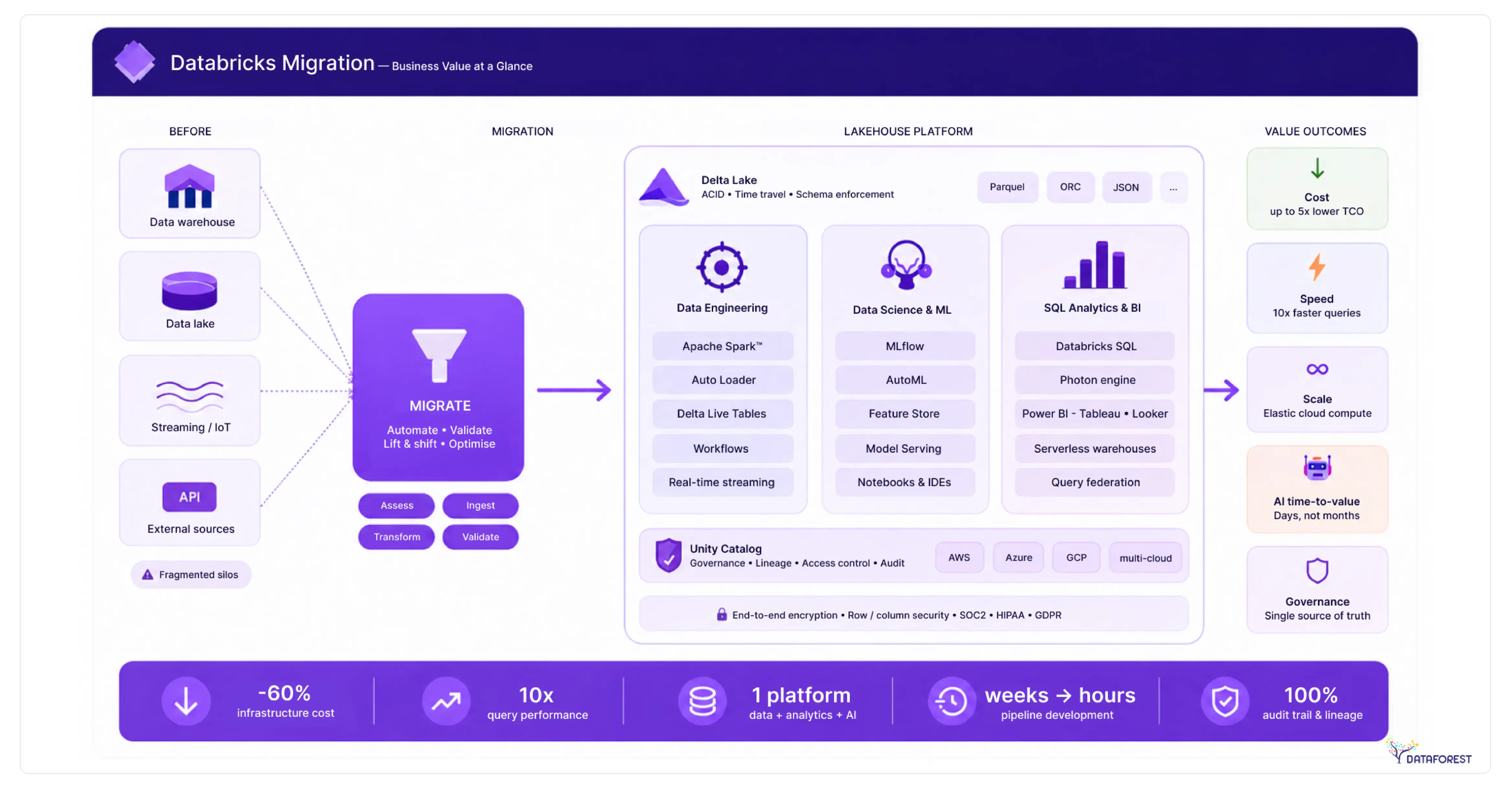
Why Legacy Data Warehouses Fail in 2026
Your old data warehouse costs more to run each year but does less for your team. Rigid hardware and siloed files stop you from using new AI tools today. This Databricks migration guide shows the four biggest risks of keeping your legacy stack in 2026.
Scaling problems in old warehouses
Old data warehouses use fixed hardware and stop business growth. Adding new storage in 2026 takes 6 weeks for most on-site data centers. Teams must buy and install physical servers to support more users. 10 analysts run queries, and the system speed drops. Data stays stuck in queues for hours during peak shifts. Maintenance costs for these old systems rose by 15% last year. Your engineers spend half of their day keeping the system running.
The hidden costs of old hardware
Old warehouses drain your budget. High licensing fees for a mid-sized firm now top 200,000 dollars per year. You must pay for the power and cooling to run these heavy machines. Specialized staff spend 60 hours every week fixing hardware errors. The labor costs rose by 12% in the first half of 2026. Sometimes upgrading a single part costs more than the original rack. These hidden bills make legacy systems far more expensive than a modern Databricks migration path.
Barriers to machine learning
Legacy warehouses only store structured rows and columns.This limitation pushes enterprises toward data migration and modernization programs focused on cloud-native analytics and AI-ready infrastructure. Many organizations adopt a Data platform development service to design scalable architectures that support advanced analytics, machine learning, and future business growth. But most AI projects need unstructured data like audio or text files. These old systems cannot process images for your machine learning models. Data scientists must copy files to other tools to start their work. This manual step adds four days to every research project in your firm. Your team cannot run real-time predictions for customers on the old hardware. Rigid data formats block your company from using new generative AI tools, which makes a Databricks migration guide more urgent.
The cost of disconnected data
Legacy warehouses store data in separate boxes. These systems do not talk to each other. Marketing teams keep files in one server. Sales teams use another. A CTO waits 10 days for engineers to pull these pieces into one report. Data architects find 4 different versions of the same customer record. Divided data stops your company from seeing a single view of the business.
Medical Lab Achieves 50% Compute Savings via Databricks Migration
.webp)

Medical Lab Achieves 50% Compute Savings via Databricks Migration
The Business Benefits of Databricks
Leaders need to lower tech costs while building better AI in 2026. The Databricks platform combines your files and analytics into one place. This Databricks migration guide shows how you can stop paying for extra tools and start delivering results faster.
One home for all your data
The lakehouse brings your data lake and data warehouse together into one system. It stores raw files and structured tables in a single place for every team. You no longer need to pay for two different tools to manage your company records. This setup lets engineers and data scientists work on the same live data at the same time. Security teams can set rules for the whole firm from one central control panel. Your business saves money by cutting out the need to copy data between systems.
Pay only for what you use
Databricks turns servers on and off based on your current work. You stop paying for hardware when your team finishes a task. The system grows in minutes to process millions of new sales records. For example, cloud tools save companies 30,000 dollars on power bills. Your engineers no longer wait for physical parts to arrive in the mail. These savings helped firms cut their yearly tech spending by 25%.
Built-in tools for AI
Databricks includes every tool your team needs to build and deploy machine learning models. Engineers use the platform to track their research and manage different versions of their code. The built-in feature store lets your data scientists reuse calculations across many different projects. For example, firms using these tools train custom language models 40% faster than before. You no longer have to buy separate software to monitor your models in production. This unified workspace helps your firm move from a raw idea to a working AI product in weeks.
Instant insights from live data
Databricks processes millions of data points as soon as they reach your system. Your teams see live sales reports in seconds instead of waiting for nightly updates. This speed lets your managers make fast choices during busy events like holiday sales through a batch-to-streaming migration. For example, a logistics firm used this feature to cut delivery delays by 18%. The platform handles streaming data and batch data with the same set of simple tools. You can spot fraud or equipment failure before these issues cost the company money.

Choosing Your Databricks Migration Way
Picking the right strategy is the first step to cloud success. You must balance the speed of a fast move against the power of a new design. This guide helps your team pick a plan that fits your budget and goals.
Picking your path
Your team must pick a migration method that fits your budget and timing. A lift and shift move offers the fastest way to the cloud for old systems. Re-platforming your code cuts costs by 40% while keeping most of your current logic. Full refactoring turns your data into a strong engine for new AI projects. Firms spend three months on this choice to avoid costly mistakes later. This decision is the heart of any Databricks migration guide.
Three paths to a modern stack
Leaders must choose a migration path that balances speed with long-term results. A lift-and-shift move sends your data to the cloud with no logic changes. Replatforming updates some code to lower your bills and boost speed. Re-architecting creates a new system to run advanced AI models. Tech teams spend 3 months planning these major shifts.
Choosing the migration speed
Managers choose between moving data at once or in steps. A big bang move switches every system to Databricks on a single day. This path is fast but carries a high risk for your business. A phased move shifts one department at a time. Most firms choose the phased path for safety.
Choose what you need, book a call, and continue in the right direction.
Migrating Legacy Systems to Databricks
Moving from old data systems to Databricks saves your firm money and time. This Databricks migration guide shows how to retire your Snowflake, Redshift, or Oracle racks. You can follow these technical paths to change your stack without losing critical business logic.
Databricks migration guide for moving from Snowflake
- Start by reviewing your Snowflake query history and warehouse costs. This audit shows which data sets your team uses most often.
- Set up the Unity Catalog to manage your files and permissions in one place. This tool replaces Snowflake roles and keeps your data secure during the Databricks migration.
- Move your tables into cloud storage using the Snowflake unload command. Convert these files into the Delta Lake format for faster speeds in Databricks.
- Update your SQL scripts to match the Databricks syntax. Some teams use automated tools to rewrite Snowpark code into Spark in just a few days.
- Run test queries on both systems to check for matching numbers. Once the data matches, point your business tools to the new Databricks endpoints.
- Shut down your Snowflake warehouses to stop the billing cycle. Your company will save on storage costs immediately after the shutdown.
Databricks migration guide for moving from Amazon Redshift
- Analyze Redshift cluster usage to find your largest data sets.
- Export all your tables to Amazon S3 folders.
- Convert your Redshift SQL code into Spark SQL using automated scripts.
- Set up Unity Catalog to manage permissions for your entire firm.
- Point your reporting tools, like Power BI, to the new Databricks workspace.
- Shut down the Redshift cluster to stop the hourly billing cycle.
Moving from Teradata and Oracle to the cloud
- Audit your Teradata BTEQ scripts by June 2026 to find logic that needs a fix.
- Convert complex Oracle PL/SQL blocks into Spark SQL or Python for the new system.
- Moving 500 terabytes of on-site data to the cloud takes weeks of high-speed network use.
- Legacy hardware fees for Oracle racks often drop by 30% in the first year.
- Data architects map proprietary storage formats to the open Delta Lake standard for better access.
- Your team can stop paying for expensive data center cooling once the old machines go away.
Solving Databricks Migration Challenges
Integrity risks: A Databricks migration moving data to the cloud often causes small errors in row counts or math. Your team must run checksums on every table to catch these gaps. Use the Delta Lake format to stop partial writes and keep your records clean.
Managing downtime: Shutting down systems for a Databricks migration can stop your sales teams from working for hours. You can avoid this by running your old warehouse and Databricks at the same time until the new one works. This dual-run method ensures your staff always has access to data, even if the move hits a snag.
Staff readiness: Teams do not know how to write Spark code or manage cloud security. You should start a training program three months before the Spark migration strategy begins. Firms that train their staff early see 30% fewer errors during the launch.
System integration: Old reporting tools and apps often fail to connect to your new cloud workspace. Your team will spend 4 weeks building new APIs to link these systems. Use the Databricks JDBC driver to keep your current dashboards running without a full rewrite.
Databricks Migration Best Practices
Planning your move carefully will prevent delays and high bills. These methods help your team move data safely and keep your cloud costs low. Use the steps to build a reliable and secure lakehouse. A solid Databricks migration guide turns risk into a controlled rollout.
The migration schedule
A written plan keeps your tech team on track.
- List every data source and app in your firm. Pick one small department for a test move during the first month. This pilot shows your architects exactly where the old code fails.
- Set firm dates for moving your largest files. Good dates help your managers plan their weekly work schedules.
- Check the cost of each move against your budget goals. A clear plan prevents your staff from repeating the same tasks. It helps the CIO see the value of the move every month.
Securing your data assets
Every data move needs strict rules to keep files safe and private. Use the Unity Catalog to set access rights for all your teams in one place. 80% of firms will use automated tools to tag sensitive records during data ingestion for Databricks. You can block unauthorized users from seeing your financial data with simple tags. This system tracks every person who opens a file and what they change. Good rules help your firm meet global laws like GDPR without extra manual work. Your data architects save time by setting permissions once for each project.
Automating your data workflow
Automation stops your team from making errors during the data migration workflow. You should use scripts to move your code across different workspaces. This method helps your engineers deploy new data pipelines in minutes. Firms use CI/CD tools like GitHub Actions or Azure DevOps for their data pipeline migration to Databricks. These tools run tests on every code change to catch bugs early. Your staff saves 10 hours a week by skipping manual file uploads. This setup makes your whole migration faster and more reliable.
Controlling your cloud bills
Managers must track cloud spending every day to stay within budget. Databricks has tools that show you exactly which team uses the most power. Firms set price alerts to stop bills from rising too fast. You can use cheaper spot instances to lower your compute costs by 50%. Your engineers should turn off test clusters after 10 minutes of no use. These steps help your firm avoid surprise bills at the end of each month. Tracking these numbers makes sure the move pays for itself within the first year.
Databricks says, migration enables: platform consolidation + AI enablement as primary ROI drivers. Real cases show: 40%+ TCO reduction, up to 97% processing cost reduction in optimized workloads. Cost reduction alone is a weak business case. Strong business case = (cost ↓) + (AI capability ↑) + (data accessibility ↑). Migration ROI comes from new workloads, not legacy optimization.
The Financial Gains of Migration
A Databricks migration helps your firm save 30% on data storage costs. Your team will finish data projects in days instead of weeks using the new system. Companies see a full return on their money within eight months of the launch. You will stop paying for high hardware fees and physical server repairs this year. Does your current stack allow you to cut data processing times by half? New automation tools for ETL migration to Databricks reduce manual work and lower your labor costs by 20%. These fast reports let your sales teams close deals with better customer data.
The DATAFOREST Expert Migration Support
- The team audits your current data stacks to find the best Databricks migration path for your firm.
- Engineers map out your files and security rules to keep your migration roadmap for Databricks clean.
- We handle the heavy lifting of rewriting your old SQL or Python code into faster Spark scripts.
- Our experts set up the Unity Catalog, so your managers keep full control over every record.
- Does your staff need training on these new cloud tools to avoid costly human errors during the Databricks migration steps? We suggest some.
- DATAFOREST provides hands-on workshops to teach your data scientists how to build AI models on the new platform.
- Our support helps your business stop paying for old hardware and start seeing profits from live data today through a Databricks migration.
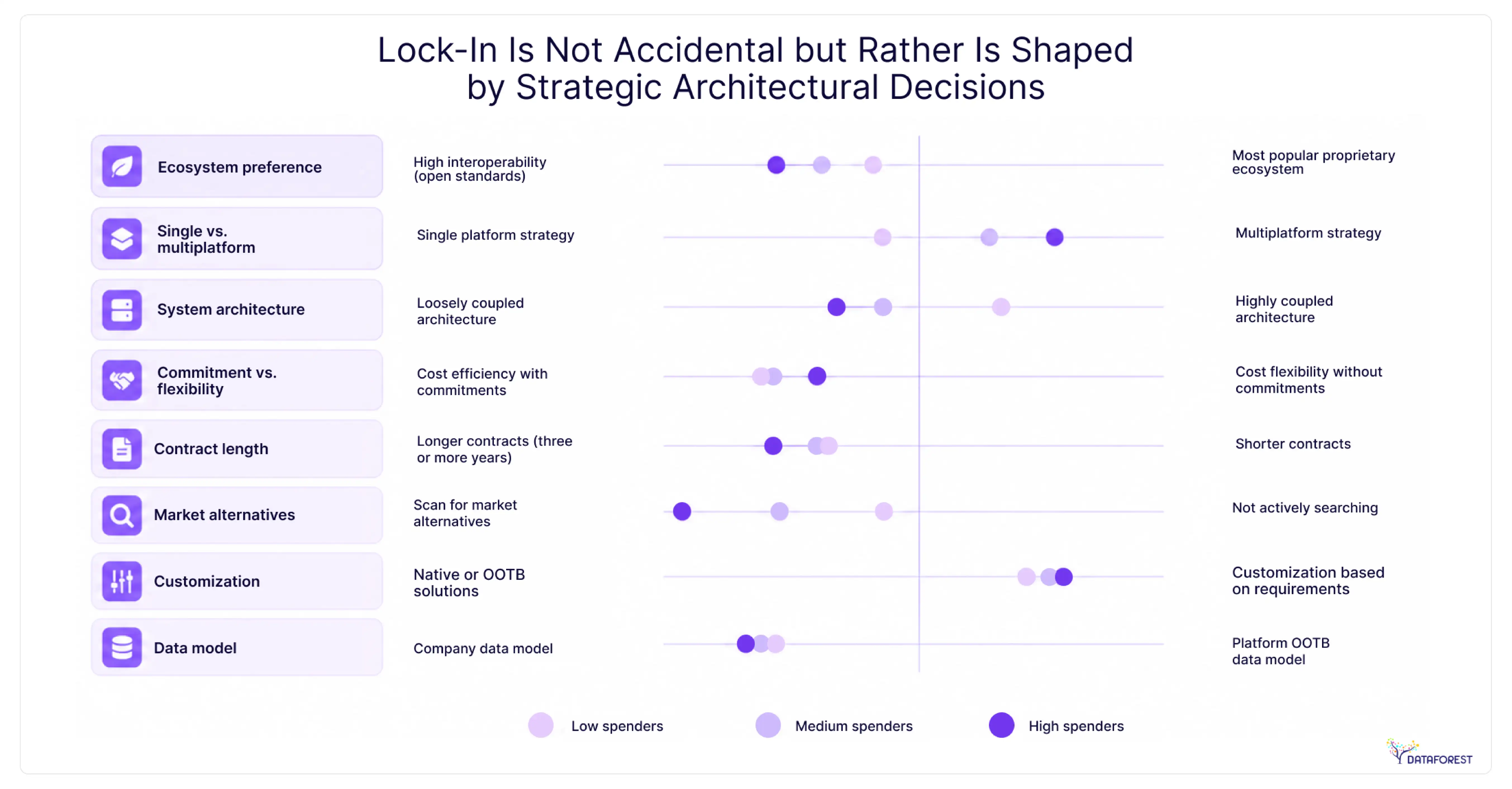
Strategy and Platform Control
BCG writes that Databricks migration reduces lock-in risk but introduces platform strategy trade-offs. 62% of IT buyers worry about platform lock-in in modern data platforms. BCG recommends decoupling data from legacy systems and building a data layer independent of core systems to accelerate innovation. A Databricks migration strategy solves legacy rigidity, but introduces platform governance decisions. Winning pattern: open formats, multi-platform strategy, and a data layer decoupled from ERP and core systems. Migration is a control vs convenience trade-off, not just a tech upgrade.
Please complete the form to try out this Databricks migration guide.
Questions on Databricks Migration
What are the key business benefits of migrating to Databricks from a legacy data warehouse?
A legacy data warehouse migration cuts your tech bills by combining data lakes and warehouses. Your teams stop paying for idle servers because the system turns off when tasks finish. Data scientists and engineers work on the same live files to build AI products faster. Teams can use Databricks for LLMOps to manage the development and deployment of generative AI models. You see sales reports in seconds to make better choices during busy market shifts. One central panel helps you manage security rules and follow data laws across the firm.
How long does a typical Databricks migration take for a mid-to-large enterprise?
Large firms typically spend six to twelve months moving their data to Databricks. Your team can finish a simple lift and shift project in just four months. Complex projects with new code and fresh logic often take a full year to complete. Most managers choose a phased migration approach to keep the business running during the move. This slow shift helps your staff learn new tools while they maintain current sales reports.
What factors influence the total cost of a Databricks migration project?
Total Databricks migration costs depend first on the amount of data you move. You must pay for the engineers who rewrite your old SQL code into Spark. Your monthly bill changes based on how many compute clusters you run each day. Complex projects that require new security rules will take more time and money. Hiring outside experts helps your firm avoid errors that lead to high cloud bills.
Should enterprises choose a lift-and-shift approach or fully re-architect their data platform during a Databricks migration?
A lift and shift migration to Databricks moves your current systems to the cloud without changing any code. This path works best if your firm needs to meet a tight deadline for its Databricks architecture migration. Re-architecting takes more time but allows you to build powerful AI tools. You will see lower monthly bills because the new system runs tasks faster. Most leaders pick lift-and-shift for speed and then update their code over the next year.
How does Databricks support AI and machine learning compared to traditional data warehouses?
A migration data warehouse to Databricks plan lets your teams build AI models directly on the same files they use for reports. Traditional warehouses force you to move data to a separate tool for machine learning. This setup saves time and prevents errors caused by copying large files. Your data scientists use Python or R, and engineers keep using SQL. Teams using this platform cut their model training time by 45% after their data warehouse migration.


.webp)

.webp)
.webp)


