
Core Software Development Concepts & Practices
Backend Development
Definition: Backend Development refers to the server-side layer of a software application — the code that runs on servers, processes requests, manages data, implements business logic, and delivers results to the frontend that users see. While users interact with the frontend (buttons, forms, pages), the backend is the engine behind the scenes: validating inputs, querying databases, applying business rules, authenticating users, and orchestrating integrations with third-party services.
For businesses, the quality of backend development directly determines application performance, security, scalability, and the ability to evolve the product rapidly — it is the technical foundation on which the entire digital product is built.
Technical Insight: Backend development encompasses: API design (RESTful APIs, GraphQL, gRPC), server frameworks (Node.js/Express, Python/FastAPI/Django, Java/Spring Boot, Go/Gin), database management (SQL: PostgreSQL, MySQL; NoSQL: MongoDB, Redis, Cassandra), authentication and authorization (OAuth 2.0, JWT, session management), caching (Redis, Memcached), message queues (RabbitMQ, Kafka for async processing), and server infrastructure (containerized deployments via Docker/Kubernetes). Backend performance is measured by throughput (requests/second), latency (p50, p95, p99 response times), and error rate. Observability is implemented via structured logging, metrics (Prometheus), and distributed tracing (OpenTelemetry).
Frontend Development
Definition: Frontend Development is the practice of building the client-side layer of a software application — everything a user directly sees and interacts with in their browser or mobile app. It encompasses the visual design implementation (layouts, typography, colors), interactive behavior (forms, navigation, animations), and the logic that fetches and displays data from backend APIs. The frontend is the face of your product: it defines the user's first impression, shapes their experience, and directly impacts conversion rates and retention.
Exceptional frontend development is not just about aesthetics — it requires deep attention to performance (fast load times), accessibility (usable by all users), and cross-device compatibility to ensure the product works flawlessly for every user on every device.
Technical Insight: Modern frontend development is built on the JavaScript ecosystem: React (component-based UI library, dominant in SPA development), Vue.js, Angular, and Svelte are the leading frameworks. Next.js and Nuxt.js add Server-Side Rendering (SSR) and Static Site Generation (SSG) for SEO and performance. Styling uses CSS-in-JS (Styled Components, Emotion), Tailwind CSS (utility-first), or component libraries (Material UI, Shadcn). Build tools: Vite, webpack, esbuild. Performance optimization involves code splitting, lazy loading, image optimization (WebP, AVIF), and Core Web Vitals monitoring (LCP, FID, CLS). TypeScript is now the industry standard for type-safe frontend code.
Full Stack Development
Definition: Full Stack Development refers to the practice of building both the frontend (client-side, user-facing) and backend (server-side, data and logic) layers of a software application — and everything in between, including databases, APIs, and deployment infrastructure. A full stack developer can independently build a complete, end-to-end feature without handing off between specialized teams.
For startups and growing businesses, full stack developers offer exceptional leverage: a single engineer who can take a feature from database schema design through API implementation to UI delivery dramatically accelerates development velocity. For larger organizations, full stack skills enable better cross-team collaboration and faster prototyping.
Technical Insight: Popular full stack combinations include the MERN stack (MongoDB, Express, React, Node.js), MEAN stack (same but with Angular), and T3 stack (TypeScript, Next.js, Prisma, tRPC, Tailwind — optimized for type safety end-to-end). Python full stack uses Django or FastAPI on the backend with React or Vue on the frontend. Full stack developers work across: database design (schema, indexing, query optimization), RESTful/GraphQL API development, state management (Redux, Zustand, React Query), authentication flows, CI/CD pipeline configuration, and cloud deployment (AWS, Vercel, Railway). The tradeoff vs. specialization is depth: full stack developers are broadly capable but may not match the depth of dedicated specialists in either layer.
Agile Methodology
Definition: Agile Methodology is an iterative approach to software development and project management that delivers value in short, frequent cycles (called sprints or iterations — typically 1-4 weeks) rather than planning and delivering everything in one large release at the end. Agile prioritizes adaptability over rigid planning: requirements evolve through continuous collaboration between self-organizing teams and customers, with working software delivered frequently as the primary measure of progress.
For businesses, Agile means faster time-to-market for new features, the ability to change direction when market conditions shift, and reduced risk — because small, frequent deliveries surface problems early when they are cheapest to fix, rather than discovering major issues after months of development.
Technical Insight: Agile is a set of values (from the Agile Manifesto) implemented through specific frameworks: Scrum (the most widely used — defines Sprints, Daily Standups, Sprint Planning, Sprint Review, Sprint Retrospective, and roles: Product Owner, Scrum Master, Development Team), Kanban (continuous flow with WIP limits and a visual board — no fixed iterations), SAFe (Scaled Agile Framework for enterprise), and XP (Extreme Programming — emphasizes engineering practices like TDD, pair programming, continuous integration). Tooling: Jira, Linear, Shortcut for backlog and sprint management. Key metrics: Velocity (story points completed per sprint), Cycle Time (time from start to delivery), and Burndown Charts.
Test-Driven Development (TDD)
Definition: Test-Driven Development (TDD) is a software development practice where engineers write automated tests before writing the implementation code — following the Red-Green-Refactor cycle: first write a failing test that defines the desired behavior (Red), then write the minimum code to make it pass (Green), then refactor the code while keeping tests green (Refactor). This inverts the traditional workflow where tests, if written at all, come after implementation.
TDD produces software with inherently high test coverage, cleaner designs (code written to be testable tends to be more modular and loosely coupled), and faster debugging cycles — because tests immediately pinpoint exactly what broke and where, rather than requiring lengthy investigation.
Technical Insight: TDD operates at multiple levels: Unit Tests (testing individual functions/classes in isolation — Jest, pytest, JUnit), Integration Tests (testing interactions between components — testing databases, APIs), and End-to-End Tests (testing full user workflows — Playwright, Cypress). The key discipline is test granularity: each test should verify one behavior, be deterministic (same result every run), fast (milliseconds), and independent (no shared state between tests). Testing concepts: mocks and stubs (replacing real dependencies with controlled substitutes), test doubles, and code coverage metrics (line, branch, mutation coverage). BDD (Behavior-Driven Development) extends TDD with human-readable test specifications using Gherkin syntax (Given/When/Then).

Code Review
Definition: Code Review is the systematic practice where one or more engineers read, analyze, and provide feedback on another engineer's code changes before those changes are merged into the main codebase. It is one of the highest-value quality assurance practices in software development — catching bugs, security vulnerabilities, and design problems before they reach production, while simultaneously spreading knowledge and maintaining consistent code quality standards across the team.
Beyond catching defects, code review is a knowledge transfer mechanism: it is how junior engineers learn from senior ones, how the team develops shared understanding of the codebase, and how architectural standards are enforced consistently rather than relying solely on documentation.
Technical Insight: Code review is implemented as pull requests (PRs) or merge requests (MRs) in Git platforms (GitHub, GitLab, Bitbucket). Best practices include: keeping PRs small (under 400 lines of changed code — larger PRs receive less thorough review), providing context in the PR description (what changed, why, how to test), using review checklists (correctness, security, performance, test coverage, documentation), and separating stylistic feedback (handled by automated linters: ESLint, Pylint, Prettier) from substantive design feedback. Automated code review tools (SonarQube, CodeClimate, GitHub Copilot code review) pre-screen for common issues. CODEOWNERS files route PRs to the relevant domain experts automatically.
Refactoring
Definition: Refactoring is the process of restructuring existing code — improving its internal design, readability, and maintainability — without changing its external behavior or functionality. It is the software equivalent of editing and reorganizing a written document to make it clearer and more logical, while keeping the content (what the code does) exactly the same.
Refactoring is how engineering teams pay down technical debt and keep codebases healthy over time. Without regular refactoring, code accumulates complexity, duplication, and fragility until new features take exponentially longer to implement — a phenomenon known as software entropy. Teams that refactor continuously maintain the ability to move fast indefinitely, rather than grinding to a halt under the weight of accumulated shortcuts.
Technical Insight: Refactoring is guided by identifying 'code smells' — patterns that indicate design problems: Long Methods (functions doing too much), Duplicate Code (violating DRY — Don't Repeat Yourself), Large Classes (violating Single Responsibility Principle), Feature Envy (a method more interested in another class's data than its own), and Magic Numbers (unexplained literals in code). Classic refactoring techniques (catalogued by Martin Fowler) include: Extract Method, Extract Class, Replace Conditional with Polymorphism, Introduce Parameter Object, and Move Method. The prerequisite for safe refactoring is comprehensive automated tests — they ensure the refactored code still behaves identically. IDEs (IntelliJ, VS Code) automate many mechanical refactoring operations.
Automation
Definition: In software development, Automation is the use of code, scripts, and tools to perform repetitive, manual tasks automatically — from running tests and building software (CI/CD automation), to provisioning infrastructure (IaC), to executing business workflows without human intervention. Automation is the multiplier that allows small engineering teams to operate at the scale and reliability of much larger ones by eliminating error-prone manual processes.
For businesses, automation directly translates to cost reduction, faster time-to-market, higher reliability, and the ability to scale operations without proportionally scaling headcount. Every manual, repeatable process in software development and IT operations is a candidate for automation.
Technical Insight: Development automation encompasses multiple domains: Test Automation (unit, integration, E2E tests running in CI — pytest, Jest, Playwright), Build Automation (Makefiles, Gradle, npm scripts — compiling, packaging, containerizing), Deployment Automation (Helm, ArgoCD, Spinnaker — deploying releases to Kubernetes without manual steps), Infrastructure Automation (Terraform, Ansible, Pulumi — provisioning cloud resources from code), Workflow Automation (Airflow, Prefect — scheduling and orchestrating data pipelines), and Business Process Automation (RPA tools like UiPath, and API-based integrations via Zapier, n8n, or custom microservices). The automation ROI calculation weighs one-time build cost against repeated manual effort saved over time.
UI/UX Design
Definition: UI/UX Design encompasses two closely related disciplines: UX (User Experience) Design focuses on the overall experience a user has with a product — how intuitive, efficient, and satisfying it is to accomplish their goals; UI (User Interface) Design focuses on the visual and interactive elements — the layout, colors, typography, icons, and components that make up the interface. UX is the architecture of the experience; UI is the finishes and furnishings.
Exceptional UI/UX design is a direct business driver: it reduces user onboarding friction, increases conversion rates, decreases support costs (users who can figure out the product themselves don't need help), and builds the brand loyalty that comes from delightful, effortless product experiences.
Technical Insight: The UX process follows: User Research (interviews, surveys, usability testing to understand user needs and pain points), Information Architecture (organizing content and navigation logically), Wireframing (low-fidelity structural layouts), Prototyping (interactive mockups for user testing — Figma, Sketch, Adobe XD), Usability Testing (observing real users complete tasks to identify friction), and Iteration. UI implementation uses design systems (Figma component libraries synced to code component libraries like Storybook) to ensure visual consistency. Key frameworks: Nielsen's 10 Usability Heuristics, WCAG accessibility guidelines (AA compliance is the standard), and Fitts's Law (element size and distance affect interaction speed). Core Web Vitals and task completion rates measure design quality in production.
Progressive Web App (PWA)
Definition: A Progressive Web App (PWA) is a type of web application that uses modern browser APIs to deliver app-like experiences directly through the web browser — without requiring users to download and install anything from an app store. PWAs can work offline, send push notifications, be added to the home screen, and load instantly — capabilities previously exclusive to native mobile apps — while being built with standard web technologies (HTML, CSS, JavaScript).
For businesses, PWAs offer a compelling middle ground: the reach and discoverability of a website (no app store friction, no install required) combined with the engagement and capability of a native app, at a fraction of the development cost of maintaining separate iOS and Android codebases.
Technical Insight: PWAs are built on three core technologies: Service Workers (JavaScript files that run in the background, intercepting network requests to enable offline functionality through cache-first strategies, background sync, and push notifications), Web App Manifest (a JSON file declaring the app's name, icons, theme color, and display mode — enabling 'Add to Home Screen' and standalone display), and HTTPS (required for Service Worker registration — ensuring secure communication). Performance targets for PWAs follow the PRPL pattern (Push critical resources, Render initial route, Pre-cache remaining routes, Lazy-load on demand). Lighthouse (Chrome DevTools) audits PWA compliance and scores. Frameworks like Workbox simplify Service Worker implementation.


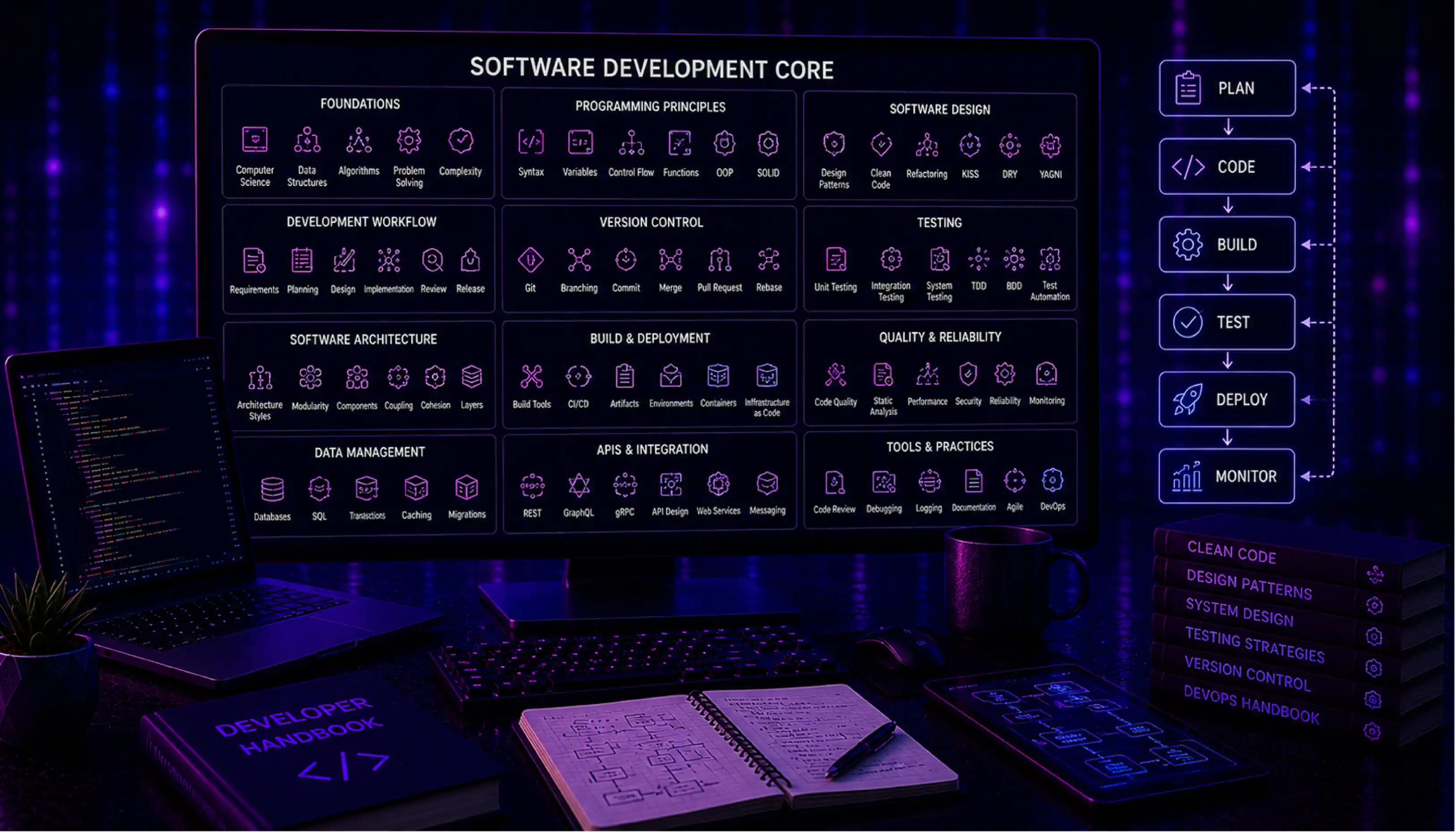
Software Development Core: The Complete Engineering Glossary
Share
Table of contents:
Podcast Platform Boosts Engagement 7× Using AI Recommendations
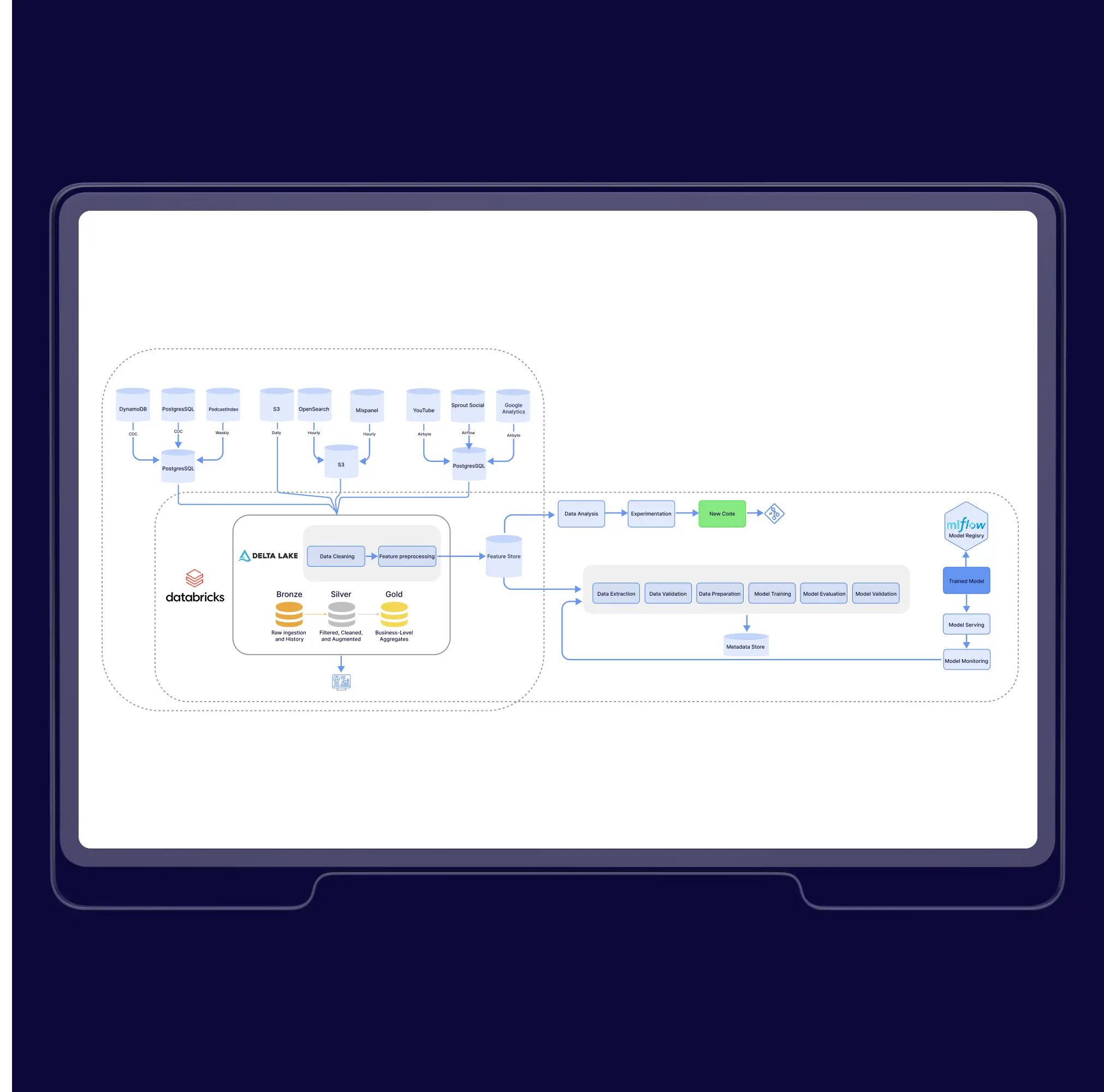

Podcast Platform Boosts Engagement 7× Using AI Recommendations
Reporting & Analysis Automation with AI Chatbots

Automating Reporting and Analysis with Intelligent AI Chatbots
Stock relocation solution

.webp)
The team reliably achieves what they promise and does so at a competitive price. Another impressive trait is their ability to prioritize features more critical to the core solution.
Latest publications
All publications
AI Personalization Tools Deliver Customized UX Automatically

Field Service App for Technicians: Works When Cell Service Doesn't
What is Web App Development? Best Practices to Build Secure and Scalable Apps
