bgr image
AI in
Finance & Accounting
Case Studies
/
Document Capture for Accounts Payable & Receipt Processing

AI document capture for accounts payable and receipt processing: an AI case study across field operations, vendor invoicing and accounting software

AI can read every receipt and invoice, check it against your business rules and post the routine ones straight to the ERP, so people only see the documents that are genuinely ambiguous. Across 5 source cases, a company replaced multi-day manual batches with same-day straight-through processing and cut per-receipt processing cost by more than 90%, with an immediate EBITDA lift and faster cash visibility.

A ten-person keying team costs more with every extra invoice, until confidence scoring decides which documents need a human

The Challenge

Companies that process thousands of receipts or invoices every week from field operations and vendors typically rely on a dedicated team keying the required fields into the ERP. In the lead source case that was a ten-person offshore team. Batch turnaround lags by days, which delays the close and the view of cash, and manual entry introduces errors that must be reconciled downstream. Because cost scales linearly with volume, growth means hiring more people.

The documents themselves make simple automation fail. They arrive in inconsistent layouts, currencies and tax treatments, which defeats template-based OCR. The work is repetitive and low-judgment, so it is hard to staff well: turnover is high, quality drifts, and the close depends on a queue that finance does not control. Every document that needs a correction downstream costs more than it did to enter.

Days of lag. Batches are keyed in bulk, so the close and cash visibility wait for the queue to clear.

Errors that need rework. Manual entry creates mistakes that cost more to fix downstream than they cost to enter.

Cost grows with every document. Headcount scales linearly with volume, so growth demands more people.

Layouts templates cannot handle. Inconsistent formats, currencies and tax treatments defeat simple template-based OCR.

The Approach

A vision-and-language pipeline combines OCR and layout parsing with LLM-based field extraction. Natural language processing reads vendor details, invoice numbers, dates, amounts and line items, and schema-aware validation enforces business rules for dates, taxes, GL mappings, currency and line-item reconciliation before anything posts. Confidence-based quality control sends low-confidence documents to a human reviewer while routine ones go straight through, and the threshold is tuned to the organization's tolerance for error: more review during rollout, less as the system proves itself.

The pipeline fits the existing environment through SFTP, a watch folder or an API connector to the current database, so no ERP replacement is required. Workflow automation carries each document from ingestion through validation to posting. Personal data is redacted, data is encrypted in transit and at rest, and every action is logged for audit. Validation rules mirror the finance team's own controls, so what posts automatically would have passed review anyway.

Techniques: OCR and layout parsing · LLM field extraction · Schema-aware validation (dates, tax, GL, currency) · Confidence-based routing to human review · PII redaction and audit logging

AI role

AI reads each document with OCR and layout parsing, extracts and validates fields against business rules, and auto-processes routine items while routing edge cases to human review.

Automation scope: End-to-end capture of high-volume financial source documents into the ERP, from ingestion through validation to posting.


More than 90% lower cost

— per-receipt processing cost versus the prior manual keying team

Same-day processing

— multi-day batch turnaround replaced by straight-through processing, with an immediate EBITDA lift and faster cash visibility

2–4 months

— reported implementation time in the lead source case

~300 milliseconds

— time for an accounting application to auto-populate form data from an uploaded document

ROI types: Cost Reduction · Time Savings

Evidenced in: Cross-industry (field operations and vendor invoicing at private-equity-backed companies, and accounting software); industry not specified in the sources

Why Companies Are Fixing This Now

How Dataforest Would Deliver This

In accounts payable, the costly error is rarely a misread field. It is a correctly read invoice that should never be paid: a duplicate under a new number, or a supplier whose bank details just changed. So we build payment controls first: a bank-detail change is confirmed through a contact already on file, never the email that announced it.

Duplicates are matched on supplier, amount and date rather than invoice number alone, and PO invoices pass a three-way match before they can post. The first rollout covers one entity and its highest-volume suppliers, in shadow mode while your team keeps keying. Straight-through and error rates are measured against your own postings, and your AP lead decides when anything posts on its own.

Book an AP pipeline review: we'll go through your invoice mix and controls and estimate how much could post without a touch.

From our projects: 80–95% less manual data handling for a healthcare recruiter

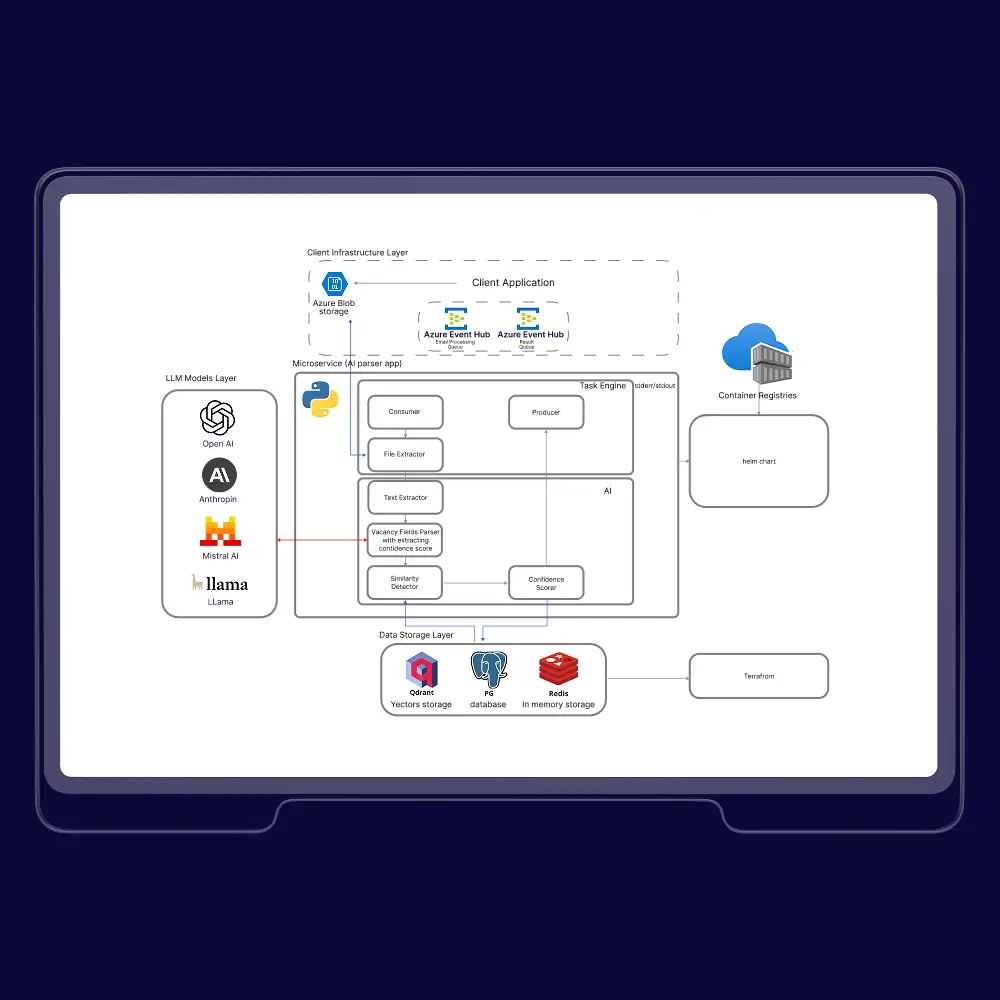
A leading healthcare recruitment company in Australia, working with hospitals, government bodies, and large medical networks, was turning its service into a platform. Up to 5,000 emails a day carried job postings inside email text, PDFs, Word files, and forwarded messages, often several roles per message. We built an LLM microservice that extracts 12–15 standardized fields per role against a fixed schema and removes duplicate postings semantically.

‍

A confidence score checks every extraction. Below the threshold, the record moves up a model chain (LLaMA, GPT, Mistral, Claude), and low-confidence cases go to human review whose corrections feed back into the system. Personal data is stripped before any LLM call. Each posting now takes 0.9 seconds against a 4-second target, manual data handling fell 80–95%, and operating costs dropped 20–40%.

‍

The boundary: the output was a fixed field schema for recruitment rather than a retail product taxonomy, and the project automated a manual workflow; it did not involve taking work back from an outsourced vendor. The extract, score, escalate, and correct loop is the one this pattern runs on. Read the full case: LLM platform that cut manual job data handling by 80%+.

"Start with a generous review queue and lower it only as the error rate earns it. A threshold you loosen with evidence is safe; one you set on day one to hit a savings target is how bad postings reach the ledger."

Related case studies

All publications
All publications

Frequently asked questions

What systems and rules does AI document capture for accounts payable need before go-live?

It needs a connection to the existing database through SFTP, a watch folder or an API connector, so no ERP replacement is required. It also needs validation rules for dates, taxes, GL mappings, currency and line-item reconciliation that mirror the finance team's own controls, so what posts automatically would have passed review anyway.

Which receipts and invoices go to human review in AI accounts payable automation?

Documents that fail schema-aware validation or fall below the confidence threshold go to a human reviewer, while routine ones post straight to the ERP. The threshold is tuned to the organization's tolerance for error. The reviewer sees only ambiguous items, so the team handles exceptions instead of keying every document.

What determines how much AI invoice processing saves per document?

Savings depend on the manual baseline and the document volume. In the lead source case the baseline was a ten-person offshore team keying thousands of receipts or invoices every week, where cost scaled linearly with volume. The AI pipeline's marginal cost per document is close to zero, so savings grow with volume. The headline figures come from that one lead case, and the industry is not specified in the sources.

How should the confidence threshold be set for AI invoice processing?

Set it for more human review during rollout and lower it only as the error rate earns it. The threshold is tuned to the organization's tolerance for error and works alongside schema-aware validation of dates, taxes, GL mappings, currency and line-item totals before anything posts. Personal data is redacted, data is encrypted in transit and at rest, and every action is logged for audit.

Which documents beyond receipts and invoices can AI document capture process?

The source cases cover receipts from field operations, vendor invoices and an accounting application that auto-populates form data from an uploaded document. Dataforest's related build applies the same confidence-and-review loop to job postings arriving as emails, PDFs and Word documents, extracting 12–15 standardized fields per role. That build does not post to an ERP, so it supports the extraction-and-control architecture rather than accounts payable itself.

When does AI document capture fail to reduce accounts payable cost?

It fails when the controls around extraction are weak. Without validation rules that match the finance team's own checks, a confidence threshold with an owner and a defined path for documents the model is unsure about, the pipeline either posts mistakes or sends so much to review that the keying queue simply moves. Dataforest treats the threshold and the validation rules as the product and the OCR model as a replaceable part.

We’d love to hear from you

Share project details, like scope or challenges. We'll review and follow up with next steps.

form image
top arrow icon