


Search for "Databricks vs. Snowflake," and the first results you see are pages published by Databricks and Snowflake themselves. Both companies have a strong financial interest in how you read that comparison. This article is not one of them.
The real problem most data teams face is not a lack of information—it is that the wrong choice is expensive to undo. Migrating a production data platform mid-stream means rewriting pipelines, retraining teams, renegotiating contracts, and absorbing months of parallel-run costs. Most teams discover the mismatch only after they have committed.
Databricks and Snowflake are not interchangeable. They were built on different architectural assumptions, optimized for different workloads, and priced in ways that make direct cost comparisons genuinely difficult. Databricks started as a compute engine for data engineering and machine learning. Snowflake started as a SQL-first data warehouse. Both have since expanded toward each other's territory—which is exactly what makes the decision harder in 2026, not easier.
This comparison covers architecture, pricing mechanics, performance trade-offs, security certifications, and workload-specific fit. It also addresses Microsoft Fabric as a third option for Azure-native organizations, and it gives you a decision framework you can use to justify the choice to a CTO or CFO who wants a defensible answer, not a vendor deck.
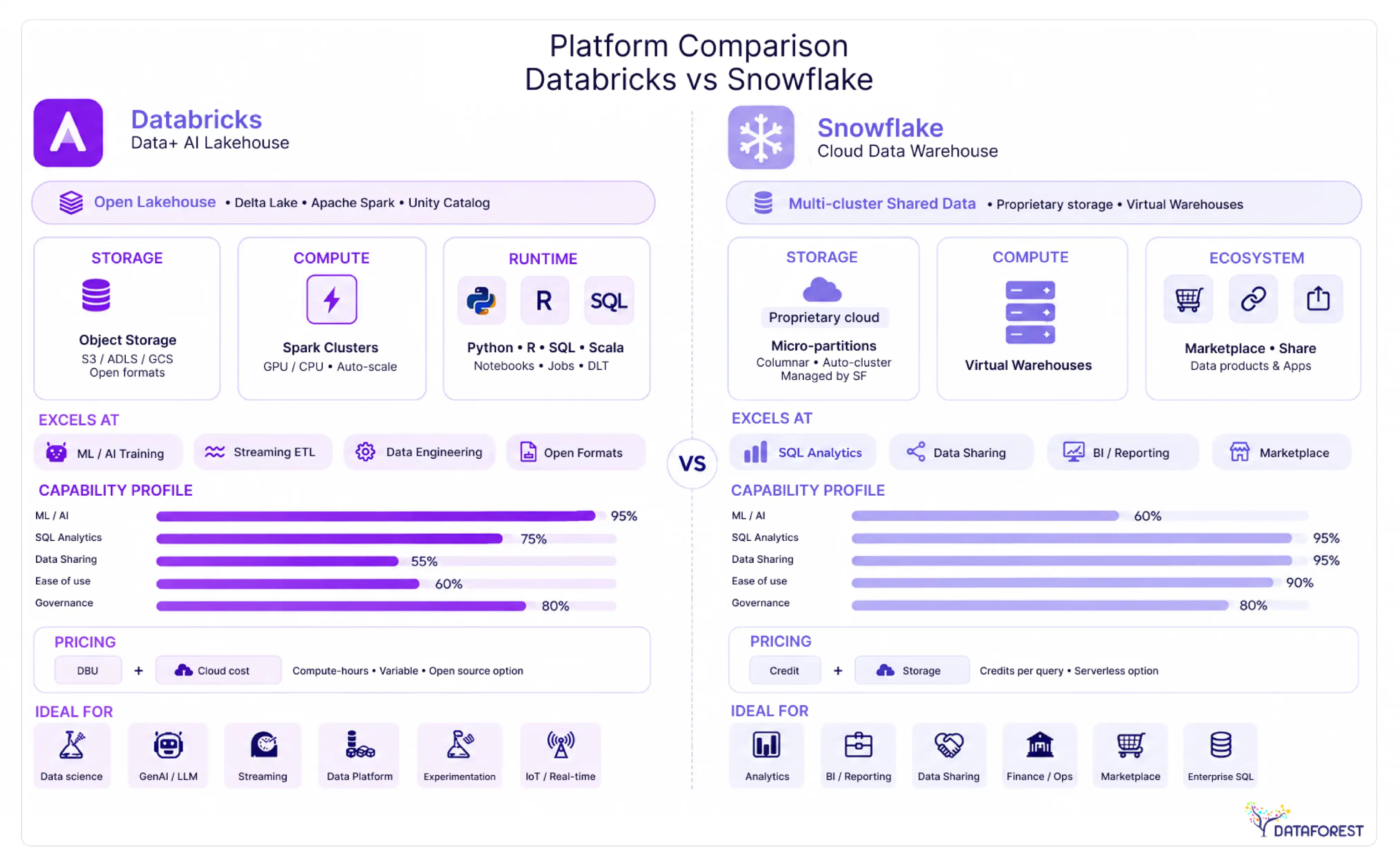
Key Takeaways
- Snowflake delivers 15-30% faster query response times for typical BI workloads than Databricks SQL Warehouses, but Databricks runs large-scale ETL 20-40% more cheaply. (see Performance Benchmarks and Workload Routing Guide below).
- Workload type predicts platform fit better than company size—data engineers default to Databricks, analysts to Snowflake, and forcing either group onto the wrong platform costs real money (see Role-Based Recommendation below).
- Vendor-reported migration savings of 50-70% when moving from Databricks to Snowflake reflect specific scenarios, not universal outcomes—model your own TCO before treating those figures as benchmarks (see Pricing and Total Cost of Ownership below).
- Running both platforms simultaneously is a legitimate architecture: Databricks handles ingestion and model training upstream while Snowflake serves BI and data sharing downstream, with Apache Iceberg enabling direct cross-platform queries without duplication (see How to Choose below).
- Platform convergence is real but incomplete—Snowflake's Python support does not replace a native Spark environment for distributed ML, and Databricks SQL still lacks Snowflake's zero-management simplicity for pure analytics teams (see Architecture Comparison below).
Databricks vs. Snowflake at a Glance
Choose Databricks when your work centers on machine learning, data engineering pipelines, or large-scale transformation. Choose Snowflake when your priority is governed, SQL-first analytics with fast onboarding and predictable sharing across business teams. Both platforms have expanded aggressively into each other's territory since 2024, but their architectural roots still determine where each one excels.
Core architectural difference in one paragraph
Databricks is built on the open lakehouse model: it stores data in open formats (Delta Lake, Apache Iceberg) on cloud object storage you control, then runs compute on top of that storage using Apache Spark-based clusters. Snowflake is a fully managed, proprietary data cloud: storage and compute are separated internally, but the entire stack is abstracted behind Snowflake's own engine. In practice, this means Databricks gives data engineers and ML teams direct access to raw infrastructure, while Snowflake gives analysts and business users a polished, SQL-native surface with near-zero operational overhead. Neither architecture is universally better. Databricks rewards teams with engineering depth; Snowflake rewards teams that want results without managing clusters. Snowflake reports that over 12,000 companies power their AI, apps, and data on its AI Data Cloud (vendor-reported), underscoring how broadly the managed-service model appeals across industries.
Side-by-side feature matrix
The matrix above reflects each platform's current defaults, not theoretical ceilings. Both vendors are shipping features quickly, so verify specific capabilities against the current release notes before making a procurement decision.
Architecture Comparison: Lakehouse vs. Data Cloud
The architectural difference between these two platforms is not cosmetic—it determines which workloads run well, which ones struggle, and how much engineering overhead you carry long-term.
Databricks lakehouse architecture explained
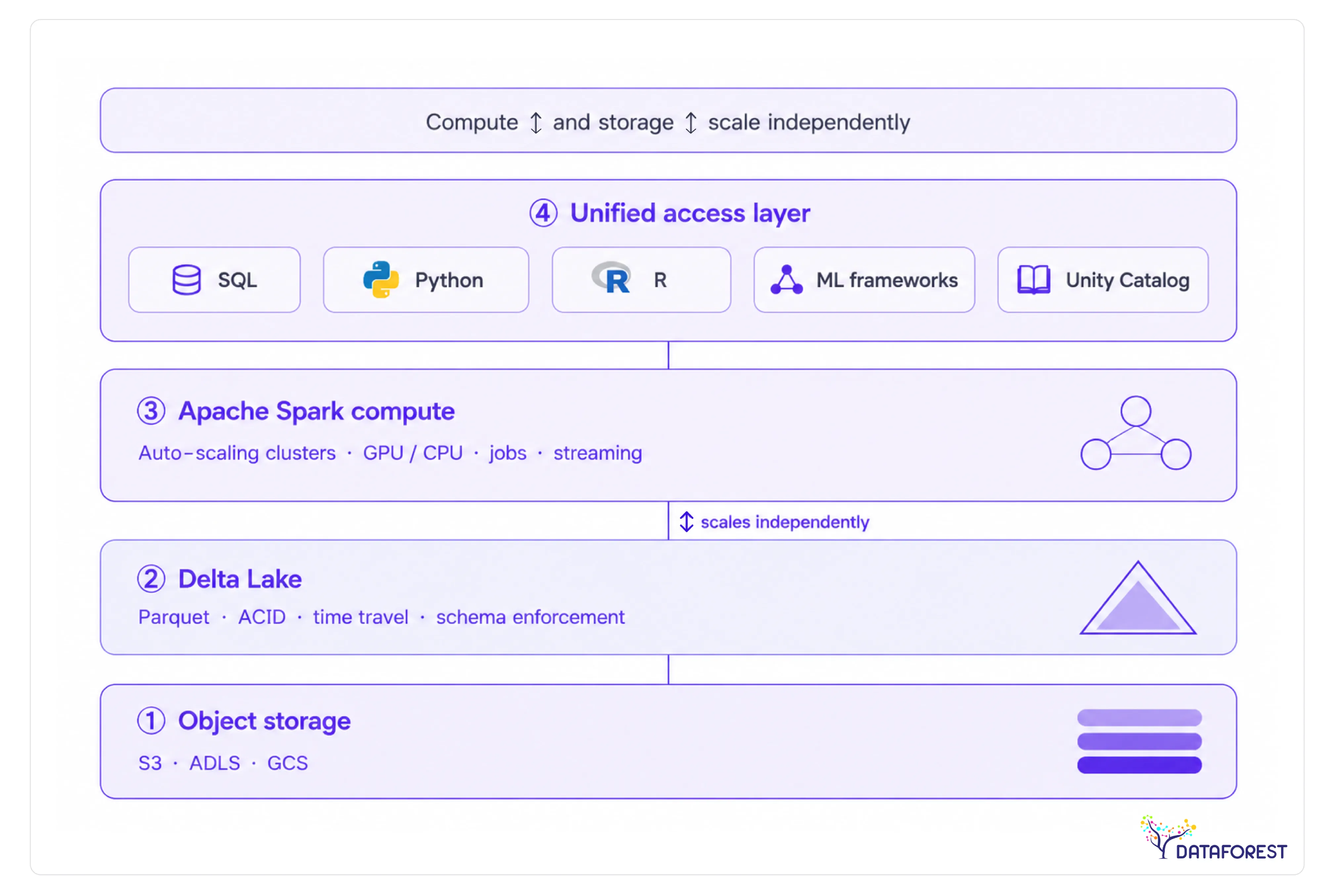
Databricks is built on the lakehouse model: a single storage layer (typically cloud object storage, such as S3 or ADLS) that serves both analytical queries and machine learning workloads. Delta Lake, the open-source storage format, adds ACID transactions, schema enforcement, and time travel directly on top of raw object storage. Apache Spark handles compute, scaling horizontally across clusters that you provision and manage.
This architecture gives data engineers and ML teams a unified environment. A data scientist can train a model on the same Delta table a data engineer just loaded—no export, no copy, no format conversion. The trade-off is operational complexity: cluster sizing, autoscaling configuration, and Spark tuning are real responsibilities that fall on your team.
> Architecture diagram: Databricks lakehouse - open object storage (S3/ADLS/GCS) → Delta Lake format → Apache Spark compute clusters → unified access layer for SQL, Python, R, and ML frameworks. Compute and storage scale independently.
Snowflake data cloud architecture explained
Snowflake separates storage, compute, and cloud services into three distinct layers. Your data lives in Snowflake-managed storage (compressed columnar format). Virtual warehouses—independent compute clusters—query that storage on demand and pause automatically when idle. A global metadata and optimization layer sits above both, handling query planning, caching, and cross-cloud data sharing.
This design makes Snowflake operationally simple. You size a warehouse, run SQL, and Snowflake handles the rest. The platform targets SQL-first teams: analysts, BI developers, and data engineers who live in structured data. The constraint is that workloads requiring low-level compute control—iterative ML training, custom Spark jobs, and streaming pipelines—have historically required moving data out of Snowflake entirely.
> Architecture diagram: Snowflake data cloud - Snowflake-managed columnar storage → independent virtual warehouses (auto-suspend/resume) → cloud services layer (query optimization, metadata, access control) → multi-cloud data sharing via secure data marketplace.

How platform convergence is blurring the lines in 2026
Both platforms have spent the last two years building features that eliminate the reason you'd choose the other. Snowflake added Snowpark, which lets Python and Java developers run non-SQL workloads natively inside the platform. Databricks launched Databricks SQL Warehouse, a serverless SQL experience designed to compete directly with Snowflake's core BI use case.
Snowflake now supports Python UDFs, ML model serving, and a notebook interface. Databricks now offers serverless compute, a polished SQL editor, and Unity Catalog for governance—territory Snowflake once owned alone.
The convergence is real, but neither platform has fully closed the gap. Snowflake's Python support is capable; it is not a replacement for a native Spark environment when you need distributed ML at scale. Databricks SQL is strong; it still lacks Snowflake's zero-management simplicity for pure analytics teams. The workload-first decision framework matters more now, not less, because the marketing from both vendors will tell you their platforms do everything.
When to Use Databricks vs. Snowflake: Workload Routing Guide
The fastest way to overspend on either platform is to pick one and route every workload through it by default. The two platforms have genuine strengths in different areas, and the cost and performance gaps between them are large enough to matter at scale. The routing table below maps five common workload types to the platform that handles them best—with the cost and performance rationale for each decision.
ETL and data engineering pipelines
ETL workloads typically account for 50% or more of an organization's overall data costs (Databricks, "Databricks vs. Snowflake," 2025), which makes platform choice here a budget decision as much as a technical one.
Snowflake typically charges $2–$4 per credit, with a Small warehouse consuming ~2 credits/hour, which means ~$4–$8/hour for ETL compute, plus ~$23/TB/month for storage.
Databricks uses DBUs, often at ~$0.22–$0.55 per DBU-hour (for SQL/ETL workloads), but it also incurs additional cloud VM costs, making real ETL costs more variable.
For large-scale data processing jobs—ETL on petabyte-scale datasets, model training, streaming—Databricks is typically 20-40% cheaper than Snowflake (Data Driven Daily, "Snowflake vs Databricks 2026: Which Platform Should You Choose?").
The cost gap comes from Databricks running on open-source Spark compute that you size and terminate yourself, versus Snowflake's virtual warehouses, which charge per-second but incur higher per-credit costs for heavy transformation work.
In practice, teams running complex multi-hop pipelines—raw ingestion to bronze, silver, and gold layers—find Databricks Delta Live Tables a more natural fit than Snowflake Tasks. If your engineering team is already Python-fluent, the productivity advantage compounds the cost advantage.
BI dashboards and ad hoc analytics
Snowflake is the stronger choice for analyst-facing workloads. In benchmarks across mid-market companies (100TB to 1PB range), Snowflake consistently delivers 15-30% faster query response times for typical BI workloads compared to Databricks SQL Warehouses (Data Driven Daily, "Snowflake vs Databricks 2026: Which Platform Should You Choose?", 2025). The performance edge comes from Snowflake's columnar storage, automatic clustering, and result caching—features that require no configuration from the analyst running the query.
Databricks SQL Warehouses have meaningfully closed the gap in recent releases, but Snowflake still wins in concurrency handling. When fifty analysts hit the same dashboard simultaneously, Snowflake's multi-cluster warehouse auto-scales without queue delays. Databricks requires more deliberate cluster sizing to match that behavior.
Machine learning and model training
Databricks is the clear choice for teams building and deploying ML models. The platform was designed around the ML lifecycle: MLflow for experiment tracking, Feature Store for reusable feature pipelines, and native GPU cluster support for deep learning workloads. Snowflake's ML capabilities have grown—Snowpark ML and Cortex bring model training and inference into the warehouse—but they work best for simpler models that run on structured data already in Snowflake.
One documented outcome: a retail organization slashed costs by 75% by moving the training of forecasting models in Databricks to a unified model in Snowflake (Snowflake, "Snowflake vs Databricks: Features, Pricing & Performance," 2025; vendor-reported) - a hybrid pattern where Databricks handles training, and Snowflake handles serving to SQL consumers. That pattern is worth considering when your ML outputs feed BI tools rather than real-time applications.
Real-time streaming workloads
Databricks handles streaming more naturally. Structured Streaming on Spark supports sub-second latency with stateful processing, windowed aggregations, and exactly-once semantics out of the box. Snowflake's Dynamic Tables and Streams offer a simpler programming model but operate on micro-batch schedules measured in minutes rather than milliseconds. If your use case is fraud detection, real-time personalization, or IoT event processing, Databricks is the right tool. If you need near-real-time reporting refreshed every few minutes, Snowflake's approach is sufficient and easier to maintain.
Data governance and sharing
Snowflake has a structural advantage in governed data sharing. Its Marketplace and Data Clean Rooms let organizations share live data across organizational boundaries without copying it—a capability that Databricks Unity Catalog is still building toward at the same maturity level. Snowflake provides built-in, cross-region/cross-cloud business continuity and disaster recovery with a 99.99% SLA (Snowflake, "Snowflake vs Databricks: Features, Pricing & Performance," 2025), which matters for organizations with strict availability requirements on their shared data products.
For internal governance—column-level security, row filters, and audit logging—both platforms now offer comparable controls through Unity Catalog and Snowflake's access policy framework, respectively. External sharing is where Snowflake's lead is clearest.

Role-Based Recommendation: Which Platform Fits Your Team
The platform that wins your organization's budget often isn't the one with the best architecture—it's the one that maps most closely to what your dominant team actually does every day. Job title is a better predictor of platform fit than company size or industry.
Data engineers
Databricks is the stronger default for data engineers building production pipelines. The Spark runtime, Delta Live Tables for declarative pipeline authoring, and deep Python ecosystem integration give engineers fine-grained control over complex transformations. Snowflake is a reasonable alternative when the pipeline is SQL-heavy and the team wants zero infrastructure management.
Data scientists and ML practitioners
Databricks was built with ML practitioners in mind. MLflow experiment tracking, the Feature Store, and native GPU cluster support mean a data scientist can move from raw data to a deployed model without switching tools. Teams running iterative model development at scale consistently find that the unified environment reduces context-switching and shortens iteration cycles.
BI analysts and business users
Snowflake's SQL-first design and managed compute make it the lower-friction choice for analysts who live in tools like Tableau, Looker, or Power BI. Query performance for standard analytics workloads is strong out of the box, and business users rarely need to touch infrastructure settings.
Data architects
Architects face the most context-dependent decision. If the organization is consolidating data lakes and warehouses into a single platform, Databricks' lakehouse model reduces architectural complexity. If the priority is governed data sharing across business units or external partners, Snowflake's Data Clean Rooms and Marketplace integrations are harder to replicate.
IT and security leads
Snowflake's fully managed model is a genuine operational advantage for IT teams. There are no clusters to size, no Spark configurations to tune, and no patching cycles to manage. Databricks has closed much of this gap with serverless compute options, but Snowflake still requires less active infrastructure oversight in most deployments.
Databricks vs. Snowflake Pricing and Total Cost of Ownership
The list price is the wrong number to use for comparison. ETL workloads alone can account for 50% or more of an organization's total data platform spend (Databricks, "Databricks vs. Snowflake," 2025)—and neither vendor's published rate card captures what you'll actually pay once you factor in storage, egress, support contracts, and the engineering hours required to keep clusters tuned. Stop evaluating these platforms on the compute unit price. Start with the total cost of ownership.
Pricing model mechanics: DBU vs. Snowflake credits
Databricks charges in Databricks Units (DBUs)—a measure of compute capacity consumed per hour, multiplied by an instance-type multiplier and a per-workload tier rate (Jobs, SQL, ML Runtime, etc.). The rate varies by cloud provider, region, and whether you're on the Standard, Premium, or Enterprise tier. Snowflake charges in credits, where one credit equals one virtual warehouse running for one hour at the smallest size. Credits scale linearly with warehouse size: a Medium warehouse consumes twice the credits per hour of a Small. Both platforms layer cloud provider infrastructure costs on top of their own consumption fees, which is where many budget models break down.
The practical difference: Databricks gives you more control over the underlying compute (instance types, spot pricing, autoscaling policies), which creates optimization headroom—but also optimization burden: Snowflake abstracts that layer entirely, trading control for predictability.
The five TCO cost components
The TCO breakdown framework covers five named components: compute, storage, egress, support, and integration overhead. Each behaves differently across the two platforms.
Worked example: 10 TB daily ETL plus 50 BI users
Consider a team running 10 TB of daily ETL alongside 50 concurrent BI users querying a reporting layer. On Databricks, the ETL jobs run on autoscaling clusters using spot instances, while the BI layer runs on a dedicated SQL Warehouse. On Snowflake, the ETL runs via Tasks or a lightweight orchestrator against a Medium warehouse, and BI users hit a separate Medium warehouse with auto-suspend set to 60 seconds.
In this scenario, Databricks tends to win on raw ETL compute cost if the team actively manages spot instance pools. Snowflake tends to win on BI query cost and total engineering hours, because auto-suspend eliminates idle compute, and there's no cluster configuration to maintain. The crossover point depends heavily on how much engineering time you price into the model—and most teams undercount that.
Note on vendor-reported data: Snowflake reports that customers have, on average, realized savings of 50-70% when migrating from Databricks, which it attributes to Snowflake's built-in optimizations (Snowflake, "Snowflake vs Databricks: Features, Pricing & Performance," 2025; vendor-reported). The cited outcomes include one customer who saved 70% in costs by eliminating redundant services and reducing cloud resource usage after moving from Databricks to Snowflake, and another who slashed costs by 75% by moving forecasting model training from Databricks to a unified model in Snowflake (both vendor-reported). These figures reflect specific migration scenarios and should not be treated as universal benchmarks.
Hidden costs neither vendor advertises
Both platforms have a cost surface area that doesn't appear in the pricing calculator. Before signing a contract, audit each of the following:
- Cloud egress fees—cross-region or cross-cloud data movement is billed by the cloud provider, not the data platform, and can be substantial at scale.
- Support tier uplift—moving from Standard to Business Critical or Enterprise support can add a meaningful percentage to your annual contract.
- Third-party integration licensing—Fivetran, dbt Cloud, Hightouch, and similar tools use consumption-based pricing that compounds with platform costs.
- Engineering time for cluster tuning—Databricks clusters require ongoing configuration work; underestimating this in headcount planning is the most common TCO modeling error.
- Idle compute—Snowflake auto-suspend helps, but warehouses left running during off-hours still burn credits; Databricks clusters left on between jobs do the same.
- Feature tier gating—Unity Catalog, Delta Sharing, and advanced security features often require the Premium or Enterprise tiers on Databricks; Snowflake similarly gates Data Clean Rooms and some governance features.
The most defensible approach is to build a TCO worksheet that prices each component separately for your actual workload mix, then stress-test the model against a 2x growth scenario.
Performance Benchmarks: What the Data Actually Shows
Performance comparisons between these two platforms are genuinely workload-dependent, and any vendor claiming one is universally faster is selling you something. The honest answer is that each platform has a structural advantage in specific scenarios, and those advantages are measurable.
BI and analytics query performance
Snowflake holds a consistent edge for standard BI and analytics workloads. In benchmarks across mid-market companies (100TB to 1PB range), Snowflake consistently delivers 15-30% faster query response times for typical BI workloads compared to Databricks SQL Warehouses (Data Driven Daily, "Snowflake vs Databricks 2026: Which Platform Should You Choose?", 2025). The gap is most visible on concurrent multi-user queries - the kind that hit a dashboard at 9 AM when an entire analyst team logs in simultaneously.
Snowflake's Virtual Warehouse architecture handles concurrency without queue contention by spinning up isolated compute clusters per workload. Databricks SQL Warehouses have improved significantly with Photon (its vectorized query engine), but the platform was designed for single-job compute, not concurrent BI serving. In several real-world customer POCs and third-party testing, Snowflake results were 2x faster than Databricks for core analytics, powered by Snowflake's fully managed, serverless engine (Snowflake, "Snowflake vs Databricks: Features, Pricing & Performance," 2025; vendor-reported). Treat the 2x figure as directionally useful rather than independently verified.
For reliability, Snowflake provides built-in, cross-region/cross-cloud business continuity and disaster recovery with a 99.99% SLA (Snowflake, "Snowflake vs Databricks: Features, Pricing & Performance," 2025). That matters for BI workloads where business users expect dashboards to load during business hours without exception.
ETL and large-scale batch processing
Flip the workload to large-scale ETL, and the calculus changes. Databricks runs on Apache Spark natively, which means it handles distributed data transformation at scale without the translation overhead introduced by Snowflake's Snowpark. Teams running petabyte-scale daily ingestion pipelines, complex multi-stage transformations, or Python-heavy preprocessing typically find Databricks faster and more cost-efficient for this class of work.
The performance gap here is less about raw speed and more about operational fit. Spark's lazy evaluation and partition-aware execution are purpose-built for large batch jobs. Snowflake's compute model, optimized for query serving, adds overhead when you push it into heavy transformation territory. If your ETL workload involves significant Python logic, UDFs, or ML feature engineering, Databricks is the stronger performer.
Snowpark vs. Databricks notebooks: feature-level comparison
Both platforms now support Python-based development, but the experience differs in ways that matter to practitioners.
Snowpark is a capable addition to Snowflake's toolkit, but data scientists who spend most of their day in notebooks will find Databricks materially more productive. The GPU support gap alone makes Databricks the default for model training. Snowpark's strength is letting SQL-fluent teams run Python logic without leaving the Snowflake environment - a meaningful convenience, not a replacement for a full ML development workflow.
Security, Governance, and Compliance: A Certification-Level Comparison
Both platforms clear the baseline security bar most enterprises require, but they reach that bar through different architectures—and the gaps matter when your legal team starts asking specific questions about where data lives and who can touch it.
Encryption and access control
Snowflake encrypts data at rest and in transit by default, using AES-256 for storage and TLS for transport. Its Tri-Secret Secure feature lets customers bring their own encryption keys through a cloud key management service, so Snowflake cannot decrypt your data without your key. Access control follows a role-based model with object-level grants, row-level security through row access policies, and column-level masking policies - all enforced at query time without requiring application-layer changes.
Databricks takes a similar encryption baseline but layers Unity Catalog on top for fine-grained governance. Unity Catalog provides attribute-based access control, column-level masking, and row filters that apply across all compute types—notebooks, SQL Warehouses, and jobs—from a single control plane. In practice, teams that have deployed Unity Catalog report that it closes the governance gap that existed when Databricks relied on workspace-level Hive metastores, where permissions were inconsistent across clusters.
One meaningful difference: Snowflake's access control is enforced inside the managed service, which simplifies auditing. Databricks enforces governance through Unity Catalog, but the underlying cloud storage (S3, ADLS, GCS) is customer-managed, meaning misconfigured storage policies can bypass catalog-level controls. Security teams should audit both layers.
Compliance certifications: SOC 2, HIPAA, FedRAMP, and beyond
Snowflake holds SOC 2 Type II, HIPAA, PCI DSS, ISO 27001, FedRAMP Moderate (on AWS GovCloud), and several regional certifications, including IRAP for Australia and C5 for Germany. Its Business Critical tier is required for HIPAA workloads and enables enhanced encryption and network isolation.
Databricks carries SOC 2 Type II, HIPAA, PCI DSS, ISO 27001, and FedRAMP Moderate authorization on Azure Government. For regulated industries, both platforms are viable - but verify the specific tier and cloud region, because certifications are not uniform across all deployment configurations. A Snowflake Standard tier account does not inherit Business Critical compliance controls.
The full certification comparison table appears in the Migration section below. Stop assuming that a vendor's compliance page covers your specific deployment. Always request the current attestation letter and confirm it covers your cloud region and account tier before signing a BAA or processing PHI.
Data residency and sovereignty options
Snowflake operates across AWS, Azure, and Google Cloud with more than 30 regional deployments. Its Business Critical tier supports customer-managed keys and private connectivity options (AWS PrivateLink, Azure Private Link) to keep data off the public internet. For organizations subject to GDPR, data can be pinned to EU regions with contractual guarantees through Snowflake's Data Processing Addendum.
Databricks offers comparable multi-cloud, multi-region coverage and supports private network configurations through each cloud provider's native tooling. Its architecture gives customers direct control over cloud storage accounts, which can simplify data residency compliance—your data never leaves your own storage bucket. That same characteristic places the residency-enforcement burden on the customer rather than the vendor.
For organizations with strict sovereignty requirements—government agencies, financial institutions in regulated jurisdictions—Databricks on Azure Government or Snowflake on AWS GovCloud are the two most common paths. The right choice depends less on the platform and more on which cloud your organization has already agreed to.
Databricks vs. Snowflake vs. Microsoft Fabric: Three-Way Comparison for Azure Organizations
Azure-native organizations face a decision that most comparison guides ignore: Microsoft Fabric now competes directly with both Databricks and Snowflake on Microsoft's own cloud, and the right answer depends heavily on your existing Microsoft licensing, your team's skill set, and how much operational overhead you're willing to own.
When Microsoft Fabric enters the conversation
Microsoft Fabric bundles data engineering, data warehousing, real-time analytics, and Power BI into a single SaaS platform billed through Microsoft 365 or Azure capacity units. For organizations already running Microsoft 365 E5 or Azure Synapse workloads, Fabric can consolidate tooling in ways that neither Databricks nor Snowflake can match on cost alone. The trade-off is real, though: Fabric's ML capabilities lag behind Databricks, and its multi-cloud story is thin compared to Snowflake's cross-cloud data sharing. Teams that need serious model training or to share data with AWS-native partners will quickly feel those limits.
Three-way feature and fit comparison
Which platform wins on Azure-native integration
Fabric wins on raw Azure integration depth—it is Azure's data platform, not a platform that runs on Azure. If your organization standardizes on Microsoft tooling, Power BI is your primary BI layer, and you want a single vendor for support and billing, Fabric is worth a serious evaluation before committing to either Databricks or Snowflake.
That said, Fabric is not a replacement for either platform in every scenario. Databricks remains the stronger choice when ML engineering is central to your roadmap. Snowflake remains the stronger choice when you need to share data across cloud boundaries or with external partners at scale. The pattern teams see in practice: Fabric handles BI and light data warehousing, while Databricks or Snowflake handles workloads that require deeper capabilities. Running all three is uncommon and expensive - pick one primary platform and treat the others as edge-case tools.
Migration Paths and Switching Costs: What Moving Actually Involves
Switching platforms mid-stream is rarely as clean as vendor migration guides suggest. Both Databricks and Snowflake have genuine lock-in vectors—not through proprietary file formats (both now support open formats like Delta Lake and Apache Iceberg), but through ecosystem depth: orchestration patterns, security models, notebook workflows, and the institutional knowledge your team has built around one platform's quirks. Before committing to a migration, you need a clear-eyed view of what actually moves cleanly, what requires rewriting, and what you'll pay in engineering time and cloud egress fees.
The tables below consolidate the key platform differences that drive migration complexity. Use them as a pre-migration reference, not a post-migration checklist.
Side-by-side feature matrix
Snowpark vs. Databricks notebooks feature comparison
Compliance certification comparison
Migrating from Databricks to Snowflake
Teams move from Databricks to Snowflake most often when their workload has matured from exploratory ML into production SQL reporting, or when a new business unit demands governed self-service analytics that Snowflake's SQL-first interface handles more cleanly.
The data layer is the easiest part. If your Databricks environment uses Delta Lake with open-format exports, you can read those files directly into Snowflake via external tables or a one-time load through cloud storage. The harder work is your transformation logic. PySpark pipelines don't translate directly to Snowflake SQL or Snowpark—expect a meaningful rewrite for any pipeline that relies on Spark-native functions, RDD operations, or custom UDFs. Delta Live Tables pipelines in particular have no direct Snowflake equivalent; you'll rebuild them using Snowflake Tasks and Streams or a third-party orchestrator like dbt or Airflow.
Security model migration also deserves attention. Databricks Unity Catalog uses attribute-based and tag-driven policies; Snowflake uses role-based access control with dynamic data masking. The concepts overlap, but the implementation differs enough that a direct lift-and-shift of your access control configuration will not work. Plan for a security model redesign, not a copy-paste.
One cost that surprises teams: cloud egress. Moving terabytes of data out of your current cloud region—even to the same cloud provider—generates egress charges that can be substantial for large datasets. Calculate this before you start, not after.
Migrating from Snowflake to Databricks
The reverse migration is most common when an organization's analytics workload has expanded into ML model training, real-time streaming, or complex Python-based transformations that Snowflake's architecture handles less efficiently.
Snowflake's structured tables can be exported cleanly to Parquet or CSV via COPY INTO, which Databricks ingests natively. The SQL dialect gap is real but manageable—Snowflake uses ANSI SQL with some proprietary extensions (QUALIFY, FLATTEN, LATERAL FLATTEN) that have no direct Spark SQL equivalent and require manual rewriting. For teams with large stored procedure libraries, the scope of the rewrite can be significant.
The bigger adjustment is operational. Snowflake's fully managed model means your team has never had to think about cluster sizing, Spark configuration, or executor memory. Moving to Databricks puts those decisions back in your hands. Budget for a learning curve on cluster management, and plan for a period of over-provisioning while your team calibrates.
Snowflake's Data Clean Rooms and Marketplace integrations also have no direct Databricks equivalent. If your organization relies on those for data sharing with external partners, factor in the cost of rebuilding those workflows using Delta Sharing or a third-party data exchange.
Migration readiness checklist
Run through every item below before committing engineering resources to a migration. Skipping steps here is where migrations stall or exceed budget.
- Audit current data formats and open-format compatibility
- Inventory all ETL/ELT pipelines and transformation logic
- Assess SQL dialect differences and rewrite scope
- Evaluate security model parity (roles, policies, row/column security)
- Estimate team retraining time and certification requirements
- Calculate egress costs for bulk data movement
- Identify third-party integrations requiring reconfiguration
- Define rollback plan and parallel-run window
- Review SLA and support tier continuity
- Confirm compliance certification coverage on the target platform
- Map all orchestration dependencies (Airflow DAGs, dbt models, native schedulers) to target equivalents
- Document all data sharing agreements and external consumer access that must be preserved
- Validate that the target platform's regional availability matches your data residency requirements
The parallel-run window deserves emphasis. Running both platforms simultaneously for a defined period—typically four to eight weeks for a mid-size deployment—is the only reliable way to validate output parity before cutting over. It costs more in the short term. It costs far less than a failed cutover.

How to Choose: Decision Framework and Final Recommendation
Most teams that struggle with this decision are asking the wrong question. The question isn't "which platform is better"—it's "which platform fits the work my team actually does most of the time." Route by workload first, then layer in team composition, cloud alignment, and compliance requirements.
Decision criteria by organizational profile
The table below maps your dominant workload to a platform recommendation, along with the reasoning and cost signals that should drive your evaluation. Use it as a starting point, not a final verdict.
When to run both platforms together
A sizable share of mature data organizations run both platforms simultaneously—and that's a legitimate architecture, not indecision. The pattern that works: Databricks handles ingestion, transformation, and model training upstream; Snowflake serves as the consumption layer for BI tools and external data sharing downstream. Delta Lake's Apache Iceberg compatibility means data written by Databricks can be queried directly by Snowflake without duplication.
This dual-platform approach makes sense when your data engineering team is Python-fluent and your analytics team is SQL-first, and the two groups have genuinely different tooling needs. It breaks down when your data volume is modest, your team is small, or you lack the operational capacity to manage two vendor relationships, two billing models, and two governance configurations simultaneously. If you're processing roughly 10 TB of data daily with a team of fewer than five data practitioners, pick one platform and grow into it.
Platform evaluation checklist
Before signing a contract or committing engineering time to a proof of concept, work through each item below. This checklist surfaces the decisions that most teams defer until after go-live - when changing course is expensive.
- Identify your dominant workload type (ETL, BI, ML, streaming)
- Map your team roles to the role-based recommendation matrix
- Model TCO using the five cost components for your data volume
- Assess compliance certification requirements
- Evaluate Azure, AWS, or GCP alignment
- Determine open-format portability requirements
- Estimate migration effort if switching from an existing platform
- Confirm vendor support tier and SLA requirements
- Run a time-boxed proof of concept (two to four weeks) on your actual data, not synthetic benchmarks
- Validate that your primary BI tool (Tableau, Power BI, Looker) has a certified connector for the platform you select
The Architecture: Lakehouse vs Data Warehouse
A data warehouse takes structured data through an ETL pipeline that enforces a schema before storage, loads it into a proprietary format, and serves it primarily to BI and SQL tools. It's fast and reliable for reporting, but rigid: unstructured data (images, logs, JSON) doesn't fit well, and data scientists usually have to export data elsewhere for ML work.
A lakehouse combines the flexibility of a data lake with the reliability of a data warehouse. Data of any type lands first, gets a schema applied on read, and sits in open formats (like Parquet with Delta Lake or Iceberg table metadata) rather than a vendor-locked one. That same storage layer can then serve BI dashboards, SQL queries, and ML training pipelines directly, avoiding duplicate copies of data spread across separate systems.
Warehouses offer mature governance and query performance out of the box but cost more to scale and lock you into structured data. Lakehouses are cheaper and more flexible, but the tooling (Delta Lake, Iceberg, Hudi) is newer and requires more careful setup to get warehouse-grade reliability (ACID transactions, schema enforcement) on top of raw object storage.
.webp)
Conclusion
The core question was never "which platform is better." It was whether your workload, team composition, and cost tolerance align with how each platform was actually built. Databricks is a lakehouse engineered for engineers who live in Python and Spark. Snowflake is a data cloud built for organizations that run on SQL and need governed sharing at scale. That distinction holds even as both platforms add features that blur the boundary.
The pressure between these two is accelerating. Both vendors are pushing hard into AI-native capabilities, and Microsoft Fabric is reshaping the calculus for Azure-native organizations. Platform decisions made today will be harder to reverse in 18 months than they are right now.
Don't start with a feature checklist. Start with your dominant workload. Map your ETL, BI, and ML requirements against the workload routing guide in this article, then run a time-boxed proof of concept—two weeks, real data, your actual queries—before committing budget or migration effort.
Frequently Asked Questions: Databricks vs. Snowflake
Databricks is closing the gap with Snowflake in analytics and SQL workloads, but overtaking it depends on how you define the race. Databricks leads in AI and ML workloads and is rapidly growing its SQL analytics footprint. Snowflake retains a strong hold on BI-centric and business-user-driven organizations. Neither platform is pulling decisively ahead across all workload categories.
Will Databricks overtake Snowflake?
Databricks has gained significant ground in the data platform market, particularly among engineering-heavy and AI-focused teams. Snowflake still holds a larger installed base among business intelligence and analytics-first organizations. The two platforms are converging on features—Databricks adding SQL and governance, Snowflake adding Python and ML—which means the competitive gap is narrowing rather than one platform clearly winning.
Who are Snowflake's biggest competitors?
Snowflake's primary competitors are Databricks, Google BigQuery, Amazon Redshift, and Microsoft Fabric. Among these, Databricks is the most direct threat because it now competes across the full data stack—ETL, analytics, and AI—rather than just one layer. BigQuery and Redshift compete primarily in analytics and warehousing, while Microsoft Fabric is an emerging challenger for organizations already invested in the Microsoft ecosystem.
Is Snowflake buying Databricks?
No. As of mid-2026, there is no acquisition of Databricks by Snowflake. The two companies remain independent and are active competitors. Both have pursued their own funding rounds and product roadmaps. Any speculation about a merger or acquisition has not been confirmed by either company.
Can ETL be done in Snowflake?
Yes. Snowflake supports ETL and ELT workflows natively through Tasks, Streams, and Dynamic Tables, and integrates with orchestration tools such as Airflow and dbt. For SQL-based transformations, Snowflake handles most ETL patterns well. Where it falls short is complex, Python-heavy pipeline logic - that's where Databricks and its Spark-native runtime have a clear advantage.


.webp)


.webp)
.webp)


