

Nearly half of AI-generated code samples introduce security vulnerabilities, according to Veracode's 2025 GenAI Code Security Report. That number should give pause to anyone who just spent a weekend building an app without writing a single line of code themselves.
Vibe coding — the practice of describing what you want in plain language and letting an AI tool generate the implementation — is genuinely useful. It compresses days of prototype work into hours. Founders use it to validate ideas before hiring engineers. Designers use it to make Figma mockups functional. For those use cases, the speed advantage is real, and the risk is manageable.
But a prototype is not a product. The moment you point real users, real data, or real money at a vibe-coded codebase, the calculus changes. Context windows saturate. Security defaults get left in place. Nobody on the team has actually read the code. Debugging becomes archaeology.
The honest answer to "Is vibe coding bad?" is: it depends on what you're building and whether you understand where the approach breaks down. This article gives you a data-backed framework to make that call — covering the specific failure modes, the security evidence, a tool-by-tool breakdown of Claude Code, Cursor, and Lovable, and a production readiness checklist for teams deciding whether to ship.
Key Takeaways
- Veracode's 2025 GenAI Code Security Report found 45% of AI-generated code samples introduced security vulnerabilities — and larger models weren't consistently safer (see 'Security Risks in AI-Generated Code' above)
- AI-generated code left websites vulnerable to XSS attacks in about 86% of tested examples, making unreviewed vibe-coded frontends a serious production risk (see 'Security Risks in AI-Generated Code' above)
- 73% of respondents in a Codecademy LinkedIn poll said vibe coding in interviews is not the norm — shipping fast doesn't translate to hiring signal (see 'Why Will Vibe Coding Fail?' above)
- Pure vibe coding can work for small prototypes, but it starts to wobble on complex codebases, where long-horizon planning, continuous refactoring, and human review are still needed to preserve architecture and prevent regressions.
- 51% of professional developers already use AI tools daily, per the 2025 Stack Overflow Developer Survey — vibe coding is an extension of that baseline, not a departure from it (see 'What Vibe Coding Actually Is' above)
What Vibe Coding Actually Is (and What Andrej Karpathy Started)
Andrej Karpathy — former Tesla AI director and OpenAI co-founder — didn't set out to name a movement. In early 2025, he posted a description of a new way he was building software: fully delegating code generation to an AI model, accepting its output without reading it closely, and iterating by feel rather than by logic. He called it vibe coding. The name stuck immediately.
The original definition: fully AI-delegated coding
The vibe coding definition, in Karpathy's own framing, is deliberate abdication. You describe what you want in plain language. The AI writes the code. You run it, observe what happens, and tell the AI what to fix — without necessarily understanding the underlying implementation. The vibe coder is not debugging; they are directing. The distinction matters because it separates vibe coding from every prior form of developer tooling: the human is no longer in the loop on the code itself.
This is not a workflow for people who are too lazy to learn programming. Karpathy is one of the most technically capable people in AI. His point was that for certain tasks — personal tools, quick experiments, throwaway scripts — the overhead of careful engineering is unnecessary. You can just vibe.
How it spread from a tweet to a movement in 2025
Andrej Karpathy coined the term in early 2025, and it has since exploded into a genuine movement: tens of thousands of people are shipping real apps without writing traditional code. Founders are building MVPs over weekends. Non-technical product managers are prototyping features without filing engineering tickets. Designers are turning Figma mockups into working interfaces by describing them to Claude Code or Cursor.
The speed of adoption reflects something real. According to the 2025 Stack Overflow Developer Survey, 51% of professional developers said they use AI tools in the development process daily. That baseline made vibe coding feel like a natural next step — if AI is already writing chunks of your code, why not hand it the wheel entirely?
The tools accelerated the movement. Lovable, Cursor, Replit, and Claude Code all lowered the floor for what counts as a working app. You no longer need to configure a build system, manage dependencies, or understand deployment pipelines to ship something that runs.
Vibe coding vs. AI-assisted coding: a meaningful distinction
The two practices look similar from the outside but operate on different assumptions. AI-assisted coding means a developer uses tools like GitHub Copilot or Claude to autocomplete functions, generate boilerplate, or explain unfamiliar APIs — while retaining full ownership of the architecture and reviewing every line that ships. The developer understands the code. They are using AI to go faster.
Vibe coding inverts that relationship. The AI owns the implementation. The human owns the outcome description. Whether the code is readable, secure, or maintainable is largely outside the vibe coder's purview — and often outside their ability to evaluate.
That inversion is what makes vibe coding genuinely new and risky in certain contexts. It is not a better version of AI-assisted coding. It is a different activity with a different risk profile. Understanding that distinction is the prerequisite for answering whether vibe coding is bad, because the answer depends entirely on what you are building and what happens after you ship it.
Is Vibe Coding Bad?
Vibe coding is not bad. It is misapplied. The honest answer depends entirely on what you are building, who will use it, and what happens when something breaks. Get those three conditions right, and vibe coding is a legitimate accelerant. Get them wrong, and you are shipping a liability.
For prototypes and solo experiments: genuinely useful
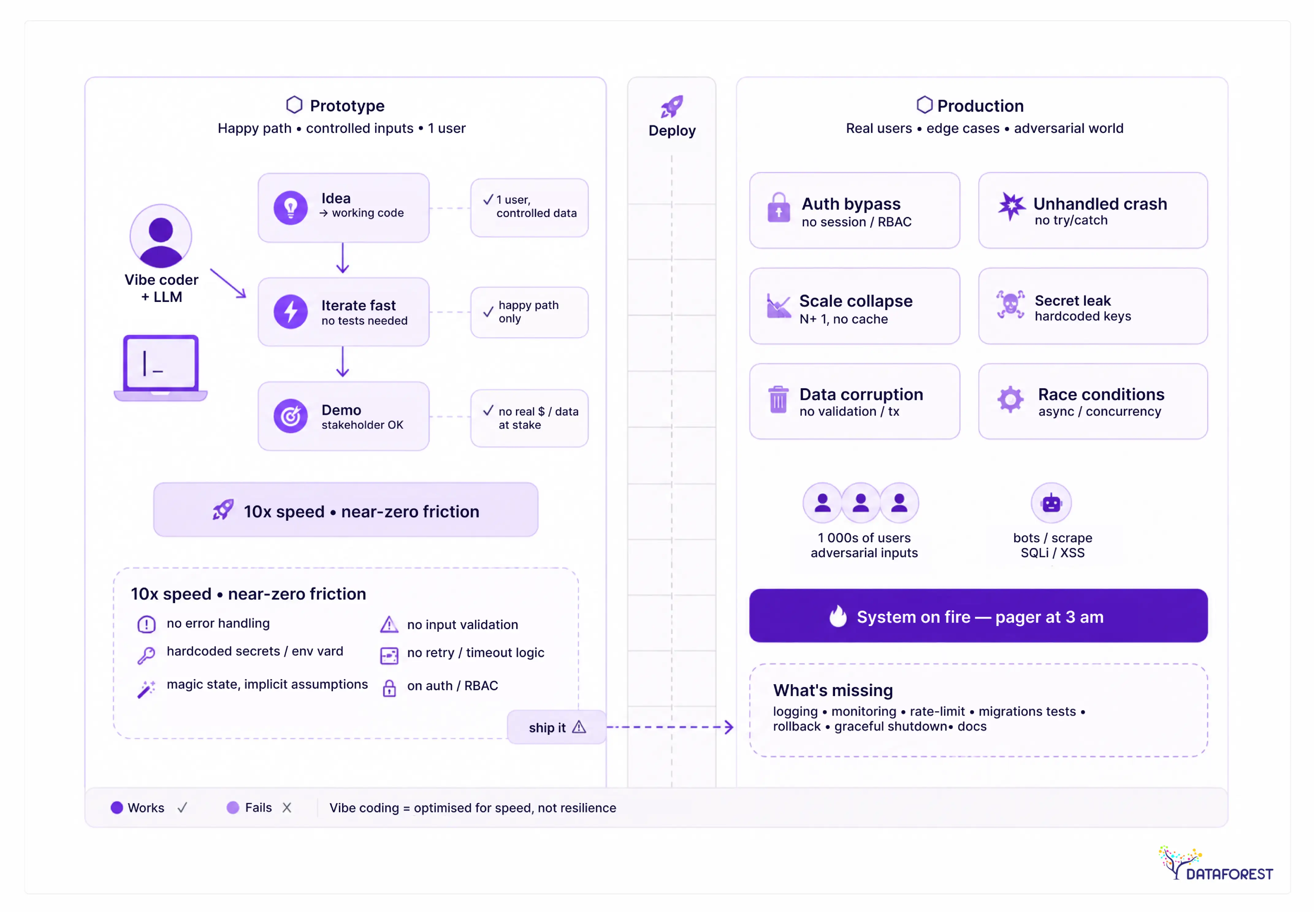
When the goal is to test an idea quickly — a landing page, an internal tool, a throwaway demo — vibe coding delivers exactly what it promises. You describe what you want, the AI generates it, and you iterate in minutes rather than days. The feedback loop is tight. The cost of failure is low. If the prototype never ships to real users, the code quality is largely irrelevant.
This is where the vibe coder archetype actually makes sense: a founder validating a market, a designer testing a flow, a solo developer exploring an API. These are contexts where speed matters more than maintainability, and where the person building the thing is also the person absorbing the risk. The tradeoffs are visible and acceptable.
For production systems: a different story
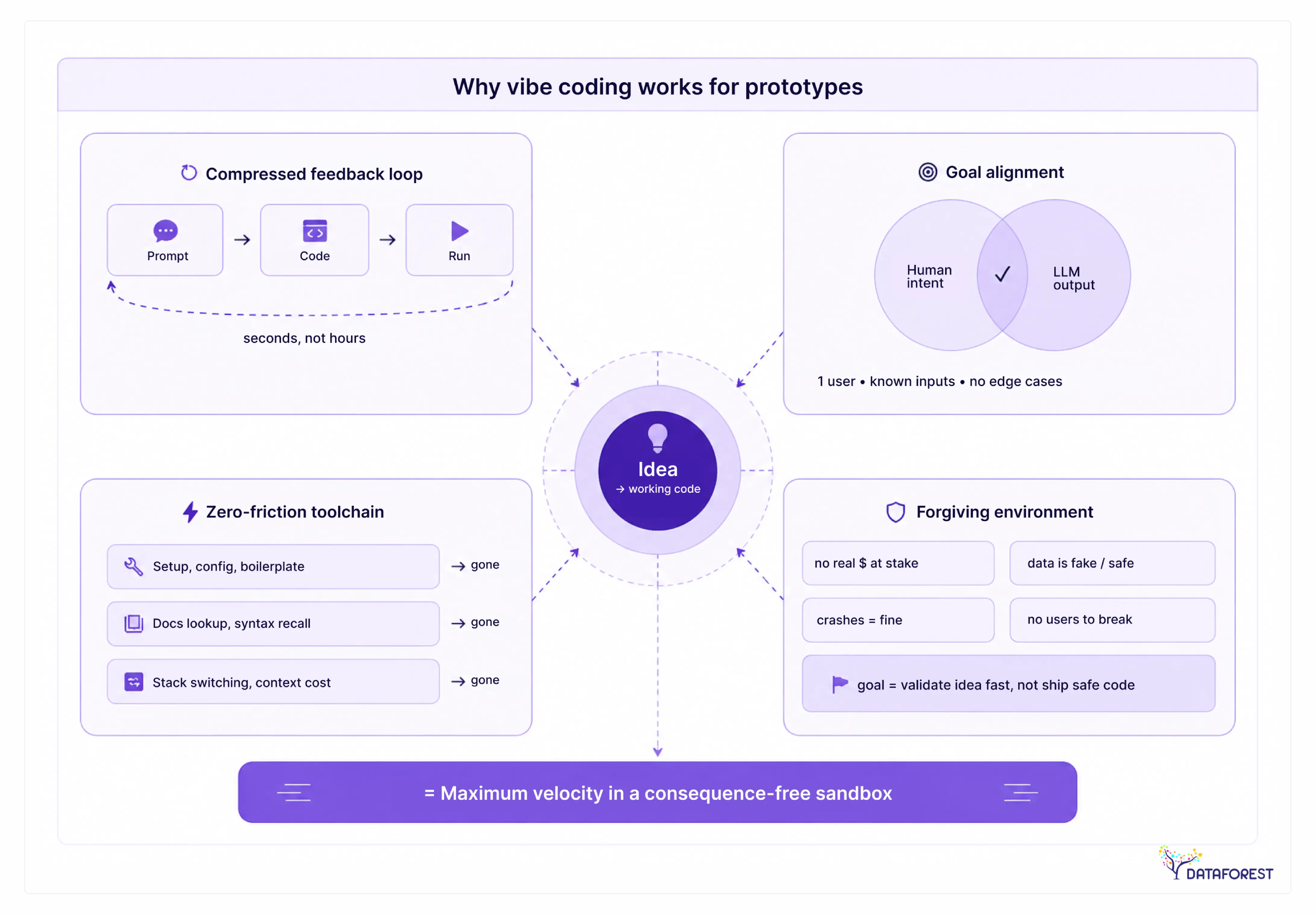
The moment real users depend on the system, the calculus changes. Production code carries obligations that a prototype does not: it must handle:
- edge cases
- degrade gracefully under load
- protect user data
- remain maintainable by someone other than the person who built it
AI-generated code, produced without deep review, routinely fails on all four counts.
The failure is not dramatic. It is slow. A vibe-coded app works fine for the first hundred users. Then a security researcher finds an exposed API key. Then a database query that worked in testing starts timing out at scale. Then a new developer joins and cannot understand the codebase because there is no coherent architecture — just a pile of AI-generated files that happened to work once.
This is why the question "Is vibe coding bad?" gets such contradictory answers. The people saying it works are usually building prototypes. The people saying it fails are usually maintaining production systems. Both are right about their own context.
Why the binary question misses the point
The real question is not whether vibe coding is good or bad. It is whether the project in front of you is a prototype or a production system. That distinction is the decision boundary.
The table below operationalizes that boundary. Use it before you start building — not after you have already shipped.
Prototype vs. Production Decision Table
The table is deliberately binary because the decision should be. Ambiguous cases — "it's sort of a prototype but real users might see it" — are the ones that cause the most damage. If you cannot confidently place a project in the left column, treat it as production.
Vibe coding is a prototype tool that gets used as a production strategy. That gap between what it is and how it gets deployed is where most of the problems live. The sections that follow explain exactly what those problems look like — and how to close the gap when you genuinely need to ship.
Why Vibe Coding Works So Well for Prototypes
The honest answer to "Is vibe coding bad?" starts with acknowledging what it does well — and for prototypes, it does a lot well. Before dismissing the approach entirely, it's worth understanding why so many builders have adopted it with genuine enthusiasm.
Speed from idea to working demo
The gap between having an idea and having something clickable used to take weeks. With AI-driven development, that gap collapses to hours. A solo founder can describe a product concept in plain language, iterate on the UI through conversation, and have a working demo before the end of a single work session.
This speed is not illusory. The demo is real software — it runs in a browser, accepts input, and responds. That matters enormously when you need to test whether an idea resonates before investing engineering resources. The prototype stage is exactly where vibe coding earns its keep.
Why is vibe coding so addictive?
Vibe coding feels addictive because it removes the longest, most frustrating part of building software: the gap between what you imagine and what you can execute. Traditional development punishes you for not knowing the right syntax, the right library, or the right architecture pattern. Vibe coding removes that tax entirely.
Every prompt produces visible output. That tight feedback loop triggers the same reward mechanism as a video game — you act, something happens, you act again. Designers who spent years watching engineers translate their mockups into code can now close that loop themselves. Non-technical founders can test product hypotheses without a technical co-founder. The sense of agency is real, and it's powerful.
There's also a compounding effect: early wins feel effortless, which makes the next prompt feel low-risk. The addictive quality isn't a bug in the workflow — it's a direct consequence of how well the tools work at the prototype stage.
The founder use case: investor demos and MVPs
Consider a common pattern in 2025: a founder builds a working app over a weekend using one of these platforms, walks into a seed meeting with a live demo, and closes a round. The demo is polished enough to communicate the vision. Investors respond to working software differently than they respond to slide decks.
This is vibe coding at its best. The goal is not a production system — it's a proof of concept that answers the question "does this idea work?" For that purpose, the code quality underneath the interface is largely irrelevant. What matters is that the product looks and behaves like the real thing.
The problem comes next. After the funding closes, that same codebase becomes the foundation for a production system. That's where the weekend build starts to crack — but that's a story for the next section.
Legitimate wins: what vibe coding genuinely delivers
Beyond investor demos, vibe coding has a clear set of legitimate use cases:
- Internal tools with a small, trusted user base and low security exposure
- Landing pages and marketing sites where the stakes of a bug are low
- Hackathon projects where shipping fast beats shipping clean
- Design validation — testing whether a UI pattern works before committing to it in production code
- Solo side projects where the builder accepts the technical debt as a personal trade-off
In each of these contexts, the trade-offs are acceptable. The speed advantage is real, the downside risk is bounded, and the alternative — writing everything from scratch — would simply mean the project never gets built. Vibe coding is not a shortcut for these use cases. It's the right tool.
Where Vibe Coding Breaks Down: The Production Failure Modes
The prototype phase feels frictionless because the codebase is small, the requirements are loose, and the AI has no prior decisions to contradict. That changes fast. The same workflow that produced a working demo in a weekend starts to produce contradictions, regressions, and unexplained behavior as the project grows — and the transition happens at a surprisingly consistent point.
AI code is not the bottleneck—the delivery pipeline is
AWS argues that AI coding assistants amplify both productivity and existing process weaknesses: they help teams generate more code faster, but that extra output quickly overwhelms slow manual review, testing, merging, and deployment steps. The fix is not to slow AI down, but to upgrade the pipeline around it with stronger test-driven development, refactoring, continuous integration, continuous delivery, and continuous deployment. It also frames deployment speed as a business metric, using DORA-style indicators such as deployment frequency, change lead time, change failure rate, and recovery time to show how automation turns AI from a burden into an accelerator.
Warning signals that your project has hit the vibe coding wall:
- AI starts contradicting earlier decisions in the same codebase
- Fixing one bug introduces two new ones
- Generated code ignores existing patterns and conventions
- Response quality degrades noticeably on complex multi-file changes
- You cannot explain what a section of the codebase does
- Test coverage is near zero, and adding tests requires full rewrites
- The AI repeatedly asks you to clarify context it should already have
- Refactoring a single module requires manually re-explaining the entire data model
If you are seeing three or more of these, the project has outgrown pure vibe coding. The question is no longer whether to change the approach — it is how much debt you have already accumulated.
Context window saturation: the technical mechanism
The failure is not random. It has a specific cause. Every AI coding model operates within a context window — the total amount of text it can process in a single interaction. When a codebase fits inside that window, the model can reason about the whole system. When it does not, the model reasons about a slice. It cannot see the authentication module while editing the payment flow. It cannot remember the database schema it helped design three weeks ago unless you paste it back in.
This is why the AI starts contradicting itself. It is not getting worse — it is working with incomplete information. The model that wrote your original data layer has no memory of it when you ask it to extend the API. The result is inconsistent naming, duplicate logic, and architectural drift that compound with every session.
Larger context windows help at the margins, but they do not solve the problem. A model with a larger window still cannot hold a 50,000-line codebase, plus your conversation history, plus the documentation you are referencing. The constraint shifts; it does not disappear.
Debugging AI-generated code you never read
Stop treating "I didn't write it" as an excuse for not understanding it. This is the most dangerous habit vibe coding encourages.
When something breaks in production, you need to diagnose it fast. That requires understanding what the code is doing, not just what it was supposed to do. If you delegated every implementation decision to an AI and accepted the output without reading it, you have no mental model of the system. You cannot reason about failure modes. You cannot tell whether the AI's proposed fix is correct or merely papering over a deeper problem.
AI-generated code can move fast, but it still needs rigorous review, security, and developer judgment before production, because untrusted AI-generated code introduces significant security vulnerabilities and operational complexity.
Hidden technical debt and the rewrite cost
Vibe-coded projects accumulate a specific kind of debt: structural debt that is invisible until it is not. The individual functions look fine. The logic is often readable. The problem is at the system level — inconsistent state management, no clear separation of concerns, authentication bolted on after the fact, and no error handling strategy.
Teams that have deployed vibe-coded projects to production consistently report that the rewrite cost exceeds the original build time by a wide margin. The prototype was fast precisely because it skipped the decisions that make systems maintainable. Revisiting those decisions later, under a live codebase with real users, is significantly harder than making them up front.
Why larger models are not the fix
A common response to context saturation is to switch to a more capable model. This works — briefly. A better model produces better individual outputs. It handles more complex prompts. It catches more of its own errors. But it does not change the fundamental dynamic: the model has no persistent understanding of your codebase between sessions, no stake in the architectural decisions it made last month, and no ability to enforce consistency across a system it can only partially see.
The pattern we see in teams that try to scale vibe coding with better models is that they buy themselves a few more weeks before hitting the same wall at a slightly higher line count. The threshold moves; the failure mode does not. At some point, the project needs engineers who can hold the whole system in their heads — not a larger context window.

Security Risks in AI-Generated Code: What the 2025 Data Shows
The risks of vibe coding fall into four categories:
- security vulnerabilities in generated code
- maintenance debt from code you never read
- scalability failures under real load
- collaboration breakdowns when a team inherits an AI-built codebase.
Security is the most acute risk — and the one most likely to cause irreversible damage in production.
Veracode 2025: 45% vulnerability rate and 86% XSS exposure
According to Veracode's 2025 GenAI Code Security Report, 45% of AI-generated code samples introduced security vulnerabilities, and newer, larger models weren't consistently more secure. That is not a marginal edge case — nearly half of what these tools produce contains a flaw an attacker could exploit.
The breakdown of specific vulnerabilities is worse than the headline number suggests. The same Veracode analysis found that AI-generated code left websites vulnerable to a common type of attack in about 86% of the examples they tested, where attackers can inject malicious code into a page. Cross-site scripting (XSS) is one of the most exploited vulnerability classes in web applications. An 86% exposure rate in AI-generated code means that if you ship a vibe-coded frontend without a dedicated security review, the odds are strongly against you.
Why bigger models do not solve the security problem
The intuitive assumption is that newer, more capable models produce safer code. The Veracode data directly contradicts this. Larger models generate more syntactically coherent code — it looks cleaner, passes linting, and often runs correctly on the happy path. But security vulnerabilities are not syntax errors. They are logical flaws: missing input validation, improper output encoding, and insecure session handling. These require security-specific training and evaluation, not just general code quality.
In practice, a more fluent model can make insecure code harder to spot. The output reads confidently, follows consistent patterns, and provides no visual indication that anything is wrong. A developer reviewing AI-generated code for obvious bugs may miss a subtle injection vector precisely because the surrounding code looks professional.
Hardcoded secrets and insecure defaults in vibe-coded apps
Beyond XSS, two failure modes appear repeatedly in vibe-coded projects: hardcoded secrets and insecure defaults. AI models trained on public code repositories have seen countless examples of API keys, database credentials, and tokens written directly into source files — often in tutorial or example code. They reproduce this pattern.
Insecure defaults are subtler. An AI tool asked to "set up authentication" will produce a working authentication setup. But "working" and "secure" are different standards. Default configurations often skip rate limiting, omit CSRF protection, or use weak session expiry settings. None of these failures is obvious at demo time. All of them matter in production.
What are the risks of vibe coding?
The primary risks are security vulnerabilities in generated code, accumulating technical debt from logic you cannot trace, performance failures at scale, and team collaboration problems when engineers inherit a codebase built without a readable structure. Security is the most urgent concern: independent research shows vulnerability rates high enough to render unreviewed AI-generated code unsuitable for production without an explicit audit.
Risk Severity Table: Vibe Coding in Production
The severity ratings above reflect production exposure, not prototype risk. A Critical security flaw in a private demo causes no harm. The same flaw in a live app with real user data is a breach waiting to happen. That distinction — prototype versus production — is what makes the Veracode numbers so important to understand before you ship.
Claude Code, Cursor, and Lovable + Supabase: Which Tools Hold Up and Where They Break
Not all vibe coding tools fail in the same way or at the same point. Claude Code, Cursor, and Lovable, paired with Supabase, each have a distinct ceiling — and knowing where that ceiling sits before you build saves you from a painful rewrite later.
Claude Code: strengths in reasoning, limits in large-repo context
Claude Code is the strongest of the three at multi-step reasoning and architectural explanation. Ask it to design a data model, walk through a refactor strategy, or explain why a particular pattern creates a race condition — it handles those tasks better than most alternatives. That depth of reasoning is genuinely useful when you're building something non-trivial from scratch.
The limitation shows up in large, existing codebases. Claude Code operates within a context window, and once your project grows beyond a few thousand lines of interconnected logic, it starts losing track of what it has already generated. It can't hold the full dependency graph in view simultaneously. Teams that have pushed Claude Code into active production repositories report that it begins producing locally correct but globally inconsistent changes — a function that works in isolation but breaks in three modules. The practical ceiling for pure Claude Code vibe coding is a codebase small enough to fit meaningfully within a single session context.
Security defaults are also not production-grade out of the box. Claude Code will generate functional authentication flows, but it won't automatically enforce rate limiting, flag insecure session configurations, or warn you that a particular pattern is vulnerable to injection. You have to know how to ask.
Cursor: IDE-native workflow, better for engineers who read the code
Cursor sits in a different position. It's built into the IDE, which means the developer is always present in the loop — reading diffs, accepting or rejecting suggestions, running tests inline. That friction is actually a feature. Engineers using Cursor tend to understand the code they're shipping because they review it at the line level rather than accept whole-file outputs.
For teams with at least one engineer on the project, Cursor is the most production-compatible of the three tools. Its codebase indexing gives it better large-repo awareness than a pure chat interface, and the inline diff workflow makes it harder to accept a change that breaks something upstream accidentally. CI/CD integration is straightforward because Cursor doesn't own your build pipeline — it sits alongside your existing tooling rather than replacing it.
The trade-off is that Cursor's value scales with engineering skill. A non-technical founder using Cursor gets less leverage than one using Lovable, because Cursor assumes you can read and evaluate what it produces. It's not a no-code tool wearing an AI costume. If you're not comfortable reviewing a pull request, Cursor will frustrate you.
Lovable + Supabase: fastest prototype path, steepest production gap
Lovable, paired with Supabase, is the fastest path from idea to deployed, interactive prototype. The combination handles UI generation, database schema creation, and basic auth in a single workflow — without requiring the user to touch a terminal. For founders validating an idea, running a user test, or pitching to investors, this stack is genuinely hard to beat for speed.
The production gap, though, is the steepest of the three. Lovable abstracts away almost everything, which means the generated codebase is largely opaque to the person who built it. When something breaks in production — and it will — debugging requires either reverse-engineering code you never wrote or starting over. Supabase's row-level security policies are not automatically configured for production use; the defaults that work fine for a demo can expose data in a live environment.
The codebase complexity threshold matters here, too. Somewhere around 10k to 20k lines of code, most people report that pure vibe coding starts fighting back — and with Lovable, you often hit that wall without realizing it because the abstraction hides the accumulating complexity. By the time the tool starts struggling, the codebase is already too tangled to hand off cleanly to an engineer.
How to read the comparison table
The table below rates each tool across six production-readiness dimensions. "Prototype" means the tool performs well for that dimension in a demo or MVP context. "Partial" means it works with significant manual intervention. "Weak" means the tool provides little or no support, and you're largely on your own.
Use this as a decision aid, not a verdict. The right tool depends on who is building, what they're building, and whether a real engineer will review the output before it ships.
The pattern across all three tools is consistent: the less the human reads and owns the code, the lower the production ceiling. Lovable maximizes speed by minimizing human involvement. Cursor maximizes safety by keeping the engineer in the loop. Claude Code sits in between, with strong reasoning but a context limit that becomes a hard constraint at scale.
Why Will Vibe Coding Fail? And Is It an AI Slop?
Vibe coding won't fail as a technique — it will fail as a career strategy. Developers who rely on it exclusively skip the debugging, architecture, and security reasoning that production systems demand. When the AI generates something broken, a vibe coder who never read the code has no foundation to fix it. That gap compounds fast.
Why will vibe coding fail?
Vibe coding fails when projects outgrow their original scope. The approach works by delegating understanding to the AI, which means the human has no mental model of the system. Once a codebase crosses a complexity threshold — new integrations, real users, security requirements — the absence of that mental model becomes a hard blocker. The AI cannot rescue you from the architecture decisions it made on your behalf.
Is vibe coding AI slop?
For throwaway prototypes, no. For production software, often yes. AI slop is output that looks functional but lacks the deliberate structure a human engineer would impose. Vibe-coded apps frequently exhibit exactly that: inconsistent error handling, duplicated logic, and security defaults left at whatever the model chose. Whether it qualifies as slop depends entirely on whether anyone ever has to maintain it.
The interview reality: 73% say vibe coding is not the norm
The professional engineering community has not embraced vibe coding as a hiring signal. According to a Codecademy LinkedIn poll, 73% of respondents said vibe coding in interviews is not the norm. That number matters because it reflects how engineering teams actually evaluate candidates: on their ability to reason through code, not on their ability to generate it.
This creates a real trap for developers who lean into vibe coding as a primary skill. Shipping a demo fast is impressive. Explaining how it works under pressure — in a system design interview, a code review, or a production incident — is a different test entirely. The workflow that makes you productive in a weekend hackathon is not the workflow that gets you hired or promoted.
What happens to vibe-coded projects at 1 week, 1 month, and 6 months
The failure pattern is consistent enough to map. Projects feel fast and clean early. Then reality accumulates.
The timeline isn't universal — a disciplined vibe coder who reviews every output and writes tests can push these thresholds out. But most don't. The workflow actively discourages reading the code, which is exactly what makes it feel so fast in week one.
None of this means vibe coding is worthless. The use cases where it genuinely delivers are specific and bounded:
Legitimate vibe coding use cases:
- investor demo or MVP
- solo side project with no external users
- internal tooling with low security exposure
- design or UX prototype
- hackathon or time-boxed experiment
- rapid validation of a product hypothesis before committing engineering resources
- learning a new framework or API surface without production stakes
Outside these contexts, the productivity gains front-load the cost. You ship faster in week one and pay for it across months two through six. That's not a reason to avoid vibe coding — it's a reason to be honest about what you're building and who will maintain it.
What Professional Engineering Teams Provide That AI Tools Cannot
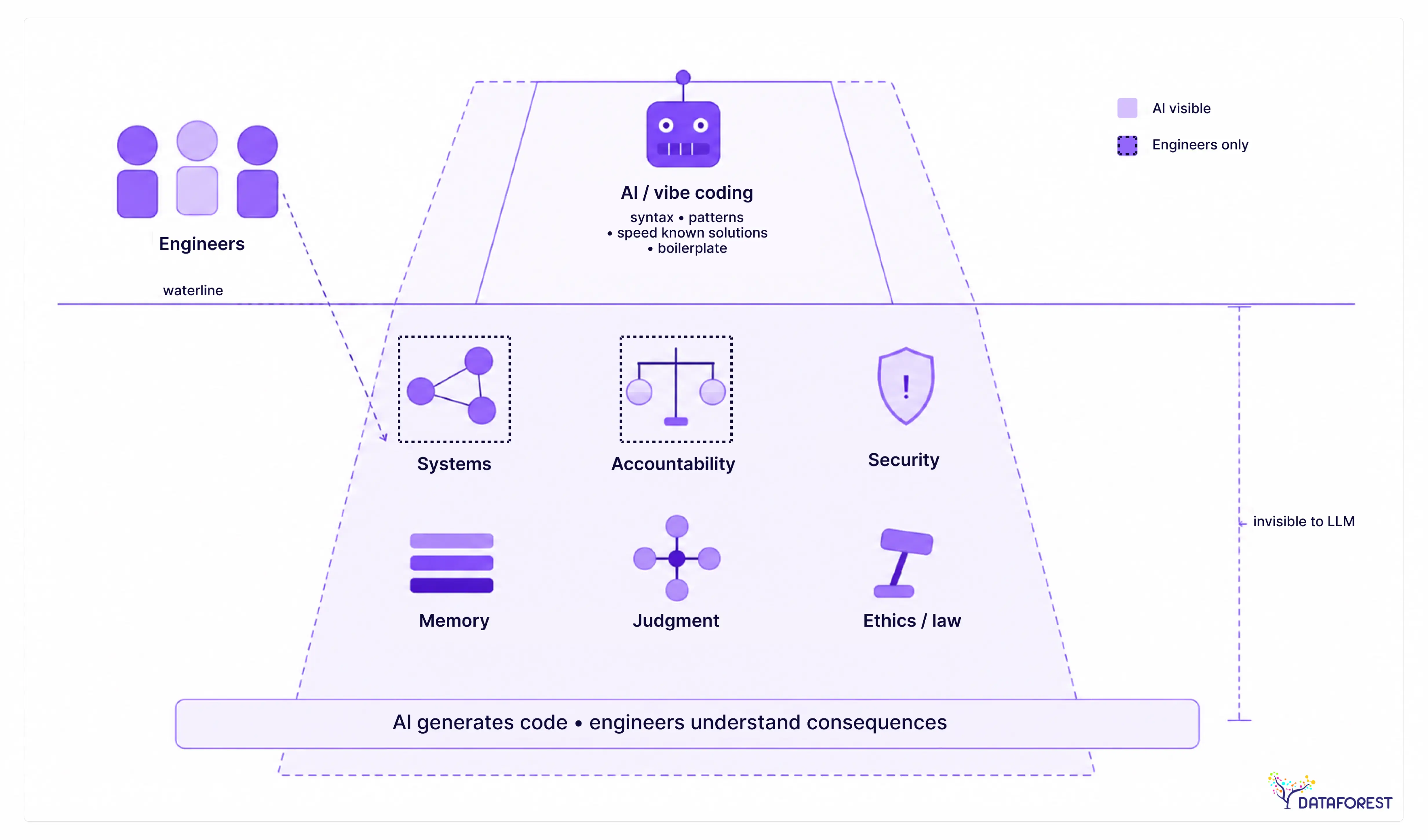
The question isn't whether AI tools can write code — they clearly can. The question is whether the code they write can survive contact with real users, real adversaries, and real organizational change. That's where professional engineering teams earn their place, and it's a different job than generating syntax.
Architectural judgment: designing for change, not just for now
AI tools optimize for the current prompt. They don't know that your authentication module will need to support SSO in six months, that your data model will need to split across two services when you hit scale, or that the third-party API you're wrapping will deprecate its v1 endpoint next year. Experienced engineers design for those futures — not because they can predict them, but because they've been burned enough times to build in the seams that make change survivable.
A vibe-coded codebase is typically a single coherent response to a single coherent problem. That's fine for a prototype. It becomes expensive when requirements shift, because the architecture has no slack. Engineers build slack deliberately.
Security review: what a human catches that Veracode flags AI missing
Automated scanners catch known vulnerability patterns. Human threat modeling catches the logic flaws that don't match any signature — the authorization bypass that only exists because two features interact in a way no single prompt anticipated, or the data exposure that emerges from a sequence of valid API calls. These are the vulnerabilities that ship with vibe-coded apps and remain hidden until someone discovers them in production.
The Veracode data from earlier in this article is worth keeping in mind here: AI-generated code introduces security vulnerabilities at a rate that should make any team pause before shipping to real users. A human security reviewer doesn't just run a scanner — they read the code with adversarial intent, model what an attacker might try, and manually trace data flows. That process can't be delegated to the same tool that wrote the code.
Operational experience: monitoring, incident response, and runbooks
Shipping is not the end of the job. Production systems fail — at 2 a.m., during a traffic spike, after an unplanned dependency update. Engineers who have been on-call know how to instrument code so failures are visible before users notice them, how to write runbooks that a half-awake colleague can follow, and how to run a post-mortem that actually prevents the next incident rather than just documenting the last one.
Vibe-coded apps typically have no observability layer. There are no structured logs, no alerting thresholds, and no defined on-call rotation. When something breaks, the only diagnostic tool is the AI chat window — which is a poor substitute for a distributed trace.
Team coordination: code review, knowledge transfer, and bus factor
Code review is not a quality gate. It's a knowledge transfer mechanism. When one engineer reviews another's work, two people now understand that part of the system. Vibe-coded projects tend to have a bus factor of one: the person who holds the conversation history. If that person leaves, or if the AI chat context is lost, the codebase becomes effectively unmaintainable.
Professional teams build documentation, review culture, and shared mental models as a matter of practice. These aren't bureaucratic overhead — they're the reason a system can outlive the person who built it.
The affirmative case: why engineers are not being replaced
The honest framing isn't that AI tools are bad. It's that they solve a different problem than engineers solve. AI tools reduce the cost of generating a first working version. Engineers reduce the cost of maintaining, securing, and evolving that version over time. Both are of real value. The mistake is treating the first as a substitute for the second.
What professional engineers provide that AI tools cannot replicate:
- Architectural judgment: designing systems that survive requirement changes
- Security review: threat modeling and manual code audit
- Operational experience: on-call, incident response, and post-mortems
- Team coordination: code review culture, knowledge transfer, and documentation
- Regulatory and compliance accountability
- Long-term system ownership and accountability for production behavior
- Institutional knowledge that persists beyond any single chat session
Handoff signals: when to stop vibe coding and bring in engineers:
- Codebase exceeds 10,000–15,000 lines of generated code
- Real user data (PII, payment, health) is being stored or processed
- A security or compliance audit is required
- More than one developer needs to work on the codebase simultaneously
- The product is generating revenue or has SLA commitments
- The system needs to integrate with enterprise identity, billing, or compliance infrastructure
- On-call coverage or incident response is required
Prototype vs. Production Decision Table
This table is a decision aid, not a hard rule. A solo founder can push vibe coding further than a regulated enterprise can. But the signals in the right column are not arbitrary — each one marks a point where the cost of not having an engineer starts compounding faster than the cost of hiring one.
The Production Readiness Checklist: What a Vibe-Coded Project Needs Before It Ships
Most vibe-coded projects fail in production, not because the idea was wrong, but because the gap between "it works on my machine" and "it handles real users safely" was never closed. This checklist exists to close that gap. It covers the twelve areas where AI-generated code most commonly ships incomplete — and where the consequences range from a broken user experience to a serious data breach.
How to use this checklist
Work through every item before you push to a production environment. This is not a "nice to have" list — each item maps to a failure mode that appears repeatedly in vibe-coded projects. If you cannot check an item off, that is a blocker, not a suggestion. Teams that treat this as optional typically discover the gaps through an incident rather than an audit.
The checklist is organized into three groups:
- security and secrets
- testing and observability
- infrastructure and documentation.
You can work through each group with a different person or in a single review session. Either way, every item needs a named owner before you ship.
Security and secrets management
AI tools generate plausible-looking code fast. They also hardcode credentials, skip authorization checks, and leave injection vectors open — not because the model is careless, but because it optimizes for code that runs, not code that is safe. The items in this group address the vulnerabilities that appear most consistently in AI-generated codebases.
Production Readiness Checklist for Vibe-Coded Projects
- Security audit: run a static analysis tool (e.g., Semgrep, Snyk) on all AI-generated code
- Secrets management: confirm no API keys, tokens, or credentials are hardcoded
- Authentication and authorization: verify all routes require appropriate access controls
- Input validation and sanitization: check for XSS, SQL injection, and injection vectors
- Test coverage: minimum 60% unit test coverage on business logic
- Error handling: all external calls have try/catch with meaningful error messages
- Logging and monitoring: structured logs and at least one uptime/error alert configured
- CI/CD pipeline: automated build, test, and deploy on every merge
- Database schema migrations: versioned and reversible
- Rate limiting and abuse protection on public endpoints
- Dependency audit: no known CVEs in direct dependencies
- Documentation: README covers setup, environment variables, and deployment
Testing, error handling, and observability
Vibe-coded projects almost never have meaningful test coverage out of the box. The AI writes the feature; nobody writes the test. The minimum 60% unit test coverage threshold on business logic is not arbitrary — it is the floor below which regressions become hard to catch before they reach users. Error handling deserves equal attention. AI-generated code frequently omits try/catch blocks on external API calls, which means a third-party timeout silently breaks a user flow with no log entry and no alert.
Observability is the item teams most often defer and most often regret. Structured logs and at least one uptime or error alert can be configured in under an hour in most hosting environments. Without them, you are debugging production issues blind.
Infrastructure, CI/CD, and documentation
A CI/CD pipeline is not optional for a production system — it is the mechanism that prevents a rushed hotfix from skipping the test suite. If your vibe-coded project deploys by dragging files or running a manual script, that process will eventually ship broken code under pressure.
Database schema migrations deserve specific attention in AI-generated projects. Models frequently generate schema changes inline rather than as versioned migration files, which makes rollbacks difficult or impossible. Every schema change should be a discrete, reversible migration from day one.
Rate limiting on public endpoints is the item most commonly skipped in early-stage projects and most commonly exploited. A public form submission endpoint or API route without rate limiting is an open invitation to abuse.
Finally, documentation. A README that covers setup, environment variables, and deployment is not bureaucracy — it is the minimum a second engineer needs to work on the codebase without asking you twelve questions. Vibe-coded projects are especially prone to undocumented environment assumptions because the original developer never had to articulate them to the AI.
Print this checklist and treat every unchecked item as a ship blocker. The projects that survive contact with real users are the ones where someone did this work before launch, not after.

How to Decide: A Practical Framework for Teams and Founders
Most teams don't fail at vibe coding because they chose the wrong tool. They fail because they never asked whether vibe coding was the right approach for their specific situation. The decision isn't hard once you have a clear set of criteria — and the criteria aren't about skill level or budget. They're about what happens if the code breaks in production.
The three-question test before starting any AI-coded project
Before writing a single prompt, answer these three questions honestly:
1. What is the cost of failure?
If the project fails — crashes, leaks data, or stops working — what happens? A demo that breaks in front of an investor is embarrassing. An app that exposes user PII or goes down during a paid transaction is a legal and financial event. Low cost of failure: vibe coding is viable. High cost of failure: you need professional engineering from the start, or a structured handoff before launch.
2. Will a human who understands the code own it long-term?
Vibe-coded projects accumulate debt fast. If no one on your team can read, debug, and refactor the output — not just prompt their way around problems — the codebase will become unmaintainable within months. If you have an engineer who will take ownership and audit the AI-generated code before it ships, the risk drops significantly.
3. Does this project handle sensitive data or external integrations at scale?
Authentication flows, payment processing, third-party API integrations with rate limits, and any storage of personal data all require deliberate security decisions. AI tools make plausible-looking choices in these areas, but plausible is not the same as correct. If your answer is yes, plan for a security review before launch — not after.
If you pass all three (low failure cost, human ownership in place, no sensitive data at scale), vibe coding is a legitimate accelerant. If you fail any one of them, treat AI tools as a drafting aid, not the primary builder.
Is vibe coding bad for beginners?
Vibe coding is genuinely useful for beginners — with one important caveat. It removes the syntax barrier and lets someone build a working prototype without months of prerequisite study. That's real value. The risk is that beginners can't tell when the AI is wrong. They accept insecure defaults, miss broken error handling, and don't recognize when a suggested architecture will collapse under load. For learning, vibe coding works best as a supplement: build something with AI, then read the output, look up what you don't understand, and try to explain every function. Used that way, it accelerates learning. Used as a black box, it creates a false sense of competence that surfaces badly when something breaks.
Is vibe coding bad for enterprises?
For enterprises, the answer is almost always: not for production, but potentially useful in controlled contexts. Internal tooling with limited scope, proof-of-concept builds before committing engineering resources, and rapid UI prototyping for stakeholder review are all reasonable applications. What enterprises cannot do is ship vibe-coded output directly to production without a full security audit, architectural review, and compliance check. The organizational risk — regulatory exposure, vendor lock-in from AI-generated infrastructure choices, and the support burden of code no one fully understands — outweighs the speed gain at scale. The pattern that works in enterprise settings is to use AI tools to accelerate early-stage work, then hand off to a professional team with explicit documentation of what was built and why.
When to hand off from vibe coding to a professional team
The handoff moment is usually obvious in retrospect and invisible in the moment. Watch for these signals:
- The codebase crosses into territory where prompting produces regressions. Fixing one thing breaks another. This is context saturation — the AI no longer holds the full picture.
- You're about to add authentication, payments, or user data storage. These are not features you want AI to design without review.
- A real user will depend on this. The moment the project moves from internal demo to external user, the failure cost changes category.
- You can't explain what the code does. If you can't walk an engineer through the architecture in 20 minutes, you don't own the codebase — you're renting it from the AI.
Handoff doesn't mean throwing away what was built. A well-scoped vibe-coded prototype can save a professional team days of exploratory work. The key is to document the decisions made during the vibe coding phase — what was tried, what the AI chose, and where shortcuts were taken — so incoming engineers aren't inheriting a mystery.
Decision summary:
Verdict: Vibe Coding Is a Prototype Tool, Not a Production Strategy
The pattern across every dimension covered in this article points in the same direction. Vibe coding accelerates early-stage work in genuinely useful ways. It also introduces security vulnerabilities, architectural fragility, and debugging complexity that compound sharply once a project reaches production scale.
What the evidence actually says
The security data from Veracode's 2025 research is hard to argue with. The context saturation problem is real and well-documented by practitioners. The gap between a working demo and a maintainable, secure, observable production system is not a gap that better prompting closes — it requires different skills, different tooling, and different processes.
None of this means vibe coding is bad. It means vibe coding is a specific tool with a specific range of appropriate use. A hammer is not bad because it cannot drive a screw. The problem is using it as if it can.
Stop treating vibe coding as a shortcut to production. It is a shortcut to a prototype — and that is genuinely valuable, as long as you know where the shortcut ends.
The right mental model going forward
Think of vibe coding as the first phase of a two-phase process. Phase one: use AI tools to move from idea to working demo as fast as possible. Validate the concept, test the UX, show investors, run a pilot. Phase two: before anything touches real users at scale, run the production readiness checklist, bring in engineering judgment on architecture and security, and treat the AI-generated codebase as a starting point rather than a finished product.
This mental model works well for solo founders, small teams, and internal tools with low stakes. It breaks down when teams skip phase two entirely — or when they never planned for it in the first place.
The question is not whether to use vibe coding. For many use cases, you should. The question is knowing when to stop delegating to the AI and start owning the code yourself.
Conclusion
Vibe coding is not bad. It is misapplied. The real problem is treating a prototype tool as a production strategy — and the gap between those two contexts is where projects break, security vulnerabilities accumulate, and rewrites become inevitable.
AI coding tools will keep getting faster, more context-aware, and harder to resist. That makes the discipline of knowing when to stop more important, not less. The teams that get this right will use AI to compress the early, exploratory phase of a project — then hand off to professional engineers before the codebase becomes something nobody fully understands.
The shift worth watching is not whether AI replaces developers. It is whether teams build the judgment to know which phase they are in.
Your next step is concrete: run the production-readiness checklist in this article against your current vibe-coded project. If more than three items are unchecked, you are not ready to ship — and you now know exactly what to fix before you do.


.webp)
.webp)
.webp)


