AI Scheduling Assistant That Cuts Scheduling Effort by 60–80%
DATAFOREST built an AI scheduling assistant for busy professionals and executives that works inside Gmail and Outlook. It reads meeting requests, checks calendars, and applies priorities and availability preferences to suggest slots, book and reschedule meetings, and draft replies. Users review each action before it reaches their calendar, cutting scheduling effort by up to 80%.
60–80
%
reduction in scheduling effort
3
×
fewer email iterations
<
5
%
post-approval manual corrections
A California-based investment company that creates and funds enterprise software startups. One of its products is an intelligent workspace for the entertainment industry. The AI scheduling assistant extends this platform for busy entertainment professionals and executives in the US.

FastApi

LangGraph

Langchain

OpenAI

LangFuse
THE CHALLENGE
Turning email conversations into reliable calendar actions without adding work or taking control away from users
The client needed an assistant that could handle meeting coordination inside Gmail and Outlook for business professionals and executives. Existing functionality did not cover the domain’s scheduling needs. The product needed to interpret requests, coordinate several stakeholders, apply priorities, manage changes, and send accompanying emails while letting users review actions before committing them to a calendar.

Manual email coordination slows meetings and pulls executives away from core work
Each meeting means reading the request, comparing calendars, suggesting times, and confirming details with four or five stakeholders. Across a high-volume inbox, this back-and-forth adds hours of admin work every week. The AI also had to read participants' replies accurately without slowing down, because more detailed interpretation takes longer to process.

Rescheduling must resolve conflicts without breaking existing bookings
Moving a meeting is more than finding an open slot. When two requests competed for the same time or a booked meeting changed, the assistant had to decide which meeting kept the slot and what happened to the other one. It also had to handle repeated requests reliably, so users never had to fix double bookings or inconsistent calendar updates.

Meeting priorities need clear rules when roles and contact relationships differ
Free time alone does not decide which meeting wins. The product needed predictable priority handling based on role hierarchy and business rules, with manual overrides and a fallback for new contacts who have no priority yet.

A free calendar slot is not always a slot the user is willing to give away
Users set working hours, lunch breaks, and time zones, and they expect emails to sound like them. The assistant had to stay within these limits and match each user's tone, even when coordinating across regions.
Users need to see and control proposed actions before AI changes their calendar
An assistant that books meetings without review undermines trust. Users needed to see what the AI proposes and why, and to confirm, cancel, or reschedule it, while admins needed a choice between automatic and confirmed booking.

Email requests and calendar actions must stay in sync across platforms and organizations
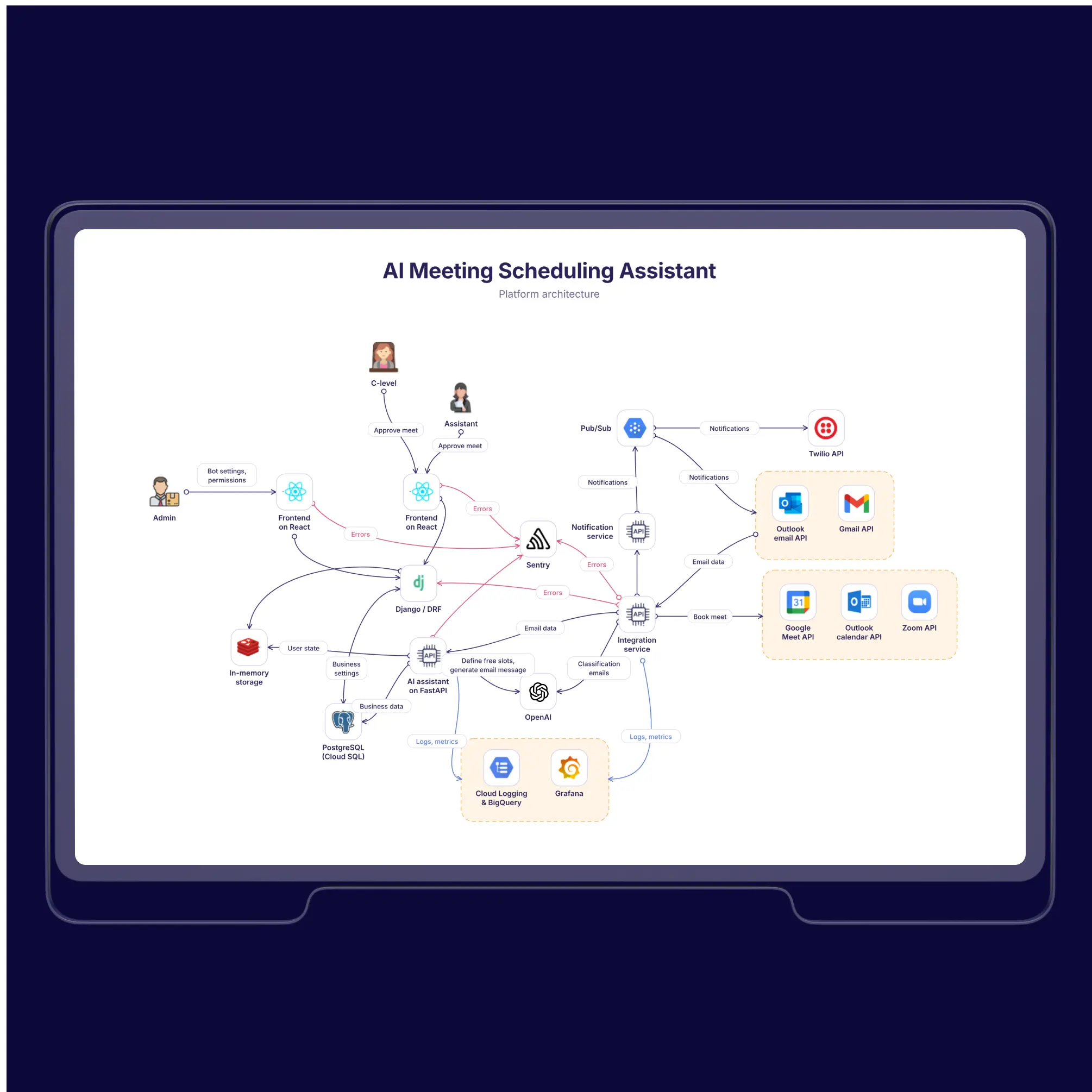
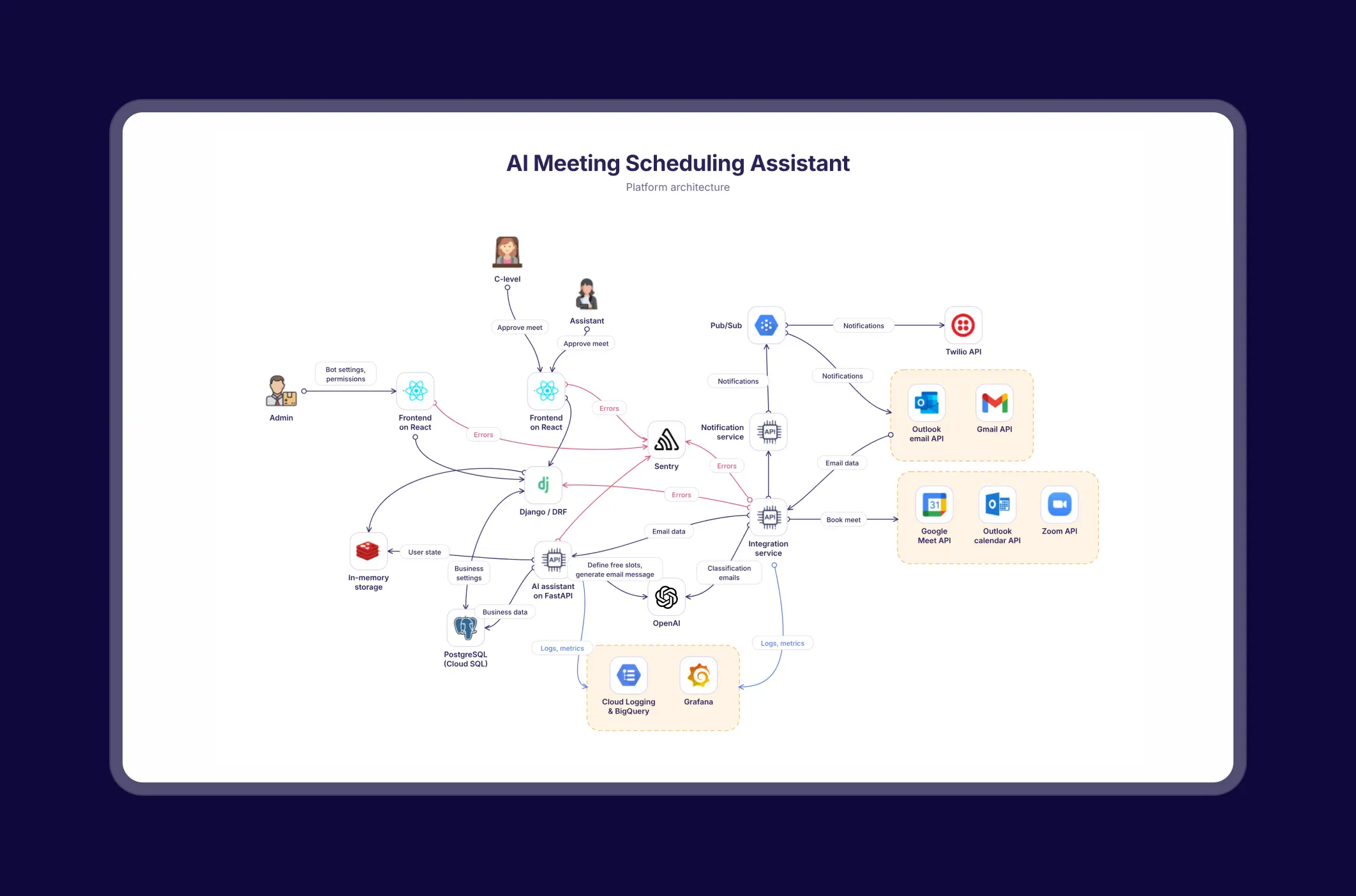
Requests arrive in Gmail or Outlook, but bookings live in Google or Outlook calendars, with Zoom or Google Meet links and reminders on top. The assistant had to turn each email into a booking or update while keeping availability, meeting details, and follow-up messages aligned. Serving several organizations also required tenant separation, access control, and a full audit trail.
THE SOLUTION
An AI assistant that handles meeting coordination for users, while they stay in control
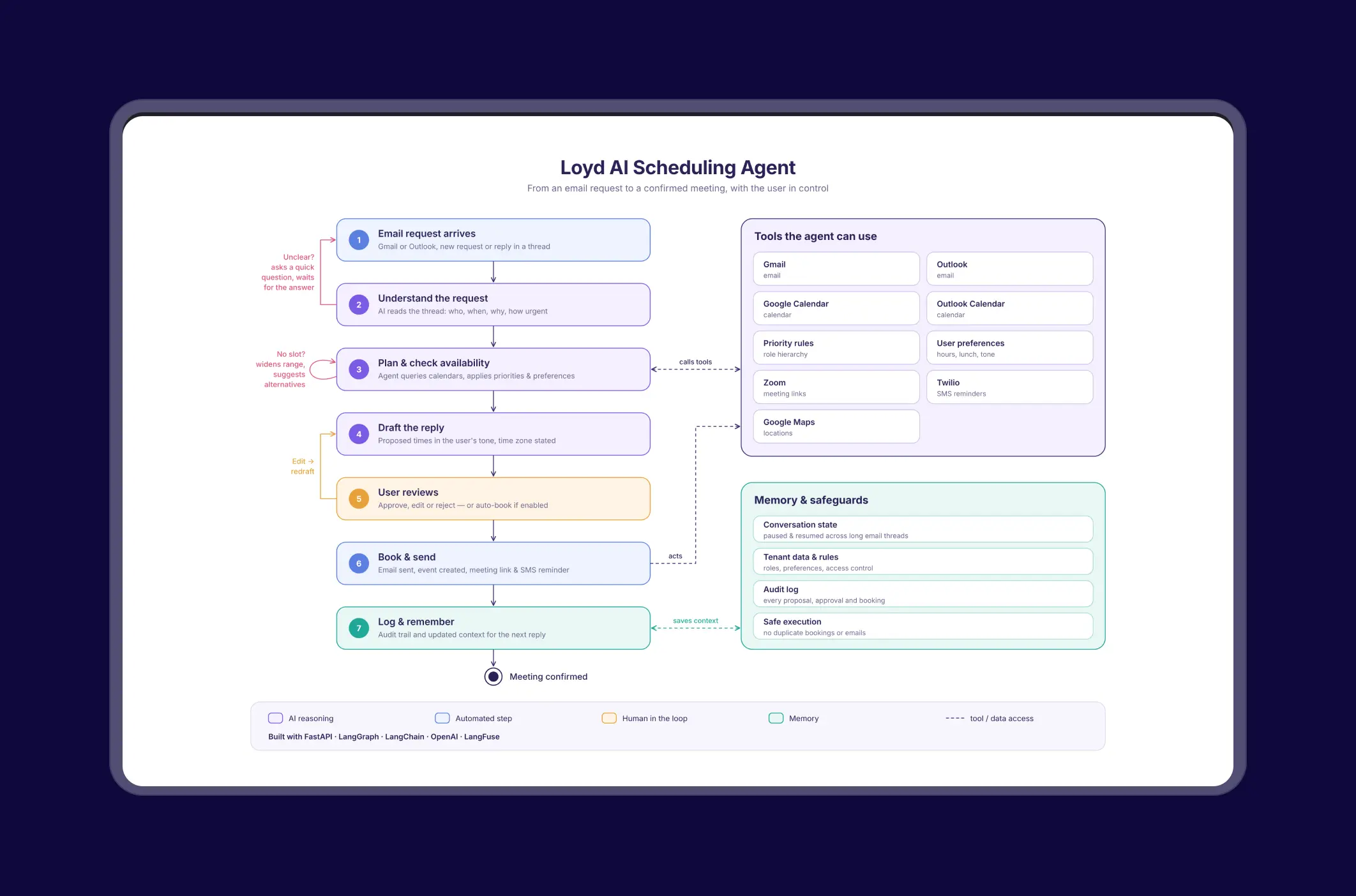
DATAFOREST built an AI assistant that works directly inside Gmail and Outlook, so users keep working in the tools they already use. The assistant reads meeting requests, suggests the best times, books and reschedules meetings, and drafts the emails that go with them. Each decision follows the client's business rules, meeting priorities, and each user's own preferences. Users see what the assistant plans to do and why, and they confirm or adjust it before it reaches their calendar.

Recognizing meeting requests and suggesting available slots right in the inbox
When an email asks for a meeting, the AI assistant recognizes it, checks the organizer's availability, and suggests time slots within seconds. It then drafts the reply and any follow-up emails, so users don't have to write each message in the chain themselves. DATAFOREST built this with LangGraph workflows and OpenAI models. Defined use cases, edge cases, and success criteria let the team measure reply quality and scheduling accuracy against processing time and tune the workflow to keep both in balance.

A priority engine that turns role hierarchy and business rules into predictable decisions
Defined use cases and edge cases translate role hierarchy and business rules into the scheduling pipeline. The AI agent can then tell which meeting takes precedence, give new contacts a default priority, and fall back safely when a request doesn't fit any rule. In the admin panel, teams set user roles, business rules, and the assistant’s communication style. Users can override any recommendation when a meeting needs an exception.
Human-in-the-loop approval with transparent reasoning and full override control
An in-context approval interface shows each proposed action with its reasoning. The user can confirm, cancel, reschedule, or edit it before anything is committed. In the admin panel, teams choose whether meetings are booked automatically or require confirmation.

Priority-based conflict resolution with repeat-safe calendar operations
The core API schedules, reschedules, and resolves conflicts directly in the organizer's calendar. When meetings clash, priority rules decide which one keeps the slot. The AI agent then proposes a new time for the other meeting, and the user can accept it, choose another time, or cancel the meeting. Idempotent operations make sure a repeated request never creates a duplicate booking, and audit logs record every calendar change.

Applying stored availability, time-zone, and tone-of-voice preferences to every action
The AI assistant proposes and books meetings only within each user’s working hours, lunch breaks, and time zone. Saved communication preferences, including tone of voice, shape every drafted email, so messages sound like the user and stay within the approval flow.
Unified email, calendar, and video integrations on a secure multi-tenant backend
Users handle meeting requests in Gmail or Outlook as usual. The assistant books, moves, and updates meetings in their Google or Outlook calendar, adds a Zoom or Google Meet link, and sends SMS reminders before each meeting. To make this work, DATAFOREST connected the assistant to these email, calendar, video, and SMS services. The team also built a backend that keeps each organization's data separate, with role-based access, encryption, and a full change history ready for SOC 2.
THE RESULT
An AI assistant that schedules calls and saves up to 80% of scheduling effort
In under 4 months, DATAFOREST took the product from idea to a working AI scheduling assistant inside Gmail and Outlook. The team built every core function: meeting-request detection, slot recommendations, priority rules, conflict-safe booking and rescheduling, email drafts in each user's tone, and an approval interface. It also built integrations with Google and Outlook calendars, Zoom, Google Meet, and SMS reminders.
Users no longer coordinate through long email threads. They go from a meeting request to a confirmed booking in a single approval step. The assistant suggests slots in under half a second and checks availability in under one second.
Scheduling effort dropped by 60–80%, and each meeting now needs a third as many email exchanges. Conflict checks and repeat-safe calendar operations have nearly eliminated double bookings, and fewer than 5% of approved actions need manual correction. Users can see why the assistant suggests each action and approve it themselves, and engagement grew two- to threefold as a result. The client now has a scalable, enterprise-ready foundation for further growth.
reduction in scheduling effort
fewer email exchanges
of approved actions need manual correction

AI Scheduling Assistant for Gmail and Outlook
Improving Chatbot Builder with AI Agents

Improve chatbot efficiency and usability with AI Agent
Reporting & Analysis Automation with AI Chatbots

Automating Reporting and Analysis with Intelligent AI Chatbots
Real-Time AI Voice Agent for Cold Calling
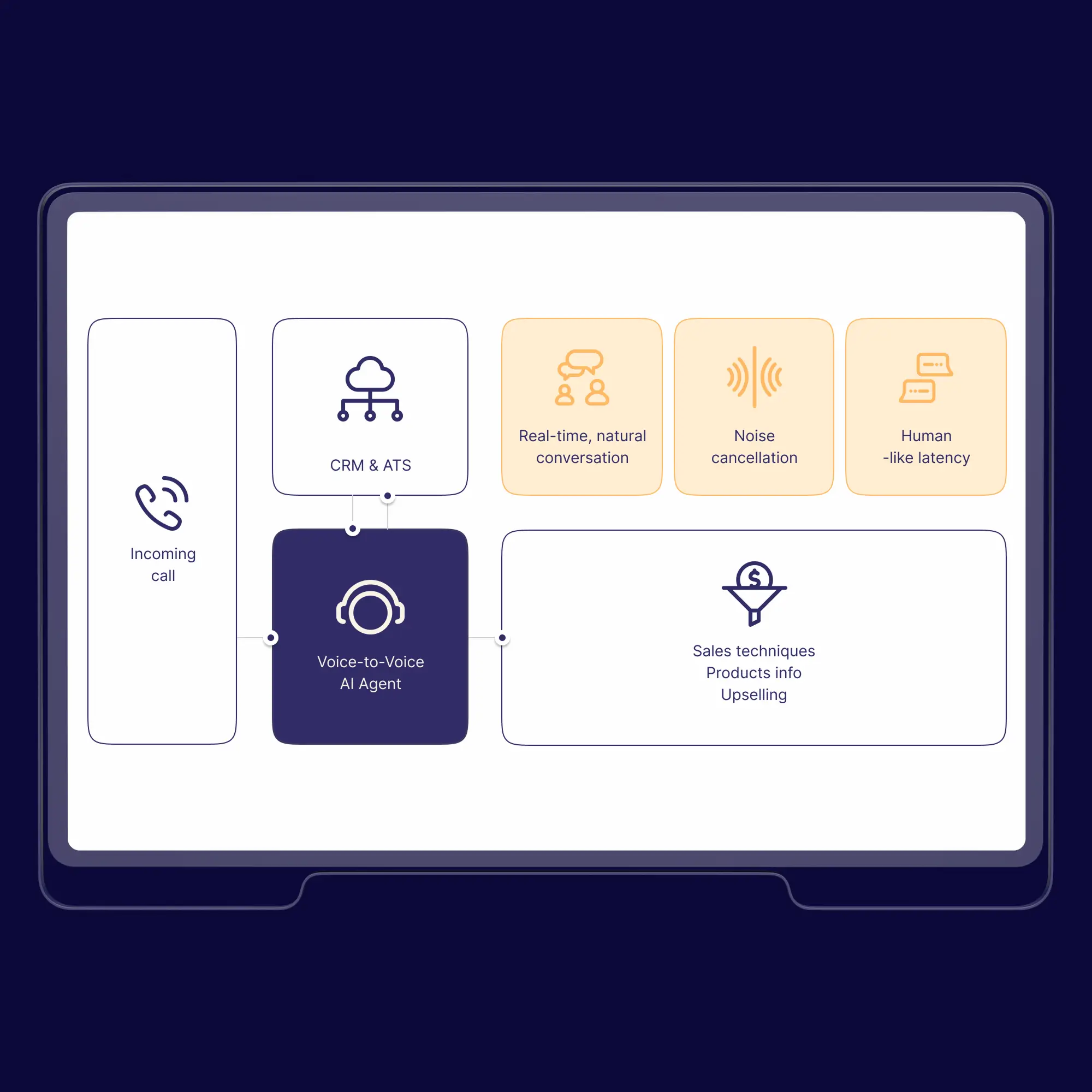
AI-Powered Cold Calling: Real-Time Voice-to-Voice Conversations
Improving Chatbot Builder with AI Agents
Improve chatbot efficiency and usability with AI Agent
Reporting & Analysis Automation with AI Chatbots
Automating Reporting and Analysis with Intelligent AI Chatbots
Real-Time AI Voice Agent for Cold Calling
AI-Powered Cold Calling: Real-Time Voice-to-Voice Conversations
Latest publications
All publications
Build vs Buy AI Infrastructure in 2026: How to Decide — Layer by Layer
Latest publications
All publications
Data Readiness for AI: 7 Signs Your Data Platform Is Analytics-Ready but Not AI-Ready
AI Copilot vs AI Agent
Build vs Buy AI Infrastructure in 2026: How to Decide — Layer by Layer
We’d love to hear from you
Share project details, like scope or challenges. We'll review and follow up with next steps.

