AI Copilot vs AI Agent: Why Your Architecture Has to Change
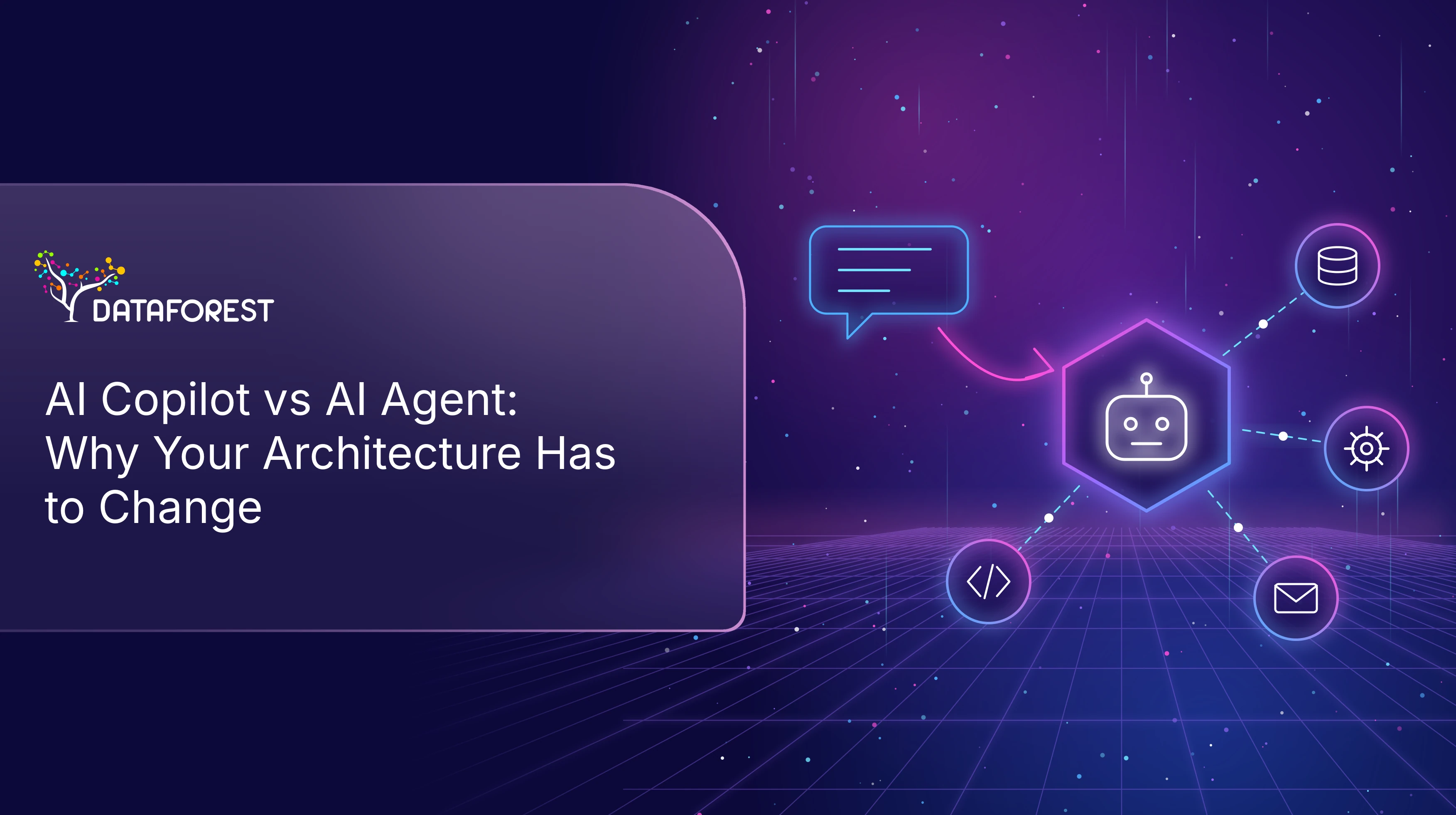
- AI copilot vs AI agent comes down to who executes the work.
- A copilot suggests actions for a person to review and carry out.
- An agent plans and executes tasks through governed tools.
- Moving to agents adds requirements for identity, fresh data, write permissions, guardrails, approvals, and auditable tool calls.
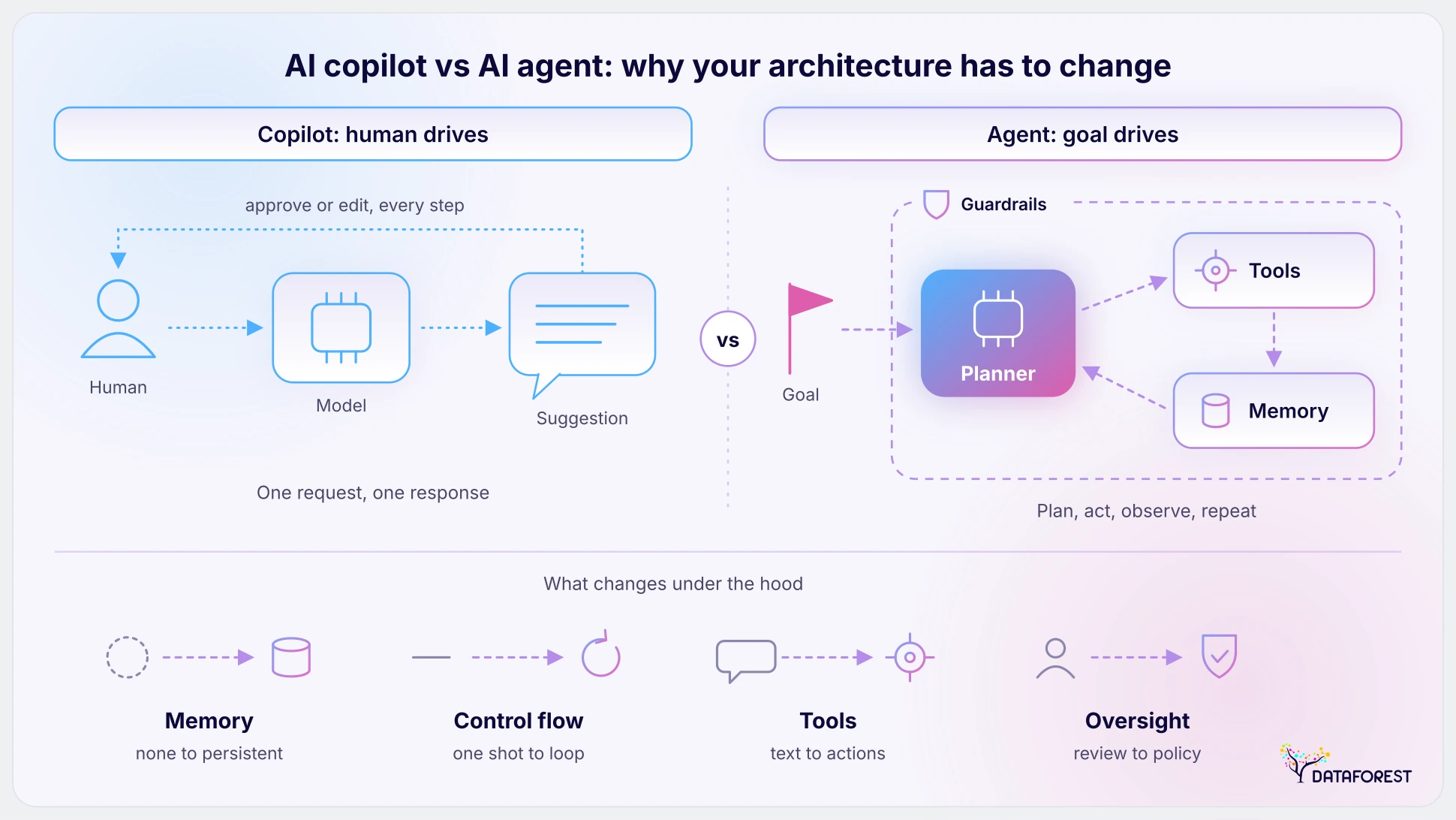
Companies start with copilots. These programs draft emails, summarize documents, suggest ideas, and answer questions. A person makes the final call. Agents go much further — they update database records, issue customer refunds, manage schedules, and trigger system workflows. The architecture built for copilots assumes a human check every single output. Autonomous agents remove that safety net almost entirely. We will explore the core difference, four levels of autonomy, seven critical architecture shifts, and a five-step path to production. You will also learn when to keep a simple copilot and when to use an AI agent.
AI Agent vs Copilot — What Changes When AI Starts Acting?
The main difference involves who takes action: a copilot recommends steps for a human to execute, while an agent executes the tasks itself.
How Copilots Work — AI Suggests, People Decide
Copilots operate within a single application. They read your information using your existing permissions. The AI analyzes the context and generates a drafted response. You might see a new block of code or get an email draft in your customer relationship management software. You might find a complex vendor invoice flagged for manual review. The software stops at this suggestion phase — a human must accept the draft. You review the output and click the button to send the email. The person remains the control point for every task. Copilots save time during creation, but leave the responsibility of final execution to the human user.
How AI Agents Work — AI Plans, Decides and Executes
Agents operate on a continuous loop of independent action, and they receive a broad goal from a user. The software plans the required steps to achieve that goal: the agent calls external tools; it checks the results of its actions; it continues until the job is done. An agent can resolve a customer support ticket from start to finish. It can reconcile vendor invoices and post the ledger entries. It can also reorder depleted warehouse stock. These programs work across multiple business systems and collaborate with other specialized agents. You can read our Generative AI Agents article for the basic concepts.
Book a call to stay ahead in technology and accelerate digital transformation initiatives.
7 Architecture Shifts AI Agents Require
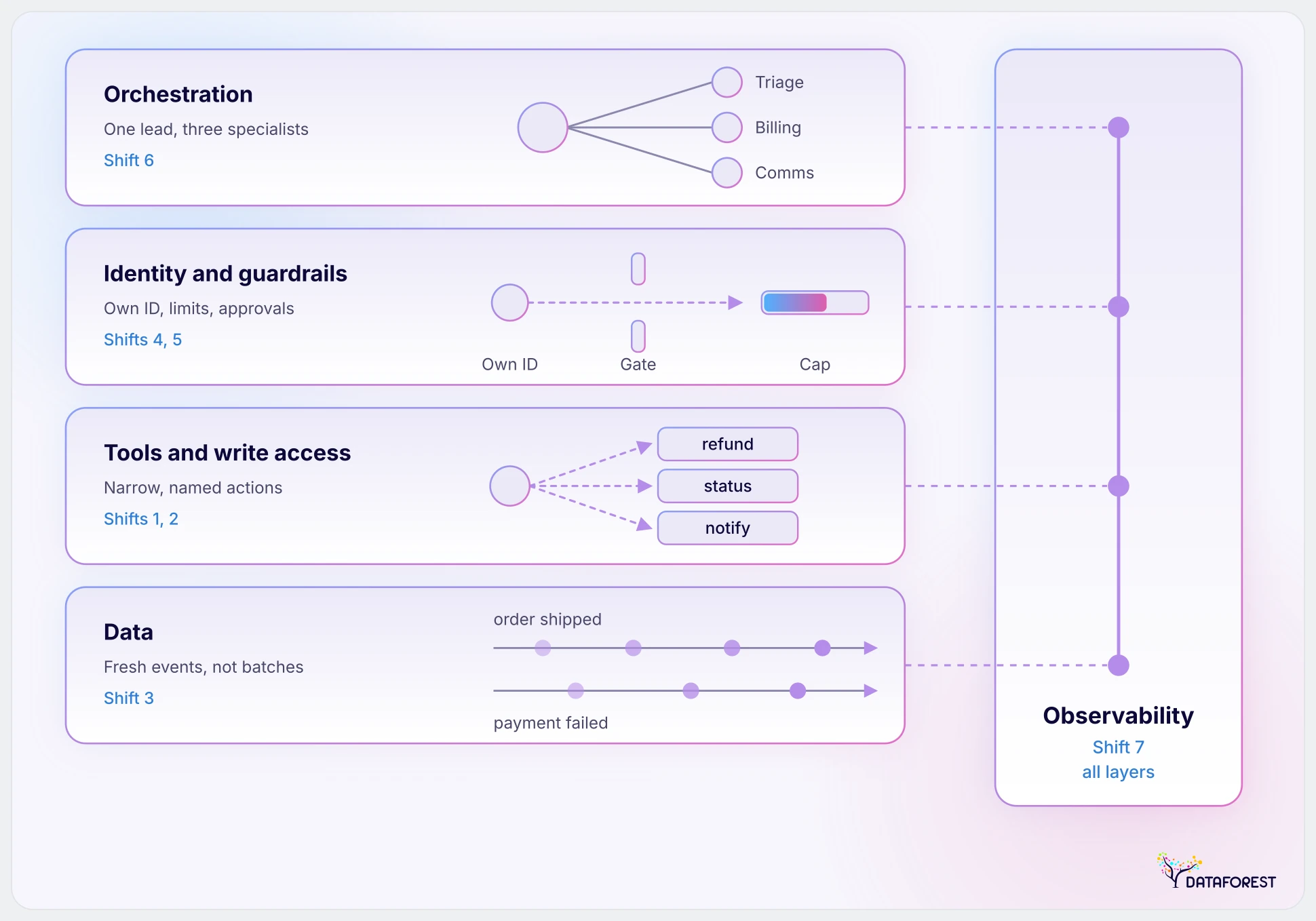
Moving from human-driven AI to autonomous agents demands new infrastructure. Copilots rely on human oversight — agents act independently. You must rebuild your system architecture to support them safely. Let us examine the seven fundamental changes required to launch agents into production.
1. From Chat Interfaces to Tools: APIs and MCP as the Agent’s Hands
Copilots produce text for human readers. This setup breaks for autonomous agents. An agent cannot click buttons on a screen. It needs documented APIs or Model Context Protocol servers to act. These interfaces act as the hands of the agent: they expose specific actions like creating a refund. UI automation is a possible fallback for legacy systems, but it is usually more fragile.
You must never grant an agent raw database access. The architecture must translate AI intent into structured tool calls. For example, a customer service agent receives a cancellation request. It calls a specific API endpoint to update the ticket status. The API handles the actual database change. The method keeps your core systems secure and your data intact.
2. From Read-Only Access to Governed Write Access
Copilots thrive on read-only access to corporate knowledge bases. It fails for agents — they change system states to complete work. You must replace broad access with narrow governed write permissions. The architecture restricts the AI to very specific actions. It enforces strict input validation prior to executing any command. The system requires idempotency — the exact same request will not run twice; it also needs safe failure handling to roll back errors gracefully.
A logistics agent updates a delivery address. The system validates the new postal code format. It updates the shipping record. A failed update logs an error without crashing the dispatch software.
3. From Batch Data to Real-Time, Event-Driven Data
Copilots work well with daily batch data updates. Humans can spot outdated numbers in a draft. Agents acting on stale data make wrong decisions immediately. They execute actions based on past states. You must shift to an event-driven architecture. Agents trigger upon shipping events, payment failures, user signups, and ticket closures. Your data infrastructure must push these updates in real time. Read more about Modern Data Architecture Services for best practices. An inventory agent receives a real-time out-of-stock alert. So, it instantly pauses the related marketing campaign. A batch system would let the campaign run for another day and waste money.
4. From User Credentials to Agent Identities
Copilots operate under the login credentials of the human user. They see exactly what the person sees. This model breaks for background programs. Borrowed logins and shared service accounts create security blind spots. You must give each agent its own distinct identity. The architecture grants least-privilege task permissions to this unique profile. It uses short-lived credentials for every session. Administrators can limit, monitor, isolate, and revoke access instantly. A financial agent reconciles daily bank statements. It logs in with its own system identity and requests a temporary token that expires in one hour. Admins revoke that specific token during anomalous activity without disrupting human accounting staff.
5. From Human Review to Built-In Guardrails
Copilots rely entirely on the human user to review. The person catches hallucinations or formatting errors prior to clicking send. Agents act without that human help. Unchecked autonomous actions lead to system errors. Built-in guardrails replace the person who checked every output. The architecture requires strict input and output validation. You must configure hard amount and volume limits. And you need approval steps for high-risk actions. The system must include prompt injection protection, anomaly detection, rate limiting, and rollback mechanisms. A purchasing agent orders replacement office supplies automatically. It operates under a spending limit of five hundred dollars. An order exceeding that hard cap automatically triggers a manual review request.
6. From Single Assistants to Orchestrated Multi-Agent Systems
Copilots function as standalone assistants for individual users. One large language model tries to handle every prompt. This breaks down for complex workflows. A single agent loses context or hallucinates under the weight of many distinct tasks. The solution is the orchestrator pattern. One primary agent coordinates several specialized agents. The system manages shared state, task handoffs, failure recovery, and conflict handling. Explore this setup via our Multi-Agent Orchestration service.
A customer return request hits the orchestrator. It routes the task to three specialized workers. The triage agent assesses the damage. The billing agent processes the refund. The communication agent emails the receipt. They complete the workflow together.
7. From Basic Logs to Full Observability and Audit Trails
Copilots generate basic application logs tracking user logins and API queries. These simple logs fail to capture autonomous decision logic. Engineers cannot debug an agent without knowing the exact reason for a specific action. You need full observability and audit trails. The system must record what each agent did, why it acted, with which data, and at what cost. You need traces of each step and tool call. Teams must monitor accuracy, cost, latency, and failure rates. Strict audit trails support compliance with the EU AI Act (European Commission) and SOC 2 standards.
A marketing agent automatically adjusts advertising bids. The audit trail shows the exact data inputs and mathematical logic behind the bid increase.
Why Copilot-Era Architecture Breaks Under AI Agents
Copilot-era architecture relies on a person to catch errors, apply permissions, monitor processes, and own the outcome. When that person steps back, the gaps become risks. An autonomous agent issues a customer refund based on an outdated order status. The process fails across four distinct points.
- The agent reads a daily batch update instead of real-time database records. This stale data causes a severe blind spot. Shift 3 fixes this gap by connecting live data feeds.
- The AI acts through a generic shared service account. You cannot trace the specific authorization. Shift 4 solves this flaw by assigning the agent its own identity.
- The software then approves a massive refund. It lacks a hard monetary cap. Shift 5 stops this financial error by enforcing strict guardrails.
- The system leaves no record of the decision logic. You cannot audit the action later. Shift 7 fixes this problem by logging every single tool call.
The Four Levels of AI Autonomy — From Assistant to Autonomous Agent
System autonomy exists on a scale rather than acting like a binary light switch. Each stage up this ladder demands structural additions to your system architecture. Where do your current software projects land across these steps? Pipeline teams can read our guide on Agentic AI in Data Engineering for team maturity ladders.
Level 1: Assistant That Answers Questions
An assistant searches documents and answers questions for human users. The software relies on simple search algorithms and reads access to corporate records. The system uses retrieval mechanisms to pull relevant text blocks from static knowledge bases. Users read the generated answers, check the facts, and copy the useful parts into their work. For example, an internal wiki chatbot reads employee handbooks to answer benefits questions. Human staff members retain full control over every action and final decision. Your engineering team faces no architectural shifts at this initial stage.
Level 2: Copilot That Recommends Inside a Workflow
A copilot sits inside software application workflows to recommend next steps. The AI analyzes current screen context and suggests specific drafts or actions. Fresh data starts to matter at this stage for accurate recommendations. A sales representative sees auto-generated email replies inside their customer management portal. The worker reviews the suggested text, edits details, and clicks send. Staff saves time by starting with complete drafts instead of blank screens. Human judgment remains the safety net before any system state changes. This stage requires shift 3.
Level 3: Supervised Agent That Acts with Approval
A supervised agent executes tasks across corporate tools with human approval. The system receives broad instructions, plans multi-step actions, and prepares database edits. It requests explicit human sign-off before committing permanent changes to real production systems. For instance, an automated finance agent reconciles vendor invoices and drafts ledger postings. A manager reviews the proposed transaction batch and approves final payment execution. The software operates using dedicated write permissions under detailed audit tracking. This level requires shifts 1, 2, 4, 5, and 7.
Level 4: Autonomous Agents Working Within Guardrails
Autonomous agents run entire end-to-end operational workflows without human intervention. System architecture enforces programmatic boundaries and execution thresholds to protect corporate assets. Multiple specialized agents coordinate actions, pass data payloads, and resolve complex operational requests together. For example, an IT support agent investigates server outages, coordinates with database bots, and restarts services. The software monitors system health metrics and rolls back failed operations automatically. Operations scale rapidly without human bottlenecks or manual approvals. This stage requires all shifts.
When to Keep a Copilot and When to Move to an Agent
Independent platforms are not always superior tools. You must match the target level of software autonomy to the specific business task. Teams use four primary decision criteria to guide this choice:
- Determine how risky and reversible the final action is.
- Evaluate how clear the functional rules remain.
- Assess how high the regular volume gets.
- Measure how much human judgment is needed.
Tasks Where Copilots Are Still the Better Choice
Some duties demand careful staff oversight. Permanent operations and high-stakes choices belong exclusively to people. Complex scenarios pull deep expert intuition. Original creative work involves a personal touch. Low-frequency chores do not justify full digital control. A professional reviews suggestions prior to executing framework changes. You should explore AI copilot development for these sensitive areas. Instances include drafting custom legal contracts, analyzing flagged financial anomalies, and troubleshooting rare server failures. The technology assists the user without taking dangerous unguided steps. Your department retains accountability over every output.
Tasks Ready for AI Agents
Other workflows fit independent processing. Continuous batches suit this application category well. Transparent regulations allow scripts to run without confusion. These utilities resolve fixable incidents easily. Code verifies the outcomes automatically. Prime candidates feature routing basic client support tickets, reconciling everyday bank statements, resetting forgotten passwords, and grouping standard expense receipts. The architecture manages thousands of requests without pause. Enterprises retain funds by letting agents complete repetitive corporate obligations. Managers reallocate recovered labor hours toward strategic initiatives.
How to Evolve Your Architecture from Copilots to Agents
You do not need to rebuild your entire architecture immediately. Teams should evolve a single workflow first and expand autonomy as organizational trust deepens. Review the enterprise data architecture guide for foundational strategies. Gradual upgrades prevent catastrophic failures.
1. Pick One Workflow and Define What the Agent May Do
Select a low-risk process using the criteria from the previous section. Leaders decide the precise permitted actions and outline escalation points. You must record concrete operational boundaries before writing any code. The engineering squad needs clear rules defining exactly what assignments the software handles independently versus when human intervention occurs. A finalized scope charter must exist before advancing.
2. Wrap Core Systems in Governed Tools
Engineers build dedicated interfaces for the chosen operation. You restrict access to only the necessary functions by implementing shifts 1 and 2. Never grant an AI Agent raw database access. Developers select which specific APIs expose safe commands. The foundational infrastructure must block unauthorized requests. You must have fully tested, functional endpoints ready before adding any identity controls.
3. Add Agent Identity, Permissions and Guardrails
Assign unique system credentials to this specific digital worker. The security group applies shifts 4 and 5 to the isolated pipeline. Administrators configure strict validation logic and pinpoint exact spending caps. The network must recognize the agent as a distinct entity with its own traceable profile. These protective mechanisms must pass rigorous simulation checks prior to live deployment.
4. Start Supervised, Then Expand Autonomy
Launch the solution at Level 3. Human supervisors monitor every proposed step. Managers track how frequently personnel reject or modify generated outputs. Division heads set custom accuracy thresholds rather than relying on universal benchmarks. You only transition to Level 4 once the application hits those departmental targets. Approval metrics must demonstrate reliable precision before removing oversight.
5. Measure, Audit and Scale to Multi-Agent Workflows
Evaluate the finished build by calculating time saved, accuracy rates, and total cost per task. Analysts inspect security incidents carefully. You can now reuse these proven utilities for your next automation project. Architects introduce shift 6 orchestration when multiple AI agents collaborate across different departments. A unified audit log confirms successful solitary performance before connecting additional autonomous systems.

AI-Powered Cold Calling: Real-Time Voice-to-Voice Conversations
How DATAFOREST Helps Build Agent-Ready Architecture
DATAFOREST helps companies transition from standard copilots to independent AI agents. We assess your existing infrastructure first. Our engineers design governed tools alongside secure MCP servers. The team builds unique digital identities, strict guardrails, safe environments, and full observability. Architects develop single- and multi-agent workflows in controlled phases.
The team brings 18+ years of technical expertise across 250+ completed corporate projects.
Book a free architecture review —>
Questions on AI Copilot vs AI Agent
Is Microsoft Copilot an AI copilot or an AI agent?
As of November 2026, Microsoft Copilot is not in one autonomy category. Microsoft 365 Copilot can act as a user-facing assistant, while Copilot Studio agents can call connectors, workflows, REST APIs, and MCP servers to perform actions. Whether approval is required depends on the agent and its configured actions.
What from an existing copilot can be reused, and what has to be built from scratch?
Your existing large language models and vector stores remain valid for future deployments. Engineering teams must construct custom tool-calling endpoints, rigid identity frameworks, and resilient event-driven triggers from scratch. This architectural transition necessitates replacing basic read-only permissions with governed database write access.
Is an AI agent more expensive to run than a copilot?
Self-directed programs incur higher compute costs per task from continuous planning loops and multiple API calls. A single complex workflow initiates up to ten distinct model inferences to reach a resolution. Organizations offset these technical expenses through labor savings and increased operational throughput.
Who is accountable when an AI agent makes a wrong decision?
The AI Act assigns distinct duties to providers and deployers, and it can treat a deployer as a provider in specified circumstances. It does not support a blanket claim of liability for every agent outcome. Contract terms, the parties' roles, and applicable law also shape liability.
Can AI agents work with legacy systems that have no API?
Modern AI agents interact with older mainframes using robotic process automation connectors. These bridging utilities translate digital intent into simulated keystrokes on outdated terminal screens. This integration method introduces severe system fragility. Upgrading your core infrastructure to support native webhooks yields better long-term reliability.
Is MCP secure enough for production use?
MCP can be used in production, but the protocol does not certify an implementation or make it secure by default. Production deployments still need authorization, token audience validation, scoped permissions, consent controls, secure transport, and protections against risks — token passthrough and server-side request forgery.
Which metrics show that an agent is ready for more autonomy?
You evaluate readiness using intervention frequency and fatal failure rates over thousands of supervised trials. An agent proves its competence upon achieving a reviewer rejection rate below one percent of proposed steps. Consistent success across isolated testing sandboxes justifies removing manual checkpoints.
What has to be in place before an agent pilot can start?
Project sponsors must finalize a narrow scope charter and establish hard budgetary limits. Developers need documented sandbox APIs that mimic live behaviors without risking real customer assets. The initiative will fade away without a dedicated observability platform to record all trial activities.
Does the EU AI Act apply to internal AI agents?
The AI Act can apply to internal agents when the provider or deployer falls within its territorial scope, or when an output is used in the EU. Risk classification depends on intended purpose: recruitment CV-sorting is listed as high-risk, while a routine calendar agent is not automatically high-risk.